Rush Mog
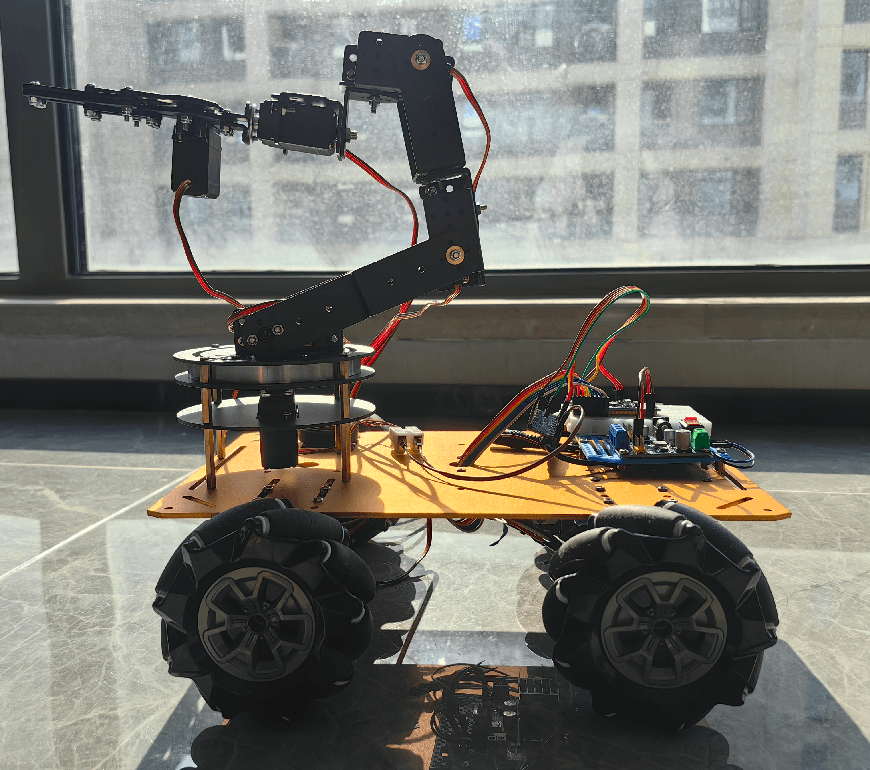
An intelligent omnidirectional wheel car inspired by the Unimog, featuring VLA control, PS2/Wi-Fi and voice control, camera monitoring, and robotic arm support.
- Wheeled
- Open source
- Work in progress
- Works with AI
- 3D printable
Suggested by Robotheca, created by @coregiu (opens in a new tab), from github.com/coregiu/rush-mog (opens in a new tab). Pinned to commit c9d4b8e (opens in a new tab).
- Hardware license
- Apache-2.0 (opens in a new tab)
- Software license
- Apache-2.0 (opens in a new tab)
- Commercial use
- Allowed
This repository contains executable files that Robotheca doesn't check. Only run them if you trust the creator.
Which files (5 scripts, 1 firmware image)
- software/audio_control/ago-audio.bin (opens in a new tab)
- software/body_control/build-debug.sh (opens in a new tab)
- software/body_control/build-eclipse.sh (opens in a new tab)
- software/body_control/build.sh (opens in a new tab)
- software/body_control/code-format.sh (opens in a new tab)
- software/body_control/tools/format.sh (opens in a new tab)
Photo
What it can do
Written by Robotheca from the project's documents.
- Moves in eight directions using omnidirectional wheels
- Controlled via phone Wi-Fi PS2 emulator interface
- Voice control for movement commands
- Camera monitoring with live video feed on phone
- Automatic object recognition and classification
- Audio playback of engine sounds
- Action programming for choreographed sequences
- Robotic arm for grasping and placing objects
Works with AI
Found by Robotheca in the project's files at commit c9d4b8e, its robot.yaml and Robotheca's notes on its documents. Never guessed; Robotheca doesn't run the code.
Ships trained model files: group1-shard1of5 and 4 more
In the project files: software/remote_center/sdcard/models/coco-ssd/group1-shard1of5Uses computer vision: YOLO
In the project files: software/remote_center/data/yolo.js
Bill of materials
This repository has no parts list Robotheca can read yet.
Build guide
The creator's steps, each with its instructions.
- 1Assemble the omnidirectional wheel base
- 2Mount the STM32F103C8T6 control board
- 3Install the ESP32-S3-CAM and OV2640 camera
- 4Connect the L298N motor driver and motors
- 5Set up the LiDAR sensor
- 6Assemble and mount the robotic arm (if included)
- 7Flash and configure the STM32 firmware
- 8Flash and configure the ESP32 firmware
- 9Calibrate sensors and motor drivers
- 10Test PS2/Wi-Fi and voice control modes
- 11Configure VLA model for object recognition
- 12Test autonomous navigation and object handling
The guide appears here as you scroll.
Guide by @coregiu (README.md), under Apache-2.0.
More guides
Wiring and electronics
Notes written by Robotheca from the project's documents.
Main parts
- STM32F103C8T6 as main control board
- ESP32-S3-CAM with OV2640 camera for Wi-Fi and vision
- L298N motor driver board for four motors
- ASR PRO voice control module
- PCA9685 16-channel servo driver for robotic arm
- JQ6500 MP3 player for audio output
- MPU6050 gyroscope for direction monitoring
- GY53L0X TOF distance sensor
- OLED display for debugging
- 12V power supply with 5V and 3.3V converters
- OpenMV for additional vision processing
Connections
- STM32 PA11/PA10/PA9/PA8/PB15/PA14/PB13/PA12 to L298N motor driver IN1-IN8
- STM32 PA2/PA3 UART2 to ASR PRO voice module
- STM32 PB6/PB7 I2C to Raspberry Pi for vision
- STM32 PB8/PB9 I2C to PCA9685 servo driver
- STM32 PB10/PB11 UART3 to ESP8266 for PS2 control
- ESP32-S3-CAM connected to OV2640 camera via UART
- LiDAR connected to ESP32-S3-CAM
- Robotic arm servos connected to PCA9685
- Power supply 12V to L298N and converters, 5V to STM32 and other modules