← Rush Mog
Project files
4 KB
Machine-translated by Robotheca from the original in Chinese (opens in a new tab). License: Apache-2.0 (opens in a new tab).
1 Overall Software Architecture
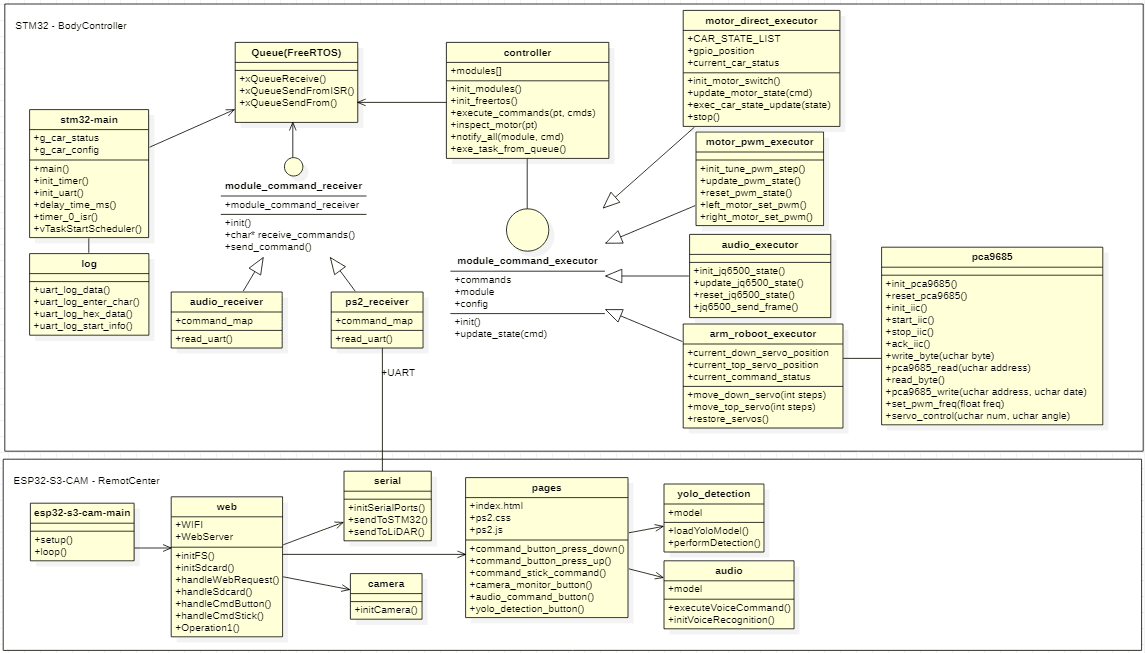
The RushMog intelligent system consists of six core subsystems: voice control system, vehicle control system, visual analysis system, remote control center system, LiDAR system, and VLA inference system, and robotic arm system.
- Voice Control System: Recognizes voice commands, converts them into execution instructions, and sends them to the main control system for execution. (Originally planned to use the asr-pro on-board control, but the car's motor noise was too loud, resulting in poor performance. Switched to terminal control.)
- Vehicle Control System: Uses an STM32 single-board computer to control the vehicle's movement, sound, and robotic arm based on voice commands and PS2 controller inputs.
- Remote Control Center System: Provides Wi-Fi for terminal connections, hosts a web server for the PS2 controller interface, receives camera monitoring images, and pushes them to the terminal PS2 interface. It also provides simulated PS2 controller command operations.
- LiDAR System: To be implemented
- VLA Inference System: To be implemented
- Robotic Arm System: To be implemented
2 Control Commands
| Voice Command | Controller Command | Function | Command ID | Indicator Light |
|---|---|---|---|---|
| Stop / Don't go | Release all buttons on the left | Car stops | 0 | |
| Forward / Go | ↑ key, or left stick up | Car moves forward | 1 | |
| Backward | ↓ key, or left stick down | Car moves backward | 2 | |
| Move left | ← key, or left stick left | Car moves left laterally | 3 | |
| Move right | → key, or left stick right | Car moves right laterally | 4 | |
| Move front-left | Left stick top-left | Car moves diagonally front-left | 5 | |
| Move front-right | Left stick top-right | Car moves diagonally front-right | 6 | |
| Move back-left | Left stick bottom-left | Car moves diagonally back-left | 7 | |
| Move back-right | Left stick bottom-right | Car moves diagonally back-right | 8 | |
| Turn left | L1 button | Car turns left | 9 | |
| Turn right | R1 button | Car turns right | A | |
| U-turn left | L2 button | Car makes a U-turn from the left | B | |
| U-turn right | R2 button | Car makes a U-turn from the right | C | |
| Test car | START key | Test the car | D | |
| △ key | Accelerate | E | ||
| × key | Decelerate | F | ||
| □ key | Slight left turn | G | ||
| ○ key | Slight right turn | H | ||
| Release □ or ○ key | Resume straight movement | I | ||
| SELECT key | Reinitialize the car | J |
3 Subsystem Design Description
3.1 Voice Control Subsystem
3.2 Chassis Control Subsystem
Functions of the chassis control subsystem:
- 1 Receive voice control commands
- 2 Drive the car motors; each of the four motors drives independently, enabling actions such as moving forward/backward/stopping
- 3 Interact with the Raspberry Pi/camera, transmit control commands, and receive image analysis results
- 4 Drive mechanical arm motion control execution
3.3 Remote Control Subsystem
Functions of the remote control subsystem:
- 1 Connect the camera to collect image data in real time
- 2 Apply machine learning for image recognition
- 3 Recognize position and distance
- 4 Generate control commands and send them to the main control system
4 Related tools and software used:
OS: Ubuntu 20.04
Software Design and Development Tools:
- Software design tool: StarUML https://staruml.io/download (opens in a new tab)
Files by @coregiu, at commit c9d4b8e, read from GitHub in your browser. Hardware license: Apache-2.0; software license: Apache-2.0. Robotheca doesn't review code: read it before running it.