Skip to content

Photo and 3D model

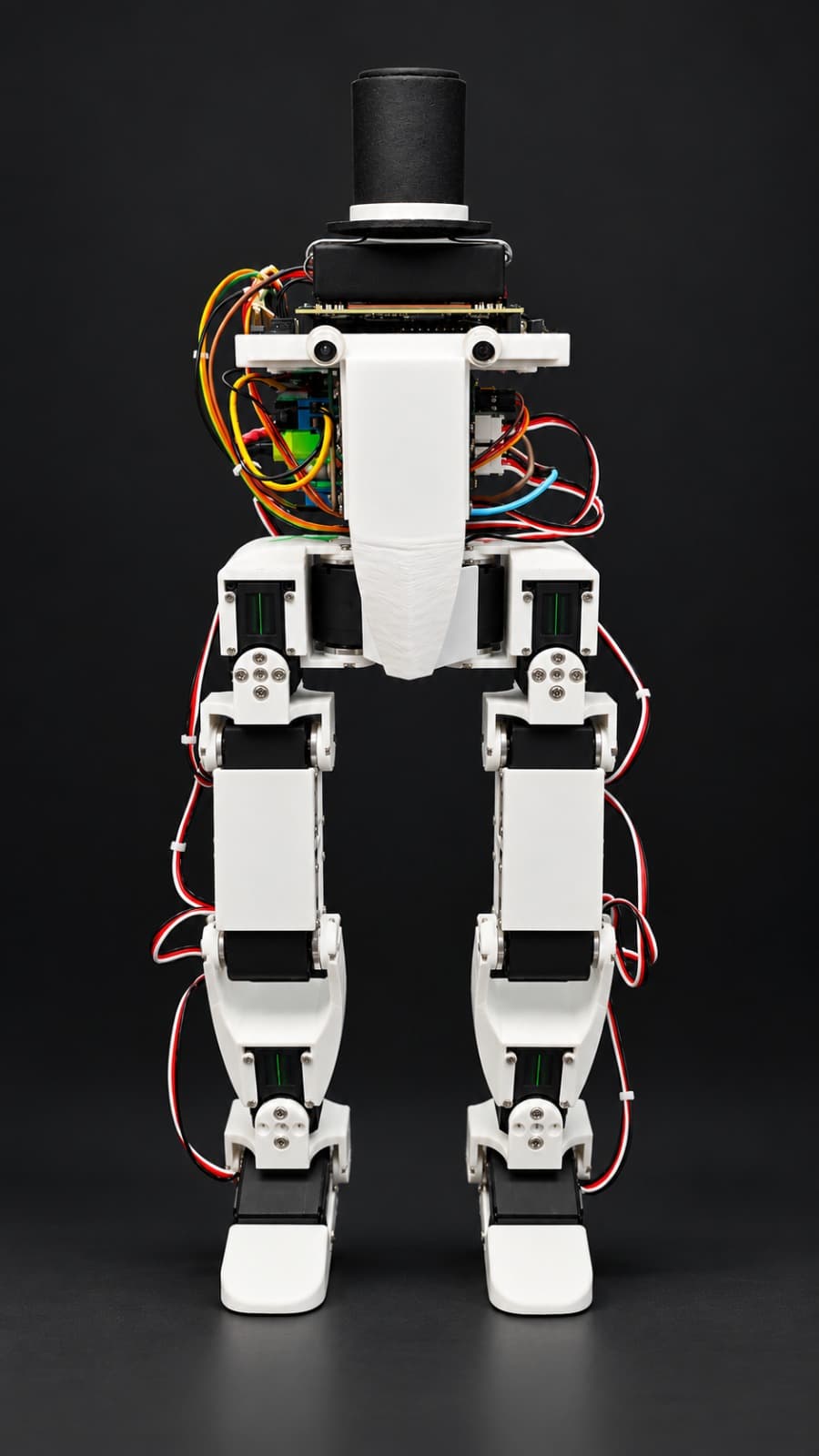
BipedRobot, photo from its repository
Photo@AsterisCrack (opens in a new tab)CERN-OHL-P-2.0source file (opens in a new tab)
Try it in the browser

3D preview converted from github.com/AsterisCrack/BipedRobotHardware at 90902ec, under CERN-OHL-P-2.0. View the original files from GitHub (823 KB) (opens in a new tab)

Open source · free files

BipedRobot

Other

A small open-source 12-servo biped robot, about 38 cm tall, that learns to walk in simulation.

Before you build

Total cost
under $500up to approx. €455 (ECB rate, 20 Nov 2026)excluding 3D-printing filament
How we got this number6 parts have no listed price; the real cost may be higher.As stated by the creator in README.md.
Parts still sold
4 shop links, not checked yetRobotheca checks shop links weekly, only on the sites it may ask. Prices are as the creator listed them.
Tools
3D printer, soldering iron, LiPo balance charger
Level
Advanced
Licence
CERN-OHL-P-2.0 (opens in a new tab), hardware and softwareCommercial use: Allowed

Not stated in the creator's files: time.

Read from the repository at commit 90902ec, read on 11 Nov 2026. Something out of date? Tell us

Project information

Buildability
77/100Buildable with some effort
Parts
6 lines
Height
38 cm
Weight
1.66 kg

Some folders have their own license: robot_description/ (MIT).

Suggested by Robotheca, created by @AsterisCrack (opens in a new tab), from github.com/AsterisCrack/BipedRobotHardware (opens in a new tab), pinned to commit 90902ec (opens in a new tab). You buy the parts yourself; Robotheca doesn't sell robots. Last checked on GitHub on 20 November 2026; its last change there was on 30 October 2026.

Build it

The creator's 6 steps, each linked to its instructions
  1. Print the 14 structural parts in PLA
  2. Order the purchased parts from the bill of materials
  3. Order and assemble the power PCB
  4. Wire the servos, IMU and power board
  5. Assemble the leg and body structure
  6. Set up the Jetson or Raspberry Pi runtime

The guide appears here as you scroll.

Guide by @AsterisCrack (README.md), under CERN-OHL-P-2.0.

More guides

What to buy

6 lines, read from bom/bom.csv at 90902ec

6 of 6 parts shown

6 of 6 needed parts have no price in the source, so there is no parts total.

Why it scores 77

It measures the published files, not the robot · How we score

77/100

Buildable with some effort

How complete the published files are for rebuilding this robot, measured by Robotheca at commit 90902ec. It isn't a rating of the robot. Counted out of 95 points and scaled to 100: the parts that don't apply to this robot are left out.

  1. 3Parts list6 lines: 0 with a price, 4 with a shop link.Most points to gain: Add prices to 6 lines. Add shop links to 2 lines.8/20
  2. 4SoftwareInstructions to install or run it.Link to your code, or add it to this repository. Say which software framework it uses (ROS 2, LeRobot, Arduino…).5/15
Full points: 3D and CAD files, Robot description, Documentation, Licenses; not counted: Simulation
  1. 13D and CAD files8 printable parts (STL, 3MF), 9 CAD source files.20/20
  2. 2Robot descriptionA URDF with all its mesh files.15/15
  3. 5DocumentationREADME of 4,067 characters with 2 pictures; 6 build steps.15/15
  4. 6LicensesHardware: CERN-OHL-P-2.0; software: CERN-OHL-P-2.0.10/10
  5. –SimulationNo simulation files. Not counted: the score is made of the parts that apply.Optional: add a simulation model (MuJoCo, Gazebo, Webots or Isaac).Not counted

Wiring and electronics

Notes written by Robotheca from the project's documents, not by its creator

Main parts: Robotheca's summary

  • Twelve Waveshare ST3215 serial bus servos, 12 V, sharing one bus at 1 Mbaud.
  • NVIDIA Jetson Orin Nano Super as the main compute board (Raspberry Pi 5 is an alternative).
  • Custom power distribution PCB with fusing and a power switch.
  • Waveshare Bus Servo Adapter (A) between the Jetson UART and the servo bus.
  • 3S LiPo battery, 11.1 V, 2200 mAh, XT60 connector.

Connections: Robotheca's summary

  • The 3S LiPo connects through XT60 to the power PCB, which feeds the servo bus terminal and the Jetson DC jack terminal, switched by a power switch.
  • Servos are daisy-chained on the shared bus powered from the PCB SERVOS terminal.
  • Jetson UART on header pins 8 (TX) and 10 (RX) connects straight through to the Waveshare adapter TX and RX, not crossed.
  • Servo IDs run from 2 to 13, one per joint; ID 1 is the factory default and unused.
  • The header UART is disabled on a fresh Jetson image and must be enabled as uarta with jetson-io.

What it can do: Robotheca's summary

Written by Robotheca from the project's documents, not by its creator
  • Small 12-servo biped robot, about 38 cm tall with straight legs, 1.66 kg in the CAD model.
  • Twelve degrees of freedom: hip yaw, hip roll, hip pitch, knee, ankle roll and ankle pitch on each leg.
  • Runs a learned walking policy in simulation, with an on-robot runtime handling the servo bus, IMU, web UI and a 50 Hz policy loop.
  • Policy is a small network run on the CPU with onnxruntime, so a Raspberry Pi 5 can replace the Jetson.

Works with AI

Found by Robotheca in the project's files at commit 90902ec, its robotheca.yaml and Robotheca's notes on its documents. Never guessed; Robotheca doesn't run the code.

Software

Framework
Not stated
License
CERN-OHL-P-2.0

Robotheca doesn't review code. Read it before running it.

How to run it: Robotheca's summary

Written by Robotheca from the project's documents, not by its creator.

  1. 1Enable the Jetson header UART on pins 8 and 10 as uarta using jetson-io.
  2. 2Set each servo to its unique ID before assembly, using the servo setup step of the build guide.
  3. 3Install the BipedRobotJetson runtime on the robot.
  4. 4Configure the robot settings in config/robot.yaml and the I2C bus in config/hardware.yaml.
  5. 5Run the on-robot runtime, which drives the servo bus, reads the IMU and runs the policy loop at 50 Hz, with a web UI available.

Software that runs on this robot

No software from Robotheca's catalogue found in this robot's files yet. Links come from its robotheca.yaml, its dependency files read as text, or Robotheca's editors.

Free files

Every file of the project, at commit 90902ec.

Community

Questions and improvements go to the creator's repository.

Add a badge to your README

For the creator: two badges that link back here. The second always shows this page's current label and score.


Listed on RobothecaRobotheca buildability

Markdown (one click selects it)

[![Listed on Robotheca](https://robotheca.org/robots/bipedrobot/badge.svg)](https://robotheca.org/robots/bipedrobot)
[![Robotheca buildability](https://robotheca.org/robots/bipedrobot/score.svg)](https://robotheca.org/robots/bipedrobot)

Licence and credits

Licenses
CERN-OHL-P-2.0 (opens in a new tab), hardware and software
Commercial use
Allowed

Simulation

BipedRobot runs in MuJoCo in your browser, from the creator's own files at the pinned commit: move each joint within its real limits.

Try it in the browser

Other other robots

All 98 other robots
  • Ready to build

    Open source · free files

    Koriobots

    Other · Intermediate

    Score
    Buildability 98 out of 100
    Cost
    $972.06≈ €884
  • Ready to build

    Open source · free files

    AmazingHand

    Other · Intermediate

    Score
    Buildability 88 out of 100
    Cost
    under €200
  • Ready to build

    Open source · free files

    DigiArm Prosthetic Hand

    Other · Advanced

    Score
    Buildability 85 out of 100
    Cost
    $250≈ €227
  • 3D render

    Open source · free files

    FloatingFace

    Other · Advanced

    Score
    Buildability 100 out of 100
    Cost
    $328.47≈ €299

≈ € values are approximate, converted at the ECB euro reference rate of 20 Nov 2026. The creator's original price always comes first.