RC WheelLeg
A 16-degree-of-freedom wheeled-legged robot designed for Robocon obstacle courses, combining reinforcement learning, MuJoCo simulation, and real-world deployment.
- Wheeled
- Open source
- Works with AI
- ROS 2
- 3D printable
Suggested by Robotheca, created by @zeitvex (opens in a new tab), from github.com/zeitvex/RC_WheelLeg (opens in a new tab). Pinned to commit 1bc9aa5 (opens in a new tab).
- Hardware license
- MIT (opens in a new tab)
- Software license
- MIT (opens in a new tab)
- Commercial use
- Allowed
This repository contains executable files that Robotheca doesn't check. Only run them if you trust the creator.
Which files (34 scripts)
- 05_software/real/sim2real_ros2_v2/docker_entrypoint.sh (opens in a new tab)
- 05_software/real/sim2real_ros2_v2/src/odin_ros_driver/script/build_ros.sh (opens in a new tab)
- 05_software/real/sim2real_ros2_v2/src/odin_ros_driver/script/build_ros2.sh (opens in a new tab)
- 05_software/real/sim2real_ros2_v2/src/odin_ros_driver/set_param.sh (opens in a new tab)
- 05_software/real/sim2real_ros2_v2/start_sim2real.sh (opens in a new tab)
- 05_software/real/sim2real_ros2_v2/tools/run_a_min_route_editor.bat (opens in a new tab)
- 05_software/real/sim2real_ros2_v2/tools/run_pcd_nav_map.bat (opens in a new tab)
- 05_software/real/sim2real_ros2_v3/docker_entrypoint.sh (opens in a new tab)
- 05_software/real/sim2real_ros2_v3/screen/install_autostart.sh (opens in a new tab)
- 05_software/real/sim2real_ros2_v3/screen/install_boot_service.sh (opens in a new tab)
- 05_software/real/sim2real_ros2_v3/screen/run_boot_screen_service.sh (opens in a new tab)
- 05_software/real/sim2real_ros2_v3/screen/run_fullscreen_quit.sh (opens in a new tab)
- 05_software/real/sim2real_ros2_v3/screen/uninstall_boot_service.sh (opens in a new tab)
- 05_software/real/sim2real_ros2_v3/src/odin_ros_driver/script/build_ros.sh (opens in a new tab)
- 05_software/real/sim2real_ros2_v3/src/odin_ros_driver/script/build_ros2.sh (opens in a new tab)
- 05_software/real/sim2real_ros2_v3/src/odin_ros_driver/set_param.sh (opens in a new tab)
- 05_software/real/sim2real_ros2_v3/start_sim2real.sh (opens in a new tab)
- 05_software/real/sim2real_ros2/docker_entrypoint.sh (opens in a new tab)
- 05_software/real/sim2real_ros2/screen/install_autostart.sh (opens in a new tab)
- 05_software/real/sim2real_ros2/screen/install_boot_service.sh (opens in a new tab)
- and 14 more
Photo and 3D model
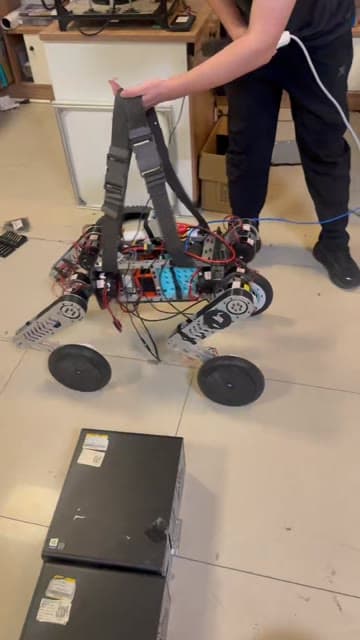
3D preview converted from github.com/zeitvex/RC_WheelLeg at 1bc9aa5, under MIT. View the original files from GitHub (35.3 MB) (opens in a new tab)
- Degrees of freedom
- 16
What it can do
Written by Robotheca from the project's documents.
- Moves on four wheel-legs with 16 DOF using reinforcement learning policies
- Runs 50 Hz policy inference and 200 Hz motor control loop on Jetson Orin Nano
- Supports ROS 2 Navigation2 stack for waypoint navigation and mapping
- Provides safety monitoring, emergency stop and zero-command hold logic
- Publishes joint states, IMU data and runtime diagnostics over ROS 2 topics
- Accepts velocity commands via /cmd_vel for teleoperation or navigation
Works with AI
Found by Robotheca in the project's files at commit 1bc9aa5, its robot.yaml and Robotheca's notes on its documents. Never guessed; Robotheca doesn't run the code.
Ships trained model files: model_6800.onnx and 13 more
In the project files: 05_software/train/rc_mjlab/model_6800.onnxUses reinforcement learning: rsl_rl
In the project files: 05_software/train/rc_mjlab/src/robot/rsl_rlUses reinforcement learning: mjlab
In the project files: 05_software/train/rc_mjlabUses a machine-learning library: PyTorch
In the project files: 05_software/train/rc_mjlab/mjlab/src/mjlab/utils/torch.pyUses a machine-learning library: ONNX
In the project files: 05_software/real/sim2real_v2/tools/export_onnx.py“Moves on four wheel-legs with 16 DOF using reinforcement learning policies”
Robotheca's notes: What it can do“Download ONNXRuntime C++ SDK for Jetson Orin and extract to /opt/onnxruntime”
Robotheca's notes: How to run it“Set ONNXRUNTIME_DIR=/opt/onnxruntime”
Robotheca's notes: How to run it
Bill of materials
This repository has no parts list Robotheca can read yet.
Build guide
The creator's steps, each with its instructions.
- 1Review project documentation and BOM
- 23D print mechanical parts
- 3Assemble mechanical structure
- 4Build and test hardware (PCB, sensors, actuators)
- 5Flash firmware to microcontrollers
- 6Set up software environment (MuJoCo, mjlab, ROS 2)
- 7Train reinforcement learning policy in simulation
- 8Validate policy with Sim2Sim
- 9Deploy policy to real robot (Python Sim2Real or ROS 2/C++)
- 10Perform safety checks and calibration
- 11Conduct real-world testing and tuning
The guide appears here as you scroll.
Guide by @zeitvex (README.md), under MIT. The English translation is by Robotheca, shared under the same license.
More guides
Wiring and electronics
Notes written by Robotheca from the project's documents.
Main parts
- Jetson Orin Nano 8G as main computer
- 16 RS02 actuators (12 for joints, 4 for wheels)
- Odin1 integrated IMU and sensors via USB
- Two CAN interfaces (CAN0, CAN1) for motor communication
- Peak CAN or USB-to-CAN adapter for CAN bus
- Peak System CAN interfaces for motor control
Connections
- CAN0 and CAN1 connected to motor drivers at 1 Mbps
- Odin1 USB connected to Jetson Orin Nano for IMU and sensor data
- Jetson Orin Nano provides power to Odin1 over USB
- Motor power and control lines routed through CAN bus and USB