Omnix
A 3D-printed 18-servo hexapod robot with an animated face that walks, balances using IMU sensing, and shows expressive face animations on a display.
- Other
- Open source
- arduino
- 3D printable
Suggested by Robotheca, created by @manojeetc (opens in a new tab), from github.com/manojeetc/Omnix (opens in a new tab). Pinned to commit 47e6c13 (opens in a new tab).
- Hardware license
- GPL-3.0-only (opens in a new tab)
- Software license
- GPL-3.0-only (opens in a new tab)
- Commercial use
- Allowed
Photo and 3D model
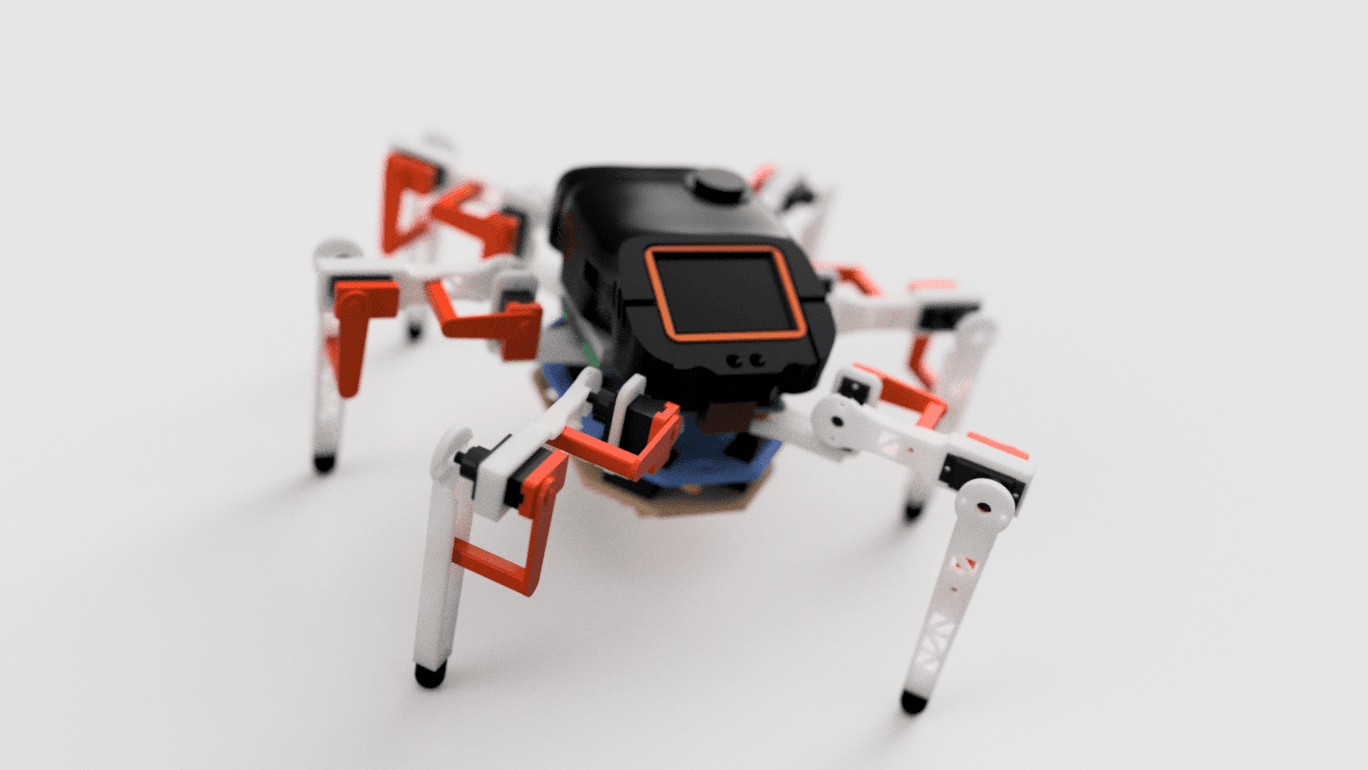
3D preview converted from github.com/manojeetc/Omnix at 47e6c13, under GPL-3.0-only. View the original files from GitHub (16.0 MB) (opens in a new tab)
- Degrees of freedom
- 18
What it can do
Written by Robotheca from the project's documents.
- Walks forward, backward and sideways, turns, and switches between tripod, ripple and wave gaits.
- Adjusts body height, stance width, foot lift and step timing, with joint limits and servo-rate guards.
- Uses accelerometer and gyro data for tilt, optional leveling, walking assists and relative gyro heading during turns.
- Plays physical tricks and expressive face animations, with dashboards for leg positions, stability and system status.
- Accepts typed commands over USB Serial or classic Bluetooth, and normal operation works offline.
Bill of materials
This repository has no parts list Robotheca can read yet.
Build guide
The creator's steps, each with its instructions.
- 1Print the body, leg, foot, head and mounting parts from the STL files
- 2Centre the servos before fitting their horns
- 3Wire the electronics power, servo power, I2C buses and display link
- 4Install the ESP32 and Beetle firmware with the listed Arduino settings
- 5Calibrate leg mapping, servo directions, neutral positions, battery voltage and
- 6Test walking with short movements at low speed over Serial at 115200 baud
The guide appears here as you scroll.
Guide by @manojeetc (README.md), under GPL-3.0-only.
More guides
Wiring and electronics
Notes written by Robotheca from the project's documents.
Main parts
- ESP32 DevKit / ESP-WROOM-32 handles motion control, settings, IMU and Bluetooth.
- 18 MG90S servos, three joints on each of six legs.
- Two PCA9685 16-channel servo driver boards provide the servo pulse outputs.
- GY-521 IMU module, which the documents say identifies as MPU6500 when installed.
- Beetle RP2350 renders the face and dashboards from ESP32 telemetry.
- 2-inch ST7789 SPI TFT display, 240 x 320 pixels.
- 2S LiPo battery with a separate 6 V servo UBEC and a 5 V electronics buck converter.
- A battery voltage divider on ESP32 pin D34 using 10 kOhm and 4.7 kOhm resistors, per the firmware guide.
Connections
- Battery feeds a 5 V buck converter that powers ESP32 VIN, Beetle VCC and the display; the servo supply uses a separate 6 V UBEC.
- Both PCA9685 boards get their servo power from the UBEC, with 2200 uF capacitors across each board's V+ and GND.
- Both PCA9685 boards share ESP32 SDA D27 and SCL D14 with logic VCC on 3V3; the left board is address 0x40 and the right is 0x60.
- The IMU uses ESP32 SDA D21 and SCL D22 on a separate I2C bus from the PCA boards.
- ESP32 TX2 (D17) connects to Beetle RX on pin 1 at 230400 baud, with a shared ground.
- The display uses SPI on Beetle pins 18 (clock), 19 (data), 27 (DC) and 26 (CS), with its power input on regulated 5 V.
- Servo channels 0-2 are the front leg, 3-5 the middle leg and 6-8 the rear leg, in coxa, femur, tibia order by default.
- The battery voltage divider junction connects to ESP32 D34, tapped after the power switch.


