Inverted Pendulum Balancing Robot (ESP32)
A two-wheel self-balancing inverted pendulum robot, first controlled by a hand-tuned dual PID and then by a PPO-trained neural network trained in MuJoCo and running on an ESP32.
- Other
- Open source
- Works with AI
- arduino
- 3D printable
Suggested by Robotheca, created by @SHuttooo (opens in a new tab), from github.com/SHuttooo/robot-pendule-inverse (opens in a new tab). Pinned to commit f981400 (opens in a new tab).
- Hardware license
- MIT (opens in a new tab)
- Software license
- MIT (opens in a new tab)
- Commercial use
- Allowed
This repository contains executable files that Robotheca doesn't check. Only run them if you trust the creator.
Which files (1 script)
Photo and 3D model
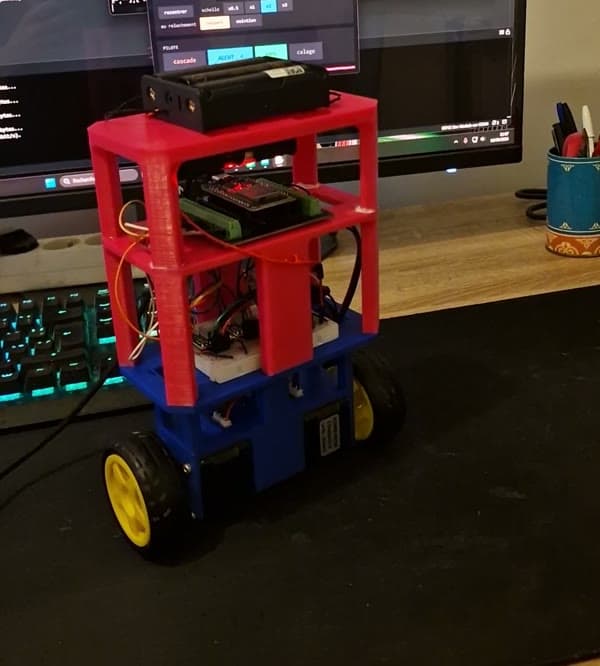
3D preview converted from github.com/SHuttooo/robot-pendule-inverse at f981400, under MIT. View the original files from GitHub (3.3 MB) (opens in a new tab)
What it can do
Written by Robotheca from the project's documents.
- Balances as a two-wheel inverted pendulum, first with a hand-tuned dual PID controller and then with a learned neural network policy.
- Switchable live between dual PID (command 1) and learned policy (command 2) via serial or a control panel button.
- Drives forward and backward, steers by setting two independent wheel speeds, and can be controlled with a joystick control panel.
- Includes diagnostic and measurement modes such as a policy sign check, shake test, motor stall ramp, and frequency sweeps.
- Policy trained with PPO in MuJoCo simulation and exported to C for the ESP32; the README reports simulation results closely matching the real robot.
- Safety checks include a dead man's switch, IMU timeout cut-off, tilt limit, watchdog reboot, and a black box in RTC RAM.
Works with AI
Found by Robotheca in the project's files at commit f981400, its robot.yaml and Robotheca's notes on its documents. Never guessed; Robotheca doesn't run the code.
“Balances as a two-wheel inverted pendulum, first with a hand-tuned dual PID controller and then with a learned neural network policy.”
Robotheca's notes: What it can do“Simulation: install requirements from simulation/requirements.txt and CPU PyTorch, then run the scripts from the simulation folder.”
Robotheca's notes: How to run it
Bill of materials
This repository has no parts list Robotheca can read yet.
Build guide
The creator's steps, each with its instructions.
- 1Print the 3D printable parts from hardware/cao/
- 2Assemble the mechanics following hardware/README.md
- 3Wire the ESP32, A4988 drivers and MPU-6050 IMU per hardware/wiring.md
- 4Flash firmware/robot_balancier/robot_balancier.ino via the Arduino IDE
- 5Tune the dual PID, then optionally train and deploy the PPO policy
The guide appears here as you scroll.
Guide by @SHuttooo (README.md), under MIT.
More guides
Wiring and electronics
Notes written by Robotheca from the project's documents.
Main parts
- ESP32 WROOM-32D development board as the microcontroller.
- MPU-6050 inertial measurement unit (gyroscope and accelerometer) over I2C at address 0x68.
- Two A4988 stepper motor drivers, set to 1/8 microstepping.
- Two NEMA 17 stepper motors (17HS3401S) driving the wheels.
- Four 18650 Li-ion cells in series (4S, 14.8 V nominal) as the battery pack.
- Step-down converter to 5 V powering the ESP32 through its VIN pin.
- 100 µF capacitor on the motor supply (VMOT).
Connections
- ESP32 GPIO 18 drives STEP and GPIO 5 drives DIR for the right wheel motor driver.
- ESP32 GPIO 16 drives STEP and GPIO 17 drives DIR for the left wheel motor driver.
- MPU-6050 connected on I2C with SDA on GPIO 21 and SCL on GPIO 22 at 100 kHz, with INT on GPIO 19.
- Each A4988 gets battery voltage on VMOT with a 100 µF capacitor, and 3.3 V from the ESP32 on VDD.
- Both A4988 drivers have MS1 and MS2 at 3.3 V for 1/8 microstepping, RESET tied to SLEEP, and ENABLE left unconnected.
- The converter steps the battery down to 5 V feeding the ESP32 VIN, and all grounds are common.