Project files
- .github1 file
- docs9 files
- src16 files
- static110 files
- .gitignore1 KB
- docusaurus.config.js6 KB
- LICENSE11 KB
- package-lock.json671 KB
- package.json1 KB
- README.md2 KB
- sidebars.js2 KB
README.md
Machine-translated by Robotheca from the original in Chinese (opens in a new tab). License: Apache-2.0 (opens in a new tab).
electronBot
electronBot is an open-source robot that you can build yourself. It has a cute appearance and rich features, making it ideal for educational tools and personal maker projects. This website focuses on sharing the AI-enhanced version of the electronBot robot, developed based on ESP32 IDF.
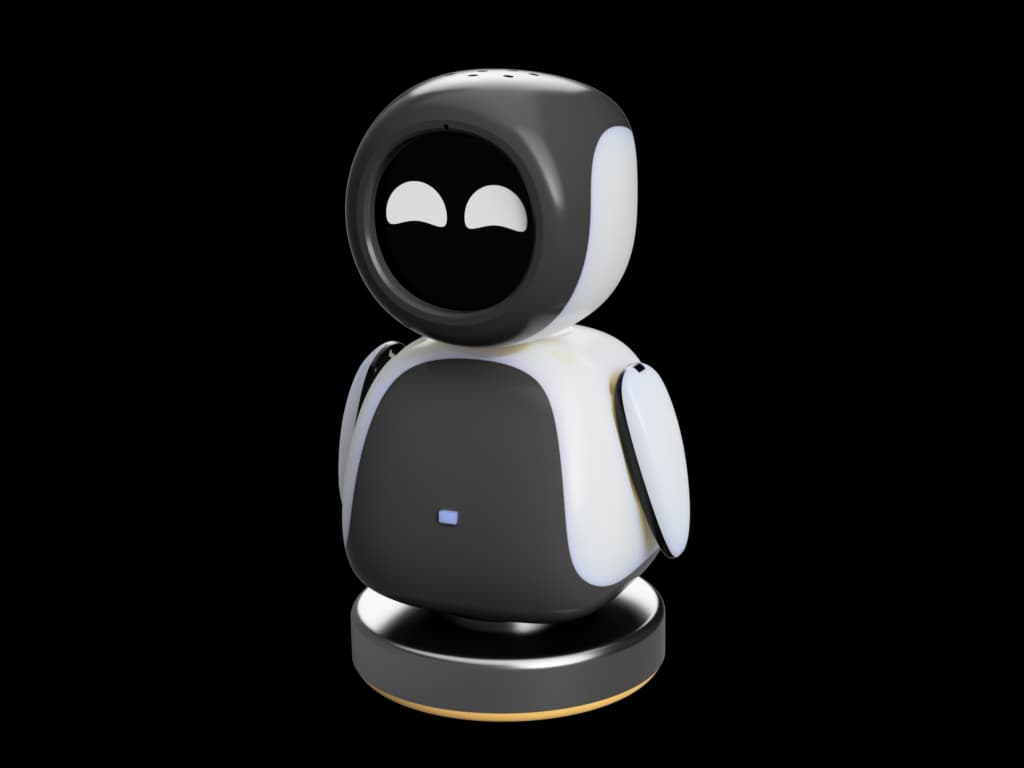
What is the ESP32+AI ElectronBot robot?
ElectronBot is a desktop-level small robot tool developed by "Zhihui Jun" (稚晖君) and open-sourced by him. Its appearance design is inspired by EVE from the movie WALL-E. The robot features USB communication and a display screen, with 6 degrees of freedom (roll and pitch for the hand, one each for the neck and waist). It uses custom-modified servos that support joint angle feedback.
Our ESP32 version injects even more powerful AI capabilities into it.
Features Implemented by Xiaozhi
- Multiple Networking Methods: Supports Wi-Fi and ML307 Cat.1 4G connections
- Smart Interaction: BOOT key wake-up and interruption, supporting both click and long-press triggers
- Offline Voice Wake-up: Uses ESP-SR technology, enabling wake-up without internet
- Streaming Voice Conversation: Supports real-time conversations via WebSocket or UDP protocols
- Multi-Language Recognition: Supports Mandarin, Cantonese, English, Japanese, and Korean (SenseVoice)
- Voiceprint Recognition: Can identify who is calling the AI (3D Speaker technology)
- High-Quality Voice Synthesis: Integrates large-model TTS from Volcano Engine or CosyVoice
- AI Brain: Connects to large language models like Qwen, DeepSeek, and Doubao
- Personalized Customization: Configurable prompts and voice tones, creating custom roles
- Memory Function: Short-term memory with self-summarization after each conversation round
- Visual Display: Supports OLED/LCD screens, displaying signal strength or conversation content
- Expression System: LCD can display rich emoji images
- Multi-Language Interface: Supports multiple languages, including Chinese and English
Content of This Site
On this website, you can find:
- Complete Tutorial: Build your own ESP32 AI version of the ElectronBot robot from scratch
- Parts List: All required electronic components and materials
- Assembly Guide: Detailed step-by-step illustrations
- Firmware Guide: ESP32 programming and AI integration tutorials
- Troubleshooting: Solutions to common issues
Files by @txp666, at commit f2f7561, read from GitHub in your browser. Hardware license: Apache-2.0; software license: Apache-2.0. Robotheca doesn't review code: read it before running it.