EL-A3
A 7-DOF desktop robotic arm with a Python SDK and ROS2 control system for research and education.
- Robot arm
- Open source
- ROS 2
- 3D model (URDF)
- 3D printable
Suggested by Robotheca, created by @RobStride (opens in a new tab), from github.com/RobStride/EDULITE_A3 (opens in a new tab). Pinned to commit 088b166 (opens in a new tab).
- Hardware license
- MIT (opens in a new tab)
- Software license
- MIT (opens in a new tab)
- Commercial use
- Allowed
This repository contains executable files that Robotheca doesn't check. Only run them if you trust the creator.
Which files (19 scripts)
- el_a3_ros/docker/entrypoint.sh (opens in a new tab)
- el_a3_ros/scripts/batch_kp_test.sh (opens in a new tab)
- el_a3_ros/scripts/install_deps.sh (opens in a new tab)
- el_a3_ros/scripts/install_joycon_driver.sh (opens in a new tab)
- el_a3_ros/scripts/install_xpadneo.sh (opens in a new tab)
- el_a3_ros/scripts/setup_bluetooth_xbox.sh (opens in a new tab)
- el_a3_ros/scripts/setup_can.sh (opens in a new tab)
- el_a3_ros/scripts/setup_multi_can.sh (opens in a new tab)
- el_a3_ros/scripts/start_real_xbox_control.sh (opens in a new tab)
- el_a3_ros/scripts/start_teleop.sh (opens in a new tab)
- el_a3_ros/scripts/start_web_ui.sh (opens in a new tab)
- el_a3_ros/scripts/start_xbox_control.sh (opens in a new tab)
- el_a3_ros/scripts/test_xbox_control.sh (opens in a new tab)
- el_a3_ros/scripts/tests/run_sim_tests.sh (opens in a new tab)
- el_a3_ros/scripts/tests/test_build.sh (opens in a new tab)
- el_a3_ros/scripts/tests/test_xacro_gen.sh (opens in a new tab)
- el_a3_ros/scripts/wait_and_start_xbox.sh (opens in a new tab)
- el_a3_sdk/scripts/setup_can.sh (opens in a new tab)
- el_a3_sdk/scripts/setup_multi_can.sh (opens in a new tab)
Photo and 3D model
3D preview converted from github.com/RobStride/EDULITE_A3 at 088b166, under MIT. View the original files from GitHub (10 KB) (opens in a new tab)
- Degrees of freedom
- 7
What it can do
Written by Robotheca from the project's documents.
- 7-DOF articulated arm with 6 joints and 1 gripper
- Direct CAN bus control via Python SDK or ROS2 interface
- Joint-level position, velocity, and torque control
- S-curve trajectory planning for smooth motion
- Cartesian space linear and pose control
- Pinocchio-based forward/inverse kinematics and gravity compensation
- Zero-torque teach-by-dragging mode with adaptive damping
- Multi-arm management via ArmManager
Bill of materials
This repository has no parts list Robotheca can read yet.
Build guide
The creator's steps, each with its instructions.
- 1Prepare hardware components and tools
- 23D print mechanical parts
- 3Assemble mechanical structure
- 4Install motors and wiring harness
- 5Set up CAN interface and power supply
- 6Install Python SDK or ROS2 control system
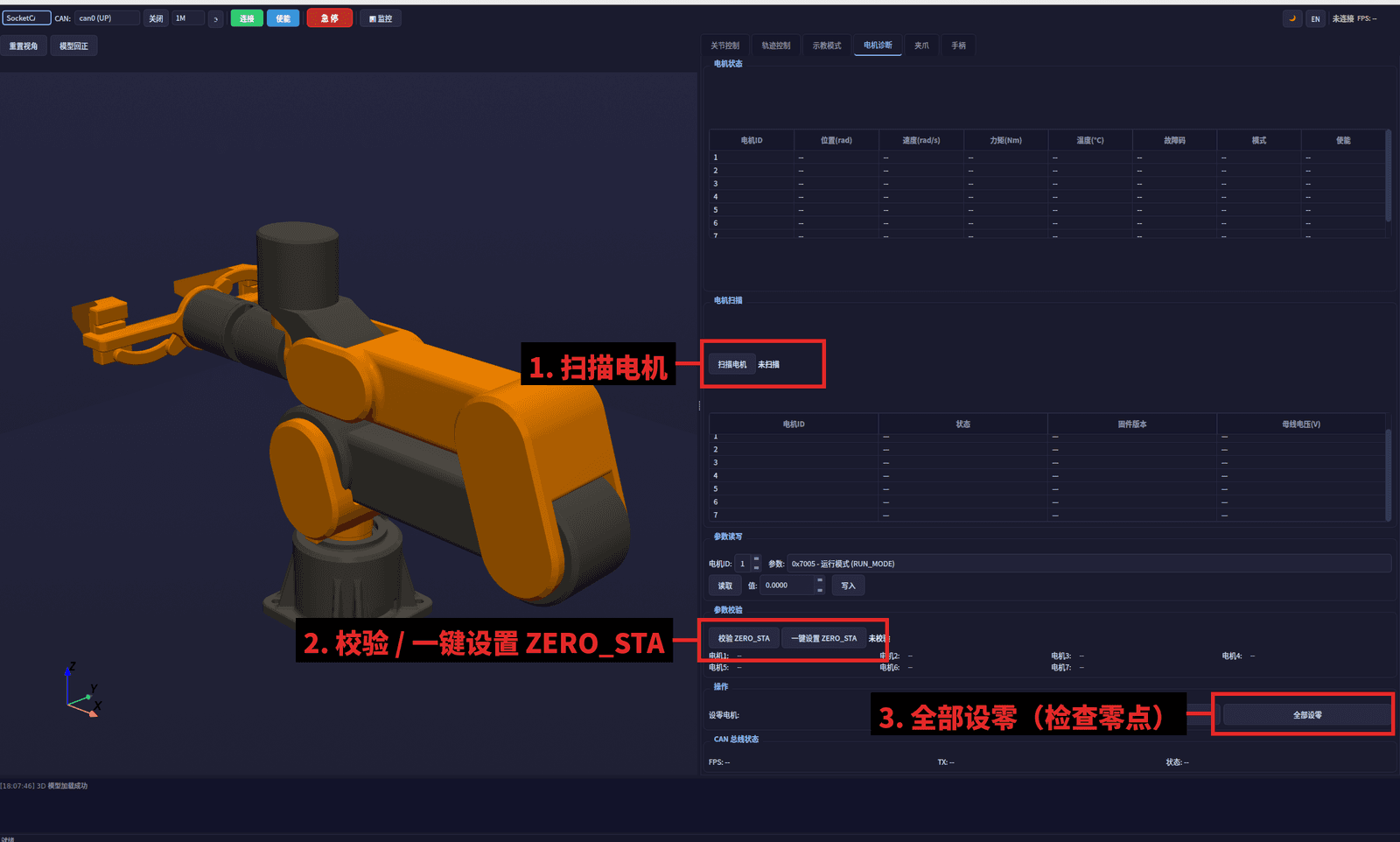
- 7Configure and calibrate the robotic arm
The guide appears here as you scroll.
Guide by @RobStride (README.md), under MIT. The English translation is by Robotheca, shared under the same license.
More guides
Wiring and electronics
Notes written by Robotheca from the project's documents.
Main parts
- Robstride RS00 motors for joints L1–L3 (±14 Nm, ±33 rad/s)
- Robstride EL05/RS05 motors for joints L4–L7 (±6/±5.5 Nm, ±50 rad/s)
- CAN adapter compatible with CANdle or gs_usb devices
- 24 V or 48 V DC power supply
- CAN bus running at 1 Mbps with SocketCAN
- Optional ROS2 PC with Ubuntu 22.04+ x86_64
Connections
- CAN bus connects motors and adapter via CANdle/gs_usb device
- Motors communicate using 29-bit extended CAN frames at 1 Mbps
- Power lines for motors separate from CAN bus
- Python SDK uses RobstrideCanDriver over SocketCAN interface named can0
- ROS2 hardware interface uses same CAN bus for real-time control