CUBOTino autonomous
A small, 3D printed robot that solves a Rubik's cube autonomously on a Raspberry Pi.
- Other
- Open source
- 3D printable
Suggested by Robotheca, created by @AndreaFavero71 (opens in a new tab), from github.com/AndreaFavero71/cubotino (opens in a new tab). Pinned to commit 7cd1ad6 (opens in a new tab).
- Hardware license
- CC-BY-4.0 (opens in a new tab)
- Software license
- CC-BY-4.0 (opens in a new tab)
- Commercial use
- Allowed
This repository contains executable files that Robotheca doesn't check. Only run them if you trust the creator.
Photo and 3D model
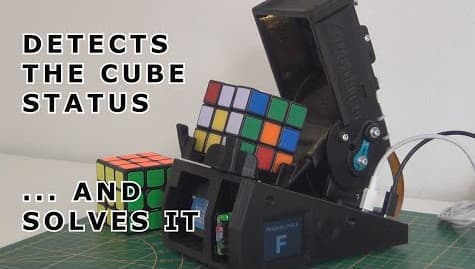
3D preview converted from github.com/AndreaFavero71/cubotino at 7cd1ad6, under CC-BY-4.0. View the original files from GitHub (114.3 MB) (opens in a new tab)
What it can do
Written by Robotheca from the project's documents.
- Solves a Rubik's cube autonomously using a small 3D printed robot
- Servo positions can be tuned through a GUI over VNC
- Can run its main Python script manually or autostart on boot via crontab
- Optional small display (Waveshare 1.8 or 2 inch) is supported
Bill of materials
This repository has no parts list Robotheca can read yet.
Build guide
The creator's steps, each with its instructions.
- 1Flash the SD card for the Raspberry Pi
- 2Boot the Raspberry Pi and connect via SSH
- 3Clone the repository and run the setup script
- 4Reboot after setup completes
- 5Build the robot following the documentation
- 6Tune the servo positions with the GUI
- 7Run the main script manually
- 8Enable autostart on boot
The guide appears here as you scroll.
Guide by @AndreaFavero71 (README.md), under CC-BY-4.0.
More guides
Wiring and electronics
Notes written by Robotheca from the project's documents.
Main parts
- Raspberry Pi as the main controller
- Servo motors for moving the cube
- Custom connections PCB based on the Cubotino schematic
- Optional Waveshare 1.8 inch ST7735 or 2 inch ST7789 LCD display
Connections
- The optional display connects to the PCB pins GND, +3.3V, SCLK, MOSI, GP22, GP27, CS0 and GP4 using a JST PH connector and dupont wires
- Connections follow the Cubotino schematic PDF in the connections_board folder
