Software
Graph-Based Local Trajectory Planner (TUM)
By TUM - Institute of Automotive Technology, from github.com/TUMFTM/GraphBasedLocalTrajectoryPlanner (opens in a new tab)
- Cars
- Library
- Reference stack
- LGPL-3.0-only
A Python graph-based local trajectory planner for vehicles that returns a set of cost-optimal actions such as keep straight, pass left, or pass right. It was used on a real race vehicle.
- Stale. No commit in 12 months: the newest is from 16 Jul 2021.
Facts
- GitHub stars
- 269read on 6 Nov 2026
- Last update
- 16 Jul 2021Newest commit on master
- Maintenance
- Staleno commit in 12 months
- Difficulty
- Reference stack: not buildable at home
Checked on GitHub on 6 Nov 2026.
Licenses
- Code
- LGPL-3.0-only (opens in a new tab)
Read by Robotheca from LICENSE (opens in a new tab) (LGPL-3.0-only) at commit 18763ef (opens in a new tab), on 4 Nov 2026.
- Commercial use
- Yes
Copyleft: Modified source must be published.
Overview
What it does: Robotheca's summary
- Returns an action set where each action is the globally cost-optimal solution for that task.
- Infeasible action primitives are left out of the returned set.
- Lets users pick actions from a priority list or plug in their own behaviour planner.
- Comes with open interfaces and debug, visualization and development tools.
- Was used on a real race vehicle during the Roborace Season Alpha, reaching speeds above 200 kph.
- Documentation is hosted on Read the Docs; the authors note it has not undergone certified safety validation.
Written by Robotheca from the project's README (opens in a new tab) at commit 18763ef, not by its creator.
The README
The creator's own README, copied as written: README.md by TUM - Institute of Automotive Technology, at commit 18763ef, under LGPL-3.0-only (opens in a new tab). The original on GitHub (opens in a new tab).
Read the README here
Graph-Based Local Trajectory Planner
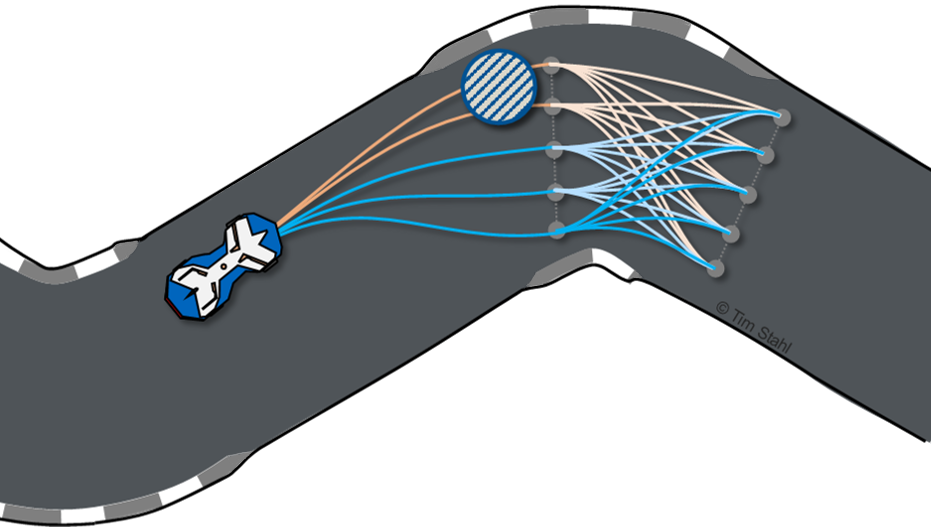
The graph-based local trajectory planner is python-based and comes with open interfaces as well as debug, visualization and development tools. The local planner is designed in a way to return an action set (e.g. keep straight, pass left, pass right), where each action is the globally cost optimal solution for that task. If any of the action primitives is not feasible, it is not returned in the set. That way, one can either select available actions based on a priority list (e.g. try to pass if possible) or use an own dedicated behaviour planner.
The planner was used on a real race vehicle during the Roborace Season Alpha and achieved speeds above 200kph. A video of the performance at the Monteblanco track can be found here (opens in a new tab).
Disclaimer
This software is provided as-is and has not been subject to a certified safety validation. Autonomous Driving is a highly complex and dangerous task. In case you plan to use this software on a vehicle, it is by all means required that you assess the overall safety of your project as a whole. By no means is this software a replacement for a valid safety-concept. See the license for more details.
Documentation
The documentation of the project can be found here (opens in a new tab).
Contributions
[1] T. Stahl, A. Wischnewski, J. Betz, and M. Lienkamp,
“Multilayer Graph-Based Trajectory Planning for Race Vehicles in Dynamic Scenarios,”
in 2019 IEEE Intelligent Transportation Systems Conference (ITSC), Oct. 2019, pp. 3149–3154.
(view pre-print) (opens in a new tab)
Contact: Tim Stahl (opens in a new tab).
If you find our work useful in your research, please consider citing:
   @inproceedings{stahl2019,
     title = {Multilayer Graph-Based Trajectory Planning for Race Vehicles in Dynamic Scenarios},
     booktitle = {2019 IEEE Intelligent Transportation Systems Conference (ITSC)},
     author = {Stahl, Tim and Wischnewski, Alexander and Betz, Johannes and Lienkamp, Markus},
     year = {2019},
     pages = {3149--3154}
   }
Files and versions
- Repository on GitHubgithub.com/TUMFTM/GraphBasedLocalTrajectoryPlanner (opens in a new tab)
- The version Robotheca read18763ef (opens in a new tab)
- Latest releaseNone published on GitHub
Robotheca never hosts the code: each link goes to the creator's own page.
Use it
How to install it, in the creator's words: The project's README (opens in a new tab)
Robotheca doesn't review code. Read it before running it.
Robotheca lists software as a reference: nothing is hosted or run here, and every fact links to where it was read.