OpenBot
A low-cost small electric vehicle body that uses an Android smartphone as its brain, supporting person following and autonomous navigation.
- Wheeled
- Open source
- Works with AI
- 3D printable
Suggested by Robotheca, created by @ob-f (opens in a new tab), from github.com/ob-f/OpenBot (opens in a new tab). Pinned to commit 216ecb0 (opens in a new tab).
- Hardware license
- MIT (opens in a new tab)
- Software license
- MIT (opens in a new tab)
- Commercial use
- Allowed
This repository contains executable files that Robotheca doesn't check. Only run them if you trust the creator.
Which files (1 file marked executable, 6 scripts, 2 programs or installers)
- android/gradle/wrapper/gradle-wrapper.jar (opens in a new tab)
- android/gradlew (opens in a new tab)
- android/gradlew.bat (opens in a new tab)
- android/utils/applyStyle.sh (opens in a new tab)
- android/utils/checkStyle.sh (opens in a new tab)
- android/utils/google-java-format-1.7-all-deps.jar (opens in a new tab)
- policy/dev.sh (opens in a new tab)
- policy/frontend/release.sh (opens in a new tab)
- python/tests/get_test_data.sh (opens in a new tab)
Photo and 3D model
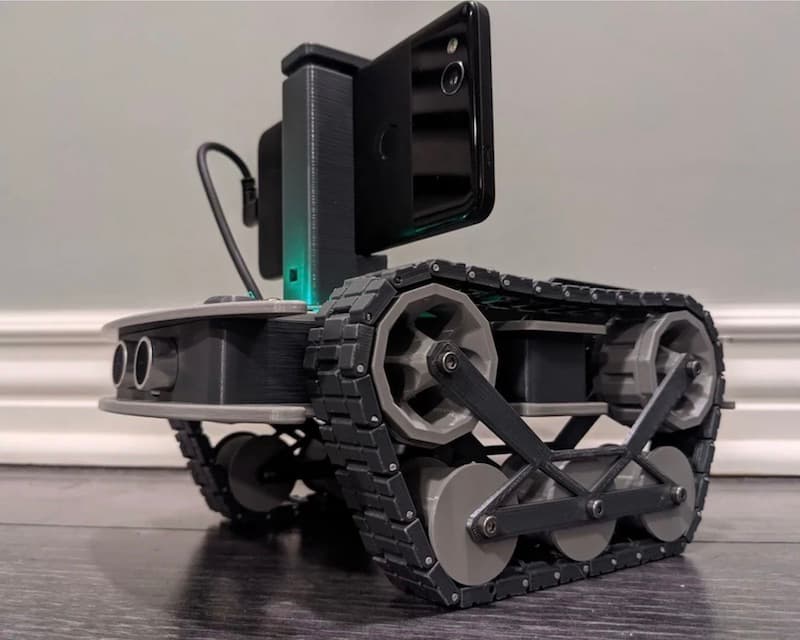
3D model loaded from the original files on GitHub at 216ecb0, under MIT. View the original files from GitHub (27.4 MB) (opens in a new tab)
What it can do
Written by Robotheca from the project's documents.
- Turns a smartphone into the brain of a low-cost wheeled robot body, with an Android software stack for tasks such as person following and autonomous navigation.
- The microcontroller handles low-level vehicle control, converting drive commands to PWM for the motor controller.
- Reads wheel rotation from optical speed sensors, battery voltage through a divider, and optional ultrasonic and bumper sensors, sending readings back to the phone over serial.
- Can be driven by a Bluetooth game controller, or by Node.js, Python, Flutter or web-server controllers over WiFi or the internet.
- Indicator LEDs, front/back lights and status LEDs can be switched on and off by serial commands.
Works with AI
Found by Robotheca in the project's files at commit 216ecb0, its robot.yaml and Robotheca's notes on its documents. Never guessed; Robotheca doesn't run the code.
Uses computer vision: YOLO
In the project files: ios/OpenBot/OpenBot/tflite/DetectorFloatYoloV4.swiftUses a machine-learning library: TensorFlow Lite
In the project files: ios/OpenBot/OpenBot/tfliteUses a machine-learning library: OpenVINO
In the project files: python/export_openvino.py
Bill of materials
21 parts21 of 21 parts shown
| # | Component | Quantity | Est. price | Supplier |
|---|---|---|---|---|
| 1 | LESD5D5.0CT1G | 2 | – | LCSC |
| 2 | B2B-PH-K-S(LF)(SN) | 4 | – | LCSC |
| 3 | 1.25T-1-10AW | 1 | – | LCSC |
| 4 | Header-Male-2.54_2x3 | 4 | – | LCSC |
| 5 | 1.25T-1-3A | 2 | – | LCSC |
| 6 | 1.25T-6A | 1 | – | LCSC |
| 7 | 10K | 2 | – | LCSC |
| 8 | 210S-1*2P L=11.6MMGold-plated black | 1 | – | LCSC |
| 9 | 30K | 1 | – | LCSC |
| 10 | 1K | 4 | – | LCSC |
| 11 | 100nF | 1 | – | LCSC |
| 12 | 10K | 8 | – | LCSC |
| 13 | 10uF | 1 | – | LCSC |
| 14 | S8050_C2146 | 4 | – | LCSC |
| 15 | SMAJ13A_C309856 | 1 | – | LCSC |
| 16 | AO3409A | 1 | – | LCSC |
| 17 | 1N5819HW1-7-F | 1 | – | LCSC |
| 18 | LM393DT | 2 | – | LCSC |
| 19 | Arduino_Nano_Header | 1 | – | – |
| 20 | 210S-2*5P L=11.6MMGold-plated black | 2 | – | LCSC |
| 21 | DC-044B-3A-2.0 | 1 | – | LCSC |
21 of 21 parts have no price in the source, so there is no parts total. Read from body/rtr/pcb/BOM_BaseBoard_Arduino_V1A.csv at the pinned commit.
Build guide
The guide appears here as you scroll.
Guide by @ob-f (README.md), under MIT.
More guides
Wiring and electronics
Notes written by Robotheca from the project's documents.
Main parts
- Arduino Nano with ATmega328P microcontroller, or an ESP32 development kit, as the firmware bridge to the phone.
- Motor driver: L298N for the DIY build, or DRV8870-based motor boards in the PCB variants.
- Optional ultrasonic distance sensor, optical wheel speed sensors and bumper sensors.
- Optional OLED display, indicator and status LEDs.
- Battery with a voltage divider circuit for battery voltage measurement.
Connections
- The microcontroller is connected to the smartphone over a serial link.
- The microcontroller drives the motor controller with PWM signals.
- Optical speed sensors on the front wheels feed interrupt pins on the microcontroller; the Arduino Nano's port interrupts allow all pins to be used as interrupts with the PinChangeInterrupt library.
- The battery voltage is read through a voltage divider circuit.
- The firmware's hardware configuration flag must match the chosen board variant (DIY, PCB_V1, PCB_V2, RTR_TT, RC_CAR, LITE, RTR_520, MTV or DIY_ESP32).
Schematics, boards and diagrams
- body/diy/pcb/v1/gerber_v1.zipGerber (PCB manufacturing)
- body/diy/pcb/v2/gerber_v2.zipGerber (PCB manufacturing)
- body/mtv/pcb/Gerber_MTV_MAIN_PCB_V.1.zipGerber (PCB manufacturing)
- body/mtv/pcb/Gerber_MTV_POWER_PCB_V.1_2021-10-23.zipGerber (PCB manufacturing)
- body/rtr/pcb/Gerber_BaseBoard_Arduino_V1A.zipGerber (PCB manufacturing)
- body/rtr/pcb/Gerber_BaseBoard_Arduino_V1B.zipGerber (PCB manufacturing)
- body/rtr/pcb/Gerber_BaseBoard_Arduino_V1C.zipGerber (PCB manufacturing)
- body/rtr/pcb/Gerber_BaseBoard_ESP32_V1A.zipGerber (PCB manufacturing)
- body/rtr/pcb/Gerber_BaseBoard_ESP32_V1B.zipGerber (PCB manufacturing)
- body/rtr/pcb/Gerber_BaseBoard_ESP32_V1C.zipGerber (PCB manufacturing)
- body/rtr/pcb/Gerber_BumpSensorBack_V1.zipGerber (PCB manufacturing)
- body/rtr/pcb/Gerber_BumpSensorTop_V1.zipGerber (PCB manufacturing)
- body/rtr/pcb/Gerber_MotorBoard_Arduino_V1_DRV8870.zipGerber (PCB manufacturing)
- body/rtr/pcb/Gerber_MotorBoard_ESP32_V1_DRV8870.zipGerber (PCB manufacturing)
- body/rtr/pcb/Gerber_SensorBoardFront_CH340G_V1.zipGerber (PCB manufacturing)
- body/rtr/pcb/Gerber_SensorBoardFront_CP2102N_V1.zipGerber (PCB manufacturing)
- body/rtr/pcb/Gerber_SpeedSensor_Arduino_V1.zipGerber (PCB manufacturing)
- body/rtr/pcb/Gerber_Status_LED_Board_V1.zipGerber (PCB manufacturing)
- docs/images/led-lamp-wiring.jpgDiagram
- docs/images/MTV/led-lamp-wiring.jpgDiagram
- docs/images/wiring_diagram.pngDiagram


