MARPY
A low-cost, open-source, 3D-printed differential-drive robot for learning ROS 2 with real hardware and simulation.
- Wheeled
- Open source
- ROS 2
- 3D printable
Suggested by Robotheca, created by @LevinTamir (opens in a new tab), from github.com/LevinTamir/MARPY (opens in a new tab). Pinned to commit 79edbec (opens in a new tab).
- Hardware license
- MIT (opens in a new tab)
- Software license
- MIT (opens in a new tab)
- Commercial use
- Allowed
This repository contains executable files that Robotheca doesn't check. Only run them if you trust the creator.
Which files (1 script)
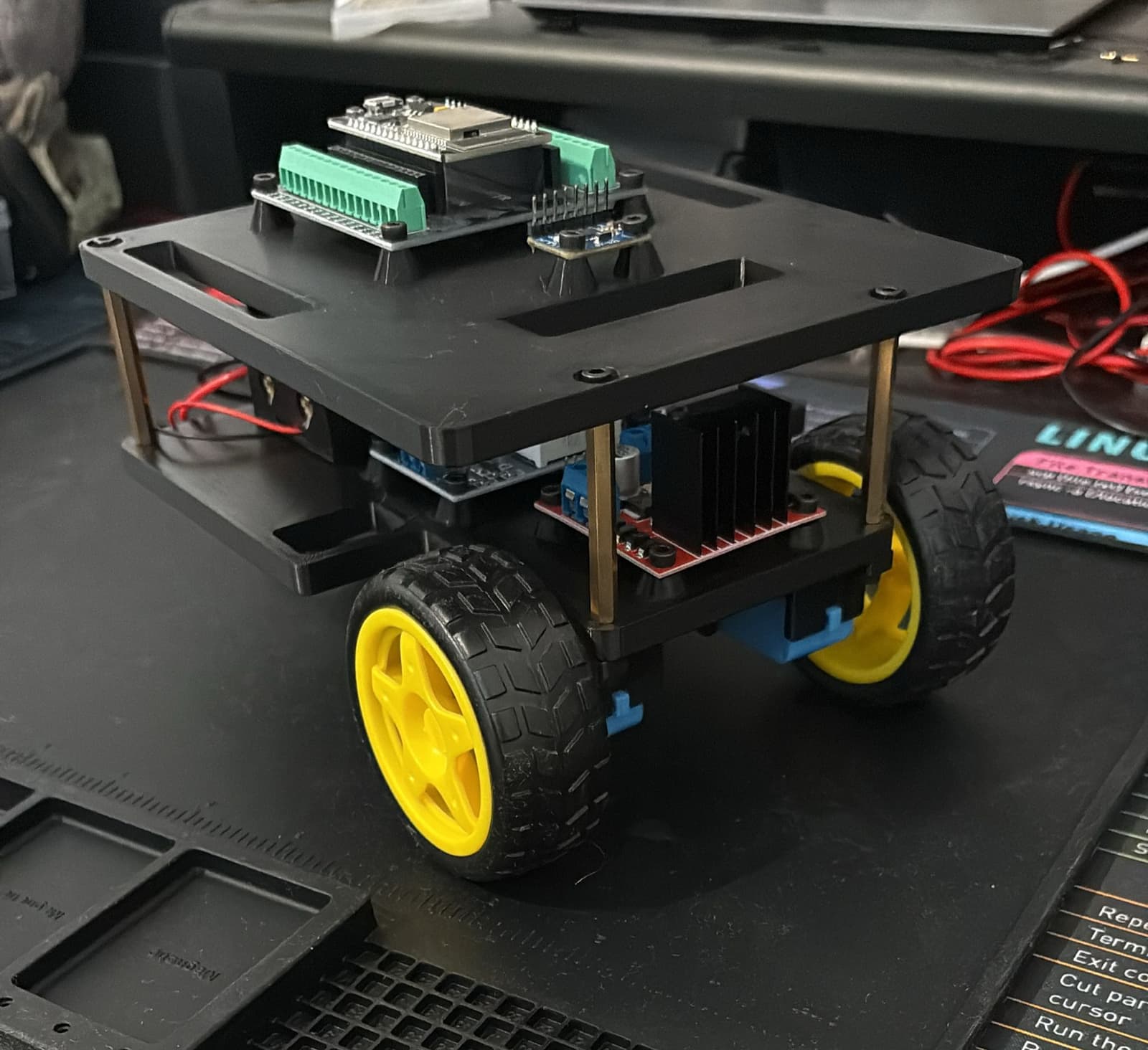
Photo
What it can do
Written by Robotheca from the project's documents.
- Differential-drive mobile robot that drives on two TT gear motor wheels with a caster for support
- Controlled from a ROS2 PC through micro-ROS over WiFi, e.g. keyboard teleop via velocity commands
- Reports wheel odometry from encoders and uses an IMU; runs in Gazebo simulation or on the real robot
- Optional ESP32-CAM streams video over HTTP as MJPEG, republished as images by a bridge node
Bill of materials
30 parts30 of 30 parts shown
| # | Component | Quantity | Est. price | Supplier |
|---|---|---|---|---|
| Electronics | ||||
| 1 | ESP32 DevKit V1 (30-pin) with Screw Terminal Breakout Board | 1 | $10≈ €9 | Amazon: buy ESP32 DevKit V1 (30-pin) with Screw Terminal Breakout Board, opens in a new tab |
| 2 | L298N Dual H-Bridge Motor Driver | 1 | $3≈ €3 | Amazon: buy L298N Dual H-Bridge Motor Driver, opens in a new tab |
| 3 | TT Encoder Motor (6V DC Gear Motor with Hall Encoder) | 2 | $12 total≈ €11 | Amazon: buy TT Encoder Motor (6V DC Gear Motor with Hall Encoder), opens in a new tab |
| 4 | 65mm TT Motor Wheels | 2 | $3 total≈ €3 | Amazon: buy 65mm TT Motor Wheels, opens in a new tab |
| 5 | Low Profile Plastic Caster Wheel (1") | 1 | $3≈ €3 | Amazon: buy Low Profile Plastic Caster Wheel (1"), opens in a new tab |
| 6 | 18650 Li-Ion Battery (3.7V, 2600mAh+) | 2 | $5 total≈ €4 | Amazon: buy 18650 Li-Ion Battery (3.7V, 2600mAh+), opens in a new tab |
| 7 | 2S 18650 Battery Holder with Switch | 1 | $3≈ €3 | Amazon: buy 2S 18650 Battery Holder with Switch, opens in a new tab |
| 8 | LM2596S Adjustable DC-DC Buck Converter (7-28V to 5V) | 1 | $2≈ €2 | Amazon: buy LM2596S Adjustable DC-DC Buck Converter (7-28V to 5V), opens in a new tab |
| 9 | MPU6050 IMU (6-axis accelerometer + gyroscope) | 1 | $2≈ €2 | Amazon: buy MPU6050 IMU (6-axis accelerometer + gyroscope), opens in a new tab |
| 10 | Jumper Wires | 1 | $3≈ €3 | Amazon: buy Jumper Wires, opens in a new tab |
| 11 | Micro-USB Cable (for flashing ESP32) | 1 | $2≈ €2 | Amazon: buy Micro-USB Cable (for flashing ESP32), opens in a new tab |
| 12 | ESP32-CAM with OV2640 Camera | 1 | $9≈ €8 | AliExpress: buy ESP32-CAM with OV2640 Camera, opens in a new tab |
| Hardware / Fasteners | ||||
| 13 | M3x24 screws | 4 | $2 total≈ €2 | – |
| 14 | M3x20 screws | 2 | $1 total≈ €1 | – |
| 15 | M3x16 screws | 2 | $1 total≈ €1 | – |
| 16 | M3x12 screws | 8 | $1 total≈ €1 | – |
| 17 | M3x8 screws | 14 | $1 total≈ €1 | – |
| 18 | M3x6 flat head screws | 2 | $1 total≈ €1 | – |
| 19 | M3 nuts | 10 | $1 total≈ €1 | – |
| 20 | M3 shims | 4 | $1 total≈ €1 | – |
| 21 | M3x12 standoffs (female-male) | 4 | $2 total≈ €2 | – |
| 22 | M3x40 standoffs (female-female) | 4 | $2 total≈ €2 | Amazon: buy M3x40 standoffs (female-female), opens in a new tab |
| 3D Printed Parts | ||||
| 23 | Base Plate (bottom deck) | 1 | – | – |
| 24 | Top Plate (electronics deck) | 1 | – | – |
| 25 | Left Motor Mount | 1 | – | – |
| 26 | Right Motor Mount | 1 | – | – |
| 27 | On/Off Switch Mount | 1 | – | – |
| 28 | Camera Mount | 1 | – | – |
| 29 | ESP32-CAM Case | 1 | – | – |
| 30 | ESP32-CAM Case (GoPro mount) | 1 | – | Printables: buy ESP32-CAM Case (GoPro mount), opens in a new tab |
≈ € amounts use the ECB reference rate of 21 Oct 2026, for comparison only.
8 of 30 needed parts have no price in the source, so there is no parts total. Read from docs/bom.md at the pinned commit.
Build guide
The creator's steps, each with its instructions.
- 1Clone the workspace
- 2Buy the parts (bill of materials)
- 3Assemble the robot
- 4Wire the electronics
- 5Flash the ESP32 firmware with micro-ROS
- 6Set up ROS 2 on your PC and drive the robot
- 7Run MARPY in Gazebo simulation
The guide appears here as you scroll.
Guide by @LevinTamir (README.md), under MIT.
More guides
Wiring and electronics
Notes written by Robotheca from the project's documents.
Main parts
- ESP32 DevKit V1 drive controller on a screw terminal breakout board
- L298N dual H-bridge motor driver
- Two TT 6V DC gear motors with hall encoders and 65mm wheels
- MPU6050 6-axis IMU
- 2S 18650 Li-Ion battery holder with on/off switch
- LM2596S adjustable buck converter stepping 7-28V down to 5V
- Optional ESP32-CAM with OV2640 camera
Connections
- Battery pack goes through the on/off switch to the L298N +12V input and the buck converter input
- Buck converter 5V output feeds the ESP32 VIN pin and the encoder VCC lines
- All grounds are tied together as one common ground
- ESP32 PWM and direction GPIOs drive the L298N enable and IN pins; the ENA and ENB jumpers must be removed
- Each motor's two encoder channels connect to ESP32 GPIOs 18/19 (right) and 21/22 (left)
- MPU6050 connects over I2C on GPIO 13 (SDA) and GPIO 15 (SCL), powered from the 3.3V pin
- Battery must be switched off before plugging the ESP32 into a PC via USB to avoid back-feeding
Cables and connectors
From the parts list.
- ESP32 DevKit V1 (30-pin) with Screw Terminal Breakout Board × 1
- Jumper Wires × 1
- Micro-USB Cable (for flashing ESP32) × 1

