← ElectronBot
Project files
4 KB
Machine-translated by Robotheca from the original in Chinese (opens in a new tab). License: GPL-3.0-only (opens in a new tab).
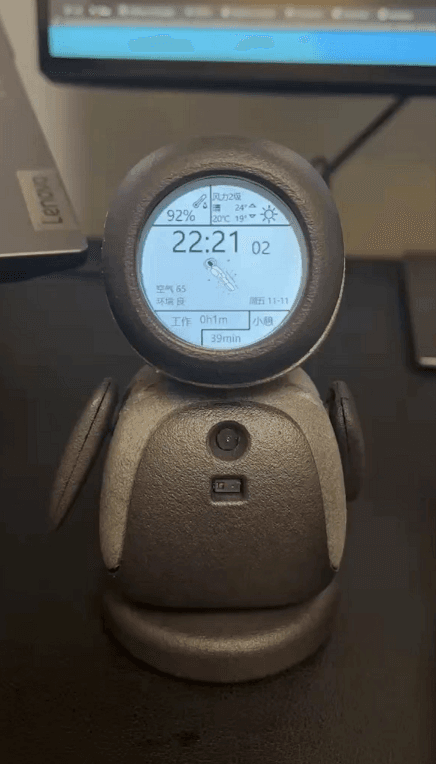
This project is a recreation of ElectronBot by "稚晖君" (Zhihui Jun). It summarizes some experiences and implements Python calls to lowlevel.dll to set servo data and receive feedback. It also supports transmission of video images, camera images, and Huawei Space Person images (including time and weather display).
1. A complete procurement BOM provided by netizens and the merging of multiple PCBs into 2 PCBs have been added to the Hardware folder to make it easier for everyone to manufacture and purchase PCBs
2. All three projects in the Firmware folder can be fully compiled using CLion. Previous attempts to convert them into MDK projects were made, but the migration process is error-prone for beginners. Therefore, it is recommended to use CLion directly, which also yields correct results. CLion is indeed very user-friendly.
4. Software folder, with a focus on the SDK and Unity.
- The lowest level of the SDK is
lowlevel, which primarily calls two modules: one isUSBInterface.dll, which encapsulateslibusb, and the other is OpenCV 3.4.8. This library was provided by 稚晖君, but it needs to be placed in the specified location of the project or the project'sCMakeLists.txtneeds to be modified to locate it. (Note: All projects provided in this project are recompiled based on OpenCV 4.6.0.) playercallslowlevel, making it convenient for users to call and use.unitybridgealso callslowlevel.- Unity is a 3D programming environment. 稚晖君 used C# to call
unitybridge.dll. The folder includes precompiled Release versions and source files forstudio. (Note: Running the Release version will report an error. You need to replace the fileRelease\Build\ElectronBot-Studio_Data\Plugins\x86_64\opencv_world348d.dll. This project has already replaced it, and it can run normally. TheStudioproject has not been studied in detail yet, so there is no experience to share at this time.)
4. CAD Model: BabyWhale has provided the design files in STEP format, which can be opened normally in Fusion 360. If you want to print them later, it's best to export the parts as STL files. This folder provides:
- A single-board STL file that integrates multiple small parts into one, as organized by a netizen
- Thickened areas in the front and rear shells of the body where JLCPCB feedback indicated that some parts were too thin
- A sorted printing list
5.Docs: Organized the communication protocol between PCsoft and the slave computer based on the source code. The communication protocol between the motherboard and the servos has already been provided by 稚晖君
6. Tests:
- TestDisplayUSB: A project provided by Zhihui Jun to individually test the LCD and PC software communication with the lower computer. (Note: Requires the use of dedicated firmware and software.)
- TestServoUSB: A firmware written by myself based on ideas provided by netizens, used to individually test servos, including single and 6-servo tests.
The following are the main additional learning and follow-up tasks for this project. The main goal is to port the SDK provided by "稚晖君" to a Python-callable interface, making it easier to combine with machine learning, image recognition, etc. in the future. The directory path is 6.Tests/ClionStudy/*.
C++ DLL Generation and Calling Experiment, mainly used to learn CLion and CMakeLists
- 6.1 clion_lib_shared: Program that generates only a dynamic library
- 6.2 clion_lib_static: Program that generates only a static library
- 6.3 clion_lib_exe: Program that calls the DLL generated in step 2, simultaneously generating a new dynamic library and an executable
- 6.4 clion_exe: Program that calls the DLL generated in step 3, generating an executable
- 6.5 clion_opencv: Application program that calls the OpenCV library
Python using ctypes to call DLLs generated by C++: experiments and previews of Python interfaces
- 6.1 vs_lib_shared: Visual Studio IDE project generating a dynamic library for Python to call
- 6.2 clion_lib_shared: Project generating only a dynamic library, with
extern "C"and__declspec(dllexport)added to the.hfile for Python to call - 6.3 python: Python using ctypes to call the DLL generated in step 6.1 or 6.2
- 6.4 clion_lib_shared: Similar functionality to 6.2, with slight differences in implementation
- 6.5 python: Similar functionality to 6.3, with slight differences in implementation
For the ElectronBot project, repackage the LowLevel DLL and call it with Python to achieve image data transmission, servo data setting and feedback
- 7.1 ElectronBotSDK-LowLevel: Repackage and modify the underlying library DLL
- 7.2 PythonTestDisplayUSB: Call 7.1 to set and feedback servo data, and transmit video images / camera images / Huawei watch dial images (implementing time and weather)
Using the libusb Module, Mainly for Learning libusb Driver Usage
- 8.libusb_demo/USB_VCP_Test: STM32CubeMX-generated STM32 USB VCP HP project
- 8.libusb_demo/USB_VCP_Test_libusbDriver: Corresponding libusb installation driver, matching the VID and PID modifications in the STM32 project
- 8.libusb_demo/libusb-win32-install-1.2.6.0.zip: Program used to generate the libusb driver
Files by @gropery, at commit b434b81, read from GitHub in your browser. Hardware license: GPL-3.0-only; software license: GPL-3.0-only. Robotheca doesn't review code: read it before running it.