Project files
8 KB
Machine-translated by Robotheca from the original in Chinese (opens in a new tab). License: MIT (opens in a new tab).
EL-A3 Robotic Arm
7-DOF desktop robotic arm project, consisting of two independent sub-projects: a pure Python SDK and a ROS2 control system.
Subprojects
| Project | Path | Description |
|---|---|---|
| Python SDK | el_a3_sdk/ | Pure Python SDK, Direct CAN communication, multi-arm management, Pinocchio dynamics |
| ROS2 Control System | el_a3_ros/ | ros2_control hardware interface, MoveIt2 motion planning, URDF description |
| Hardware Manufacturing Data | hardware/ | STEP models, 3MF print files, wiring harness drawings, PCB data, assembly SOP |
For detailed documentation of each subproject, see the corresponding README.md in its directory.
Note: Large files in the
hardware/directory are managed via Git LFS. After the initial clone, rungit lfs pull.
Hardware Requirements
| Item | Specification |
|---|---|
| Robotic Arm | EL-A3 7-DOF (6 arm joints + L7 gripper) |
| Motors | Robstride RS00 ×3 (L1-L3) + EL05/RS05 ×4 (L4-L7) |
| CAN Adapter | CANdle / gs_usb compatible devices |
| Power Supply | 24V / 48V DC power supply |
| PC | Ubuntu 22.04+ x86_64 |
Motor Configuration
| Joint | Motor ID | Model | Torque Limit | Speed Limit | Position Limit | Direction |
|---|---|---|---|---|---|---|
| L1 | 1 | RS00 | ±14 Nm | ±33 rad/s | ±2.79 rad (±160°) | -1 |
| L2 | 2 | RS00 | ±14 Nm | ±33 rad/s | 0~3.67 rad (0°~210°) | +1 |
| L3 | 3 | RS00 | ±14 Nm | ±33 rad/s | -4.01~0 rad (-230°~0°) | -1 |
| L4 | 4 | EL05/RS05 | ±6/±5.5 Nm | ±50 rad/s | ±1.57 rad (±90°) | +1 |
| L5 | 5 | EL05/RS05 | ±6/±5.5 Nm | ±50 rad/s | ±1.57 rad (±90°) | -1 |
| L6 | 6 | EL05/RS05 | ±6/±5.5 Nm | ±50 rad/s | ±1.57 rad (±90°) | +1 |
| L7 (Gripper) | 7 | EL05/RS05 | ±6/±5.5 Nm | ±50 rad/s | ±1.57 rad (±90°) | +1 |
Software Environment
| Dependency | Version / Description |
|---|---|
| Operating System | Ubuntu 22.04+ (x86_64) |
| Python | 3.10+ |
| ROS2 | Humble Hawksbill (required only for ROS2 sub-projects) |
| CAN Bus | SocketCAN · CAN 2.0 extended frames · 1 Mbps |
| Core Python Dependencies | numpy, pyyaml |
| Optional Python Dependencies | pinocchio (pip install pin) — FK/IK/gravity compensation |
| Debugger GUI | pyqt6, pyqtgraph, pyvista, pyvistaqt (pip install -e ".[debugger]" ) |
| ROS2 Dependencies | ros2_control, MoveIt2, pick_ik, joy, etc. (installed via scripts/install_deps.sh) |
Installing the Debugger GUI
The Debugger provides a PyQt6 GUI with features such as 3D URDF visualization based on PyVista (VTK), joint drag control, and real-time monitoring.
Verified on Ubuntu 22.04 + Python 3.10 (PyQt6 6.11 / pyvista 0.47 / vtk 9.5).
# Ubuntu system dependencies (OpenGL runtime + Qt xcb platform plugin dependencies)
# Note: libgl1-mesa-glx has been replaced by libgl1 since Ubuntu 22.04; libxcb-cursor0 is required for Qt 6.5+
sudo apt install -y libgl1 libxrender1 libxcb-xinerama0 libxcb-cursor0

# Install SDK and Debugger dependencies in editable mode (pyqt6 / pyqtgraph / pyvista / pyvistaqt)
# The dynamics extra installs Pinocchio (pin) for FK/IK and gravity compensation
cd el_a3_sdk
pip install -e ".[debugger,dynamics]"

# Launch the GUI (installed to ~/.local/bin; ensure it is in your PATH)
el-a3-debugger
Special Attention
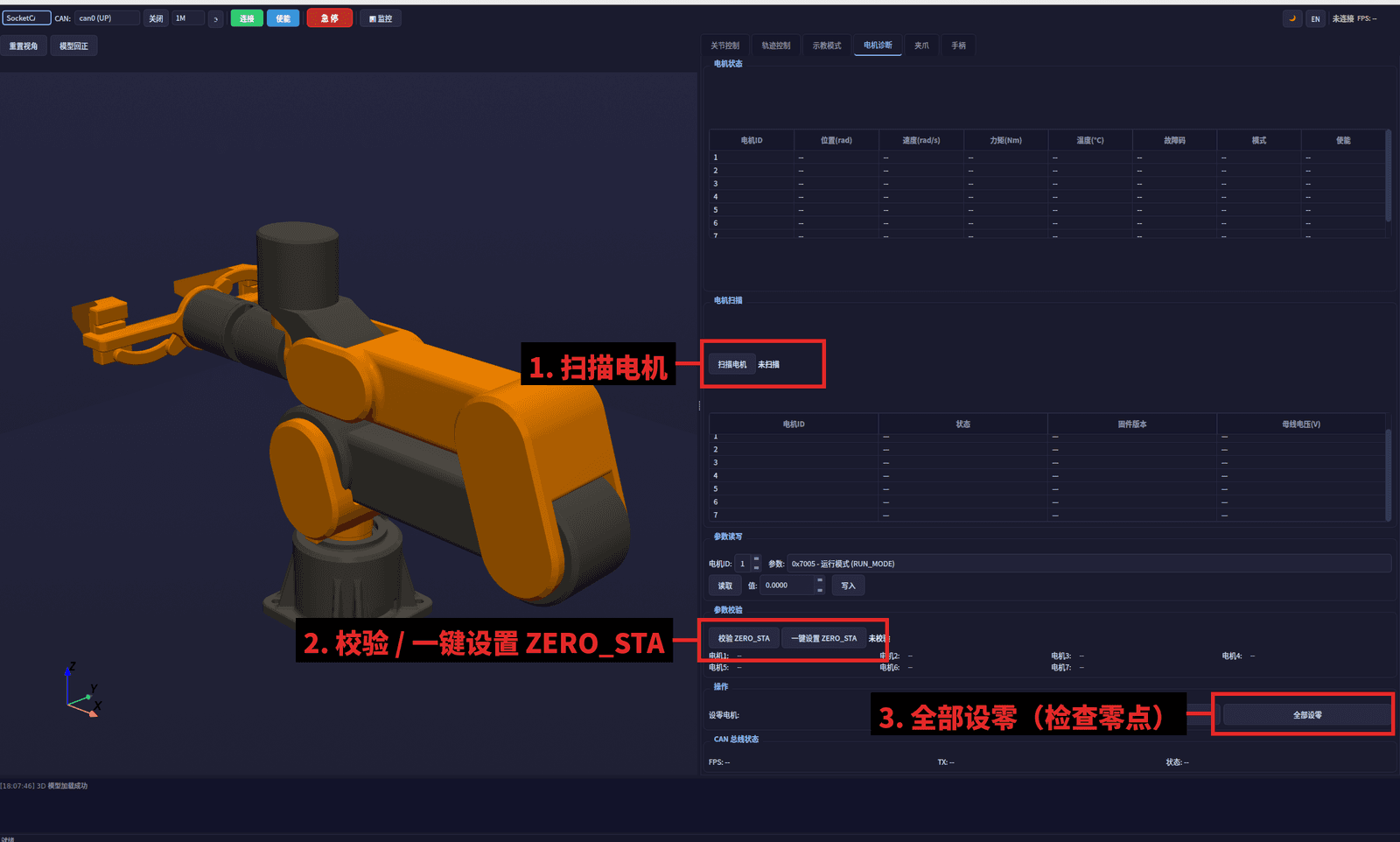
Before powering on, use the upper computer (motor diagnosis page) to check the motor IDs, ZERO_STA, and zero points according to the steps marked by the red box in the following diagram:
- Scan Motors — Confirm that all 7 motor IDs (1~7) are online;
- Verify / One-Click Set ZERO_STA — Confirm that the ZERO_STA parameters for each motor are correct;
- Set All Zeros — After positioning the robotic arm to its mechanical zero position, set the zero points.
CAN Interface Configuration
# Using script (recommended)
sudo bash scripts/setup_can.sh can0 1000000

# Or manual configuration
sudo modprobe gs_usb
sudo ip link set can0 type can bitrate 1000000
sudo ip link set can0 txqueuelen 1000
sudo ip link set can0 up

# Verification
ip link show can0
English
A 7-DOF desktop robotic arm project comprising two independent sub-projects: a pure Python SDK and a ROS2 control system.
Sub-projects
| Project | Path | Description |
|---|---|---|
| Python SDK | el_a3_sdk/ | Pure Python SDK with direct CAN communication, multi-arm management, and Pinocchio dynamics |
| ROS2 Control System | el_a3_ros/ | ros2_control hardware interface, MoveIt2 motion planning, URDF description |
| Hardware Manufacturing | hardware/ | STEP models, 3MF print files, wiring harness drawings, PCB files, assembly SOP |
For detailed documentation, refer to the README.md in each sub-project directory.
Note: Large files in the
hardware/directory are managed via Git LFS. Rungit lfs pullafter initial clone.
Hardware Requirements
| Item | Specification |
|---|---|
| Robotic Arm | EL-A3 7-DOF (6 arm joints + L7 gripper) |
| Motors | Robstride RS00 ×3 (L1-L3) + EL05/RS05 ×4 (L4-L7) |
| CAN Adapter | CANdle / gs_usb compatible device |
| Power Supply | 24V / 48V DC |
| PC | Ubuntu 22.04+ x86_64 |
Motor Configuration
| Joint | Motor ID | Model | Torque Limit | Velocity Limit | Position Limit | Direction |
|---|---|---|---|---|---|---|
| L1 | 1 | RS00 | ±14 Nm | ±33 rad/s | ±2.79 rad (±160°) | -1 |
| L2 | 2 | RS00 | ±14 Nm | ±33 rad/s | 0~3.67 rad (0°~210°) | +1 |
| L3 | 3 | RS00 | ±14 Nm | ±33 rad/s | -4.01~0 rad (-230°~0°) | -1 |
| L4 | 4 | EL05/RS05 | ±6/±5.5 Nm | ±50 rad/s | ±1.57 rad (±90°) | +1 |
| L5 | 5 | EL05/RS05 | ±6/±5.5 Nm | ±50 rad/s | ±1.57 rad (±90°) | -1 |
| L6 | 6 | EL05/RS05 | ±6/±5.5 Nm | ±50 rad/s | ±1.57 rad (±90°) | +1 |
| L7 (Gripper) | 7 | EL05/RS05 | ±6/±5.5 Nm | ±50 rad/s | ±1.57 rad (±90°) | +1 |
Software Environment
| Dependency | Version / Notes |
|---|---|
| OS | Ubuntu 22.04+ (x86_64) |
| Python | 3.10+ |
| ROS2 | Humble Hawksbill (required only for the ROS2 sub-project) |
| CAN Bus | SocketCAN · CAN 2.0 Extended Frame · 1 Mbps |
| Core Python Dependencies | numpy, pyyaml |
| Optional Python Dependencies | pinocchio (pip install pin) — FK/IK/Gravity compensation |
| Debugger GUI | pyqt6, pyqtgraph, pyvista, pyvistaqt (pip install -e ".[debugger]") |
| ROS2 Dependencies | ros2_control, MoveIt2, pick_ik, joy, etc. (install via scripts/install_deps.sh) |
Debugger GUI Installation
The Debugger provides a PyQt6-based GUI with 3D URDF visualization (PyVista/VTK), joint drag control, and real-time monitoring.
Verified on Ubuntu 22.04 + Python 3.10 (PyQt6 6.11 / pyvista 0.47 / vtk 9.5).
# Ubuntu system dependencies (OpenGL runtime + Qt xcb platform plugin)
# Note: libgl1-mesa-glx was replaced by libgl1 since Ubuntu 22.04; Qt 6.5+ requires libxcb-cursor0
sudo apt install -y libgl1 libxrender1 libxcb-xinerama0 libxcb-cursor0

# Install the SDK in editable mode with Debugger dependencies
# (pyqt6 / pyqtgraph / pyvista / pyvistaqt); the "dynamics" extra adds Pinocchio (pin) for FK/IK
cd el_a3_sdk
pip install -e ".[debugger,dynamics]"

# Launch (installed to ~/.local/bin — make sure it is on your PATH)
el-a3-debugger
CAN Interface Setup
# Using the provided script (recommended)
sudo bash scripts/setup_can.sh can0 1000000

# Or configure manually
sudo modprobe gs_usb
sudo ip link set can0 type can bitrate 1000000
sudo ip link set can0 txqueuelen 1000
sudo ip link set can0 up

# Verify
ip link show can0
Files by @RobStride, at commit 088b166, read from GitHub in your browser. Hardware license: MIT; software license: MIT. Robotheca doesn't review code: read it before running it.