Cubli Armonia Reaction-Wheel Cube
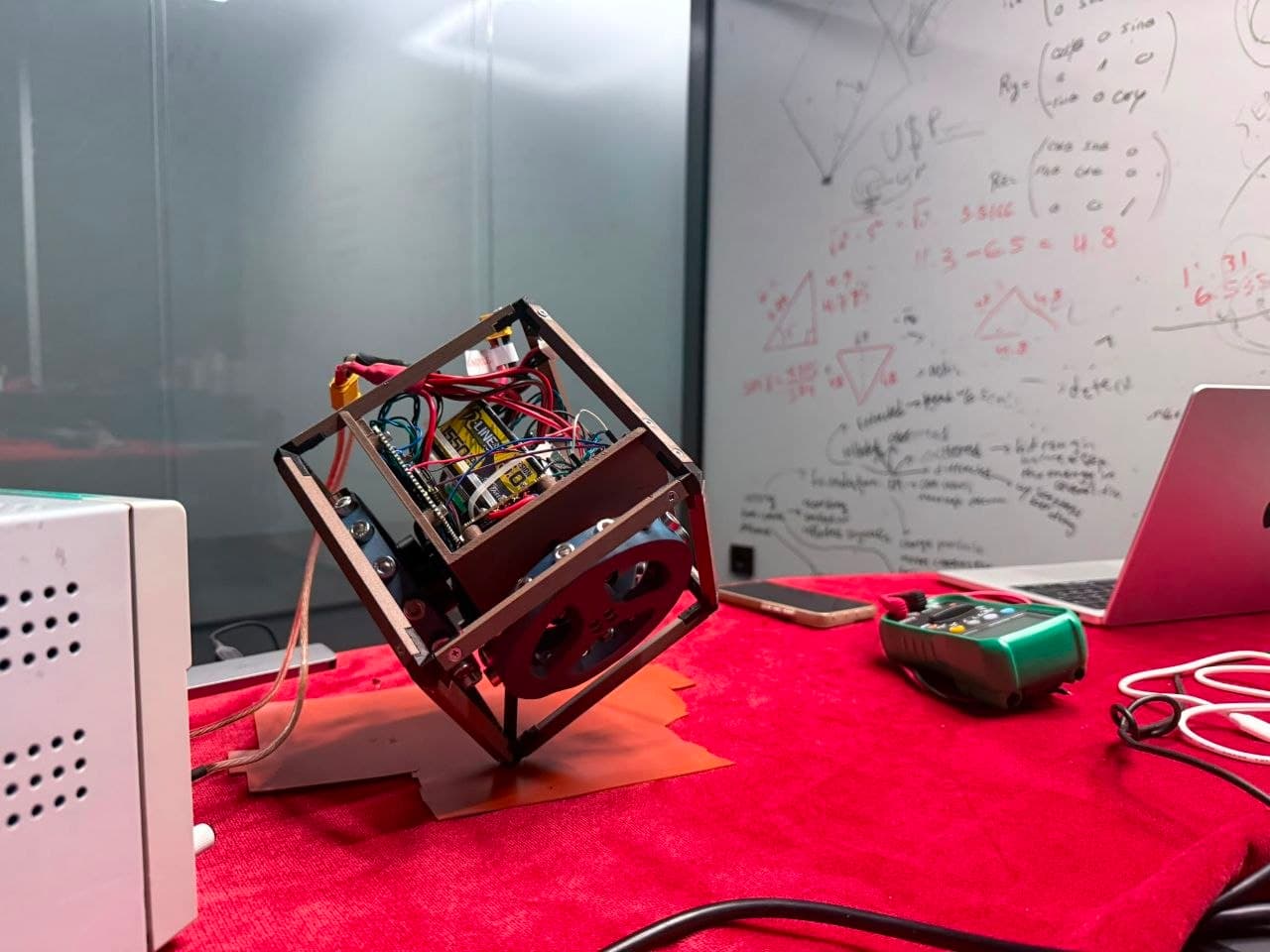
A 156 mm reaction-wheel cube that balances on an edge and on a corner, using three reaction wheels, a Teensy 4.1 control loop and a Wi-Fi telemetry bridge.
- Other
- Open source
- arduino
Suggested by Robotheca, created by @NiccoloTonetto (opens in a new tab), from github.com/NiccoloTonetto/Cubli-Space-challenge-2026 (opens in a new tab). Pinned to commit 1b6e3d0 (opens in a new tab).
- Hardware license
- MIT (opens in a new tab)
- Software license
- MIT (opens in a new tab)
- Commercial use
- Allowed
Photo and 3D model
3D preview converted from github.com/NiccoloTonetto/Cubli-Space-challenge-2026 at 1b6e3d0, under MIT. View the original files from GitHub (13.5 MB) (opens in a new tab)
- Weight
- 1.615 kg
What it can do
Written by Robotheca from the project's documents.
- Balances a 156 mm reaction-wheel cube on an edge and on a corner, per the README.
- Corner balance reported at 373.5 s continuous with tilt RMS 0.40 degrees.
- Edge balance reported at 197 s continuous with tilt RMS 0.58 degrees.
- Recovers from disturbances of about 3 degrees in 0.08 to 0.20 s, per the README.
- Only corner [-1,-1,-1] has been flown; gains for other corners are not yet in firmware.
- Balance only; no jump-up is implemented.
Bill of materials
This repository has no parts list Robotheca can read yet.
Build guide
The creator's steps, each with its instructions.
- 1Print the 156 mm PETG-CF frame
- 2Assemble the three reaction wheels with T-Motor Antigravity 4006 motors
- 3Mount the mjbots moteus-n1 FOC drivers on the CAN-FD bus
- 4Fit the Bosch BMI270 IMU at the cube's geometric centre
- 5Wire the Teensy 4.1 controller and XIAO ESP32-C6 Wi-Fi bridge
- 6Flash the staged bring-up firmware and calibrate the IMU
- 7Tune the per-corner LQR gains and balance on a corner
The guide appears here as you scroll.
Guide by @NiccoloTonetto (README.md), under MIT.
More guides
Wiring and electronics
Notes written by Robotheca from the project's documents.
Main parts
- Teensy 4.1 running the 2 ms control loop.
- XIAO ESP32-C6 acting as a Wi-Fi telemetry bridge.
- Three T-Motor Antigravity 4006 motors.
- Three mjbots moteus-n1 FOC motor drivers.
- Bosch BMI270 IMU at the cube's geometric centre.
- KiCad schematic and PCB files for the electronics are in the repository.
Connections
- The three moteus-n1 drivers are connected on a CAN-FD bus, run at 1 Mbps.
- The IMU sits at the cube's geometric centre, 130 mm from every corner.
- The XIAO ESP32-C6 bridges telemetry over Wi-Fi.
- Wiring details beyond these bus and placement facts are in the KiCad schematics, which the documents provided do not describe in text.
Schematics, boards and diagrams
- docs/electronics/Circuit-Schematic-Classic-Color.pdfDiagram
- docs/electronics/Circuit-Schematic.pdfDiagram
- hardware/kicad/libraries/moteus_n1.brdEagle
- hardware/kicad/libraries/moteus_n1.schEagle
- hardware/kicad/project/Circuit Schematic - Classic Color.pdfDiagram
- hardware/kicad/project/Circuit Schematic.pdfDiagram
- hardware/kicad/project/Cubli - Space Challenge 2026.kicad_pcbKiCad
- hardware/kicad/project/Cubli - Space Challenge 2026.kicad_schKiCad
- hardware/kicad/project/Workshop/Workshop.kicad_pcbKiCad
- hardware/kicad/project/Workshop/Workshop.kicad_schKiCad
- hardware/kicad/xiao-esp32-c6-board/01 Descriptions.kicad_schKiCad
- hardware/kicad/xiao-esp32-c6-board/02 Block Diagram.kicad_schKiCad
- hardware/kicad/xiao-esp32-c6-board/03 Power.kicad_schKiCad
- hardware/kicad/xiao-esp32-c6-board/04 ESP32 C6.kicad_schKiCad
- hardware/kicad/xiao-esp32-c6-board/XIAO ESP32 C6_gerberGerber (PCB manufacturing)
- hardware/kicad/xiao-esp32-c6-board/XIAO ESP32 C6.kicad_pcbKiCad
- hardware/kicad/xiao-esp32-c6-board/XIAO ESP32 C6.kicad_schKiCad