Borinot
An open-source, torque-controlled aerial loco-manipulator whose extremity can be reconfigured as a tail for flight, a hand for manipulation, or a leg for hybrid aerial-contact locomotion.
- Drone
- Open source
Suggested by Robotheca, created by @hidro-iri (opens in a new tab), from github.com/hidro-iri/Borinot (opens in a new tab). Pinned to commit 421fb26 (opens in a new tab).
- Hardware license
- BSD-3-Clause (opens in a new tab)
- Software license
- BSD-3-Clause (opens in a new tab)
- Commercial use
- Allowed
This repository contains executable files that Robotheca doesn't check. Only run them if you trust the creator.
Which files (1 script)
Photo and 3D model
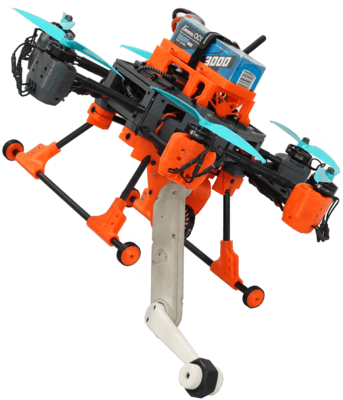
3D preview converted from github.com/hidro-iri/Borinot at 421fb26, under BSD-3-Clause. View the original files from GitHub (54.5 MB) (opens in a new tab)
What it can do
Written by Robotheca from the project's documents.
- Torque-controlled unmanned aerial loco-manipulator that reconfigures its extremity as a tail for agile flight, a hand for aerial manipulation, or a leg for hybrid aerial-contact locomotion.
- Hexacopter-style upper body with six motors on carbon fiber tubes, supporting flight.
- Flying arm with two links and an extremity, driven by ODRI-based actuator modules.
- Flight controlled by a Pixhawk flight controller with radio receiver input; onboard NUC computer runs higher-level control.
- Optimal control problems for aerial manipulators are solved with the Eagle MPC library built on Crocoddyl.
Bill of materials
35 parts35 of 35 parts shown
| # | Component | Quantity | Est. price | Supplier |
|---|---|---|---|---|
| 1 | PM03D Power Module | 1 | – | Holybro: buy PM03D Power Module, opens in a new tab |
| 2 | EC5-M Connector | 1 | – | TME: buy EC5-M Connector, opens in a new tab |
| 3 | XT30-F Connector | 1 | – | RC Innovations: buy XT30-F Connector, opens in a new tab |
| 4 | XT30-M Connector | 1 | – | RC Innovations: buy XT30-M Connector, opens in a new tab |
| 5 | Diode | 1 | – | BQ30TB 45B714 |
| 6 | Red Power Cable | 2 | – | RC Innovations: buy Red Power Cable, opens in a new tab |
| 7 | Black Power Cable | 2 | – | RC Innovations: buy Black Power Cable, opens in a new tab |
| 8 | Computer Cable | 1 | – | Amazon: buy Computer Cable, opens in a new tab |
| 9 | Masterboard Cable | 1 | – | – |
| 10 | Connector JST | 1 | – | – |
| 11 | Motor Cases | 6 | – | – |
| 12 | Body Case | 1 | – | – |
| 13 | Landing Gear | 1 | – | – |
| 14 | Controller Case | 1 | – | – |
| 15 | 2DOF Flying Arm | 1 | – | – |
| 16 | TMotor F90-1300KV | 6 | – | – |
| 17 | TMotor F35A 6s | 6 | – | – |
| 18 | NUC i7 | 1 | – | – |
| 19 | PixHawk5 | 1 | – | – |
| 20 | ø...mm O-ring Seals | 24 | – | – |
| 21 | ø20mm O-ring Seals | 12 | – | – |
| 22 | M3x5mm Screws | 12 | – | – |
| 23 | M3x10mm Screws | 8 | – | – |
| 24 | M3x10mm Nylon Screws | 6 | – | – |
| 25 | M3x16mm Screws | 8 | – | – |
| 26 | M3x30mm Screws | 24 | – | – |
| 27 | M4 Nuts | 6 | – | – |
| 28 | M3 Nuts | 16 | – | – |
| 29 | M3 Inserts | 12 | – | – |
| 30 | Cable Ties | 6 | – | – |
| 31 | ø8mmx110.0mm Carbon Fiber Round Tubes | 4 | – | – |
| 32 | ø8mmx170.0mm Carbon Fiber Round Tubes | 2 | – | – |
| 33 | ø8mmx300.0mm Carbon Fiber Round Tubes | 2 | – | – |
| 34 | ø8mmx352.5mm Carbon Fiber Round Tubes | 6 | – | – |
| 35 | Markers | 11 | – | – |
35 of 35 parts have no price in the source, so there is no parts total. Read from hardware/0_components_list.md at the pinned commit.
Build guide
The guide appears here as you scroll.
Guide by @hidro-iri (README.md), under BSD-3-Clause.
More guides
Wiring and electronics
Notes written by Robotheca from the project's documents.
Main parts
- NUC i7 onboard computer (NUC7i7DNKE)
- Pixhawk 5x flight controller (Pixhawk 6x mentioned as mechanically compatible)
- Power module (PM03D) with modification guide
- Brushless motors (TMotor F90-1300KV) with ESCs (TMotor F35A 6s)
- FlySky FS-iA6B radio receiver
- ODRI Master Board and micro driver for the arm actuators
- Arm motor and encoder for the base link
- Wi-Fi antenna and Ethernet converter
- Battery support and XT30/EC5 power connectors
Connections
- Pixhawk 5x Ethernet connects to the NUC.
- Pixhawk 5x USB connects to the NUC with a USB C cable.
- Pixhawk 5x power connects to the power module.
- NUC connects to the power module with a computer cable.
- NUC connects to the Wi-Fi antenna.
- ESC cables route through the carbon fiber tubes to each motor.
- Micro driver connects to the master board; the two arm links connect to the micro driver.
- UDriver power cables and Master Board power cables are joined, and an Ethernet cable connects to the master board.
Cables and connectors
From the parts list.
- EC5-M Connector × 1
- XT30-F Connector × 1
- XT30-M Connector × 1
- Red Power Cable × 2
- Black Power Cable × 2
- Computer Cable × 1
- Masterboard Cable × 1
- Connector JST × 1
- Cable Ties × 6