Andino
Andino is a fully open-source diff drive robot for education and low-cost applications, integrated with ROS 2.
- Wheeled
- Open source
- ROS 2
- 3D printable
Suggested by Robotheca, created by @Ekumen-OS (opens in a new tab), from github.com/Ekumen-OS/andino (opens in a new tab). Pinned to commit 8ee8408 (opens in a new tab).
- Hardware license
- BSD-3-Clause (opens in a new tab)
- Software license
- BSD-3-Clause (opens in a new tab)
- Commercial use
- Allowed
Some folders have their own license: andino_base/ (BSD-3-Clause), andino_bringup/ (BSD-3-Clause), andino_control/ (BSD-3-Clause), andino_description/ (BSD-3-Clause).
This repository contains executable files that Robotheca doesn't check. Only run them if you trust the creator.
Photo and 3D model
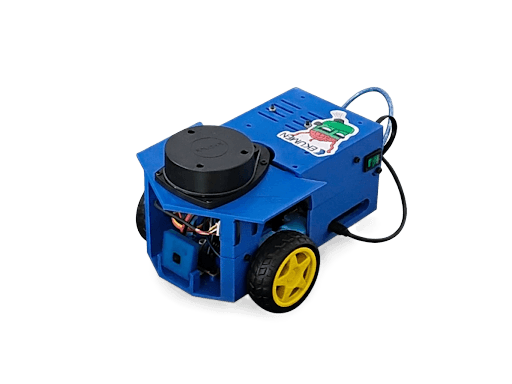
3D preview converted from github.com/Ekumen-OS/andino at 8ee8408, under BSD-3-Clause. View the original files from GitHub (1.1 MB) (opens in a new tab)
What it can do
Written by Robotheca from the project's documents.
- Andino is an open-source differential drive robot for education and low-cost use, integrated with ROS 2.
- Closed-loop speed control of two wheel motors via PID, with commands given in ticks per second.
- Open-loop motor control with direct PWM values, forward and backward.
- Auto-stop: motors stop and PID disables if no motor command arrives within 3 seconds.
- Reads wheel encoder ticks and an optional BNO055 IMU, reporting orientation, angular velocity and acceleration.
- Teleoperation by keyboard or joystick, and navigation/SLAM via ROS 2 packages.
Bill of materials
This repository has no parts list Robotheca can read yet.
Build guide
The creator's steps, each with its instructions.
- 1Visit andino_hardware for assembly instructions
- 2Install ROS 2 Humble or Jazzy and colcon
- 3Create a colcon workspace and clone the repository
- 4Install dependencies via rosdep
- 5Build the packages with colcon build
- 6Source the built packages
- 7Launch the robot bringup
The guide appears here as you scroll.
Guide by @Ekumen-OS (README.md), under BSD-3-Clause.
More guides
Wiring and electronics
Notes written by Robotheca from the project's documents.
Main parts
- Arduino Uno, Arduino Nano, or STM32 Blue Pill microcontroller running the firmware.
- Two wheel motors with encoders; an L298N motor driver is mentioned for enable wiring.
- Optional Adafruit BNO055 IMU on the I2C bus.
- Single-board computer such as a Raspberry Pi 4B running ROS 2 on the real robot.
- RP 2D LiDAR and a camera are launched as sensors on the real robot.
- Battery and power supply are not described in the documents.
Connections
- Each encoder's channels A and B connect to specific microcontroller interrupt-capable pins, listed per board.
- Each motor has backward PWM, forward PWM and enable pins on the microcontroller, which drive the motor driver.
- The Arduino enable input of the L298N can be jumped to 5V if the board has a jumper.
- The IMU connects over I2C (SCL and SDA pins).
- The Blue Pill serial link is its USB port and needs no USB-to-serial adapter; it is flashed through an ST-Link on the SWD header.
- On Arduino boards the host connects over serial at 57600 baud.
