Software
web_tf_editor
From github.com/farshad-heravi/web_tf_editor (opens in a new tab)
- Middleware
- Tool
- Apache-2.0
A browser-based, rviz-like viewer for ROS 2 Jazzy that renders robot URDFs and lets you author 3D TF frames interactively, broadcasting them on /tf.
Facts
- GitHub stars
- 0read on 6 Nov 2026
- Last update
- 27 Sept 2026Newest commit on jazzy
- Maintenance
- Activea commit in the last 90 days
- Difficulty
- Beginner
- Hardware it needs, as the project states it
- Requires a sourced ROS 2 Jazzy install on the host, plus rosbridge_server, robot_state_publisher, joint_state_publisher, xacro and, for the default robot, turtlebot3_manipulation_description.
Checked on GitHub on 6 Nov 2026.
Licenses
- Code
- Apache-2.0 (opens in a new tab)
Read by Robotheca from LICENSE (opens in a new tab) (Apache-2.0) at commit 9208b5d (opens in a new tab), on 22 Oct 2026.
- Commercial use
- Yes
Overview
What it does: Robotheca's summary
- Loads a robot's URDF or xacro from a file, a ROS topic, or the robot_description parameter and drives it from joint states.
- Lets you place new TF frames by clicking a point on the robot or in empty space and dragging to set a direction.
- Provides a 6-DoF gizmo for translating and rotating frames, plus a full editor for names, parents, poses and publishing.
- Exports any frame as YAML or as a static_transform_publisher command.
- Supports loading several robots or static scenes side by side in the same view.
- Runs as a standard ROS 2 package launched with ros2 launch, with the interface served as a web page.
Written by Robotheca from the project's README (opens in a new tab) at commit 9208b5d, not by its creator.
The README
The creator's own README, copied as written: README.md by @farshad-heravi, at commit 9208b5d, under Apache-2.0 (opens in a new tab). The original on GitHub (opens in a new tab).
Read the README here
web_tf_editor
A browser-based, rviz-like viewer for ROS 2 Jazzy. It renders a robot's URDF, lets you
orbit/pan/zoom the scene, and — unlike rviz — lets you author 3D TF frames interactively:
click a point on the robot (or in empty space), drag to set a direction, then refine with a
6-DoF gizmo. Authored frames are broadcast on /tf so rviz2, MoveIt, or any other ROS 2 node
can consume them immediately.
It's a normal ROS 2 Jazzy package (colcon build + ros2 launch). The UI is just a web page (no rviz plugin, no X11 forwarding, shareable with a link).
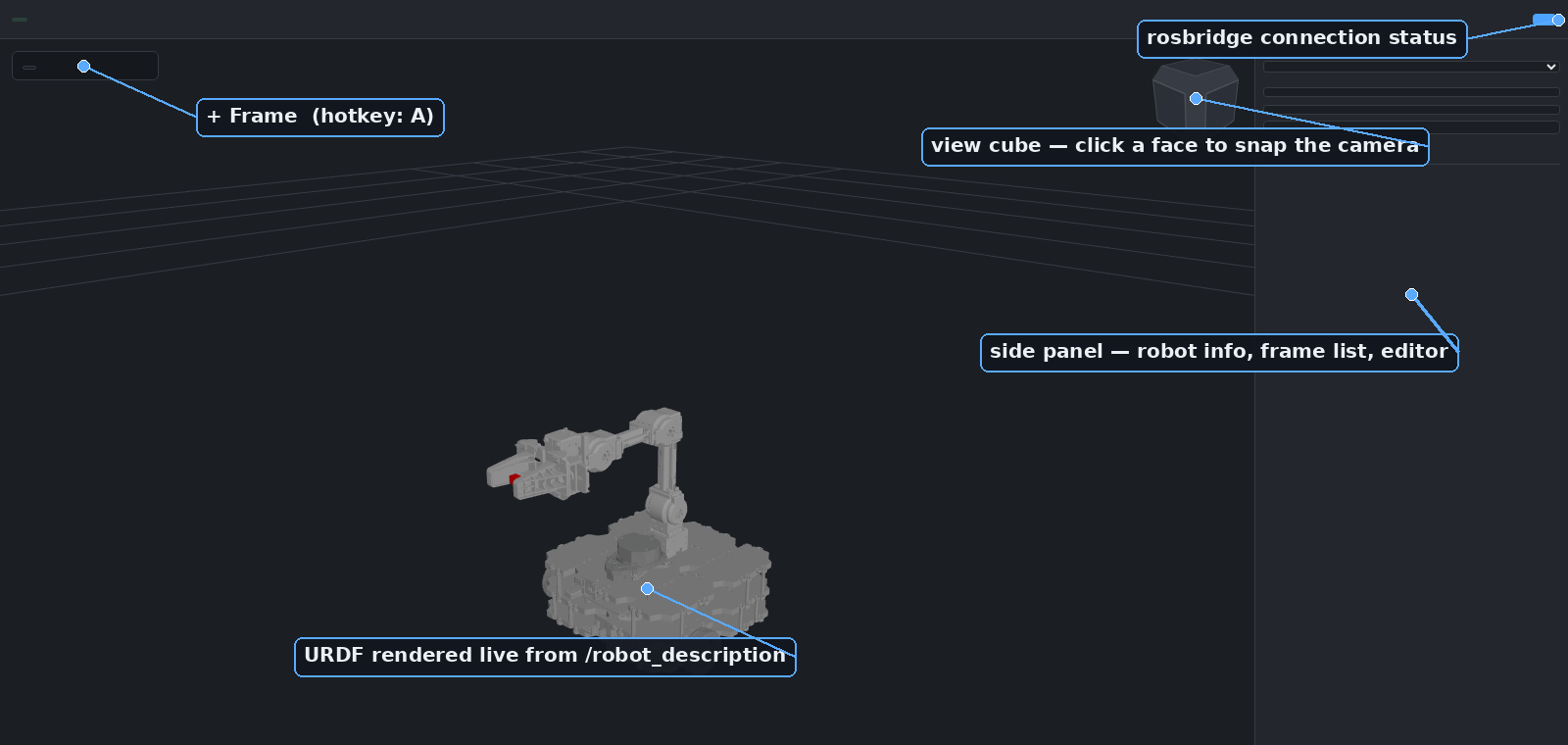
Features
- Live URDF viewer — loads a robot's URDF/xacro (from a file path, a ROS topic, or the
robot_descriptionparameter), drives it from/joint_states, and places the root from/tfwhen an odom→base transform exists. Multiple robots and static scenes can be loaded side by side (each panel "Add robot" call adds a new instance instead of replacing the current one) — see Multiple robots and scenes. - Interactive frame authoring — click anywhere (mesh surface, ground plane, or a camera-facing plane as a fallback) and drag to set the new frame's Z axis, no typing coordinates by hand.
- 6-DoF gizmo — translate/rotate handles (
T/R) for precise placement once a frame exists. - Full frame editor — rename, reparent (world pose is preserved across reparenting), edit
position as XYZ and orientation as RPY/quaternion simultaneously (two-way synced), toggle
visibility, publish/unpublish to
/tf. - Copy-out for ROS — export any frame as YAML or as a ready-to-run
ros2 run tf2_ros static_transform_publisher …command. - rviz-style navigation — orbit/pan/zoom plus a click-to-snap view cube.
Screenshots
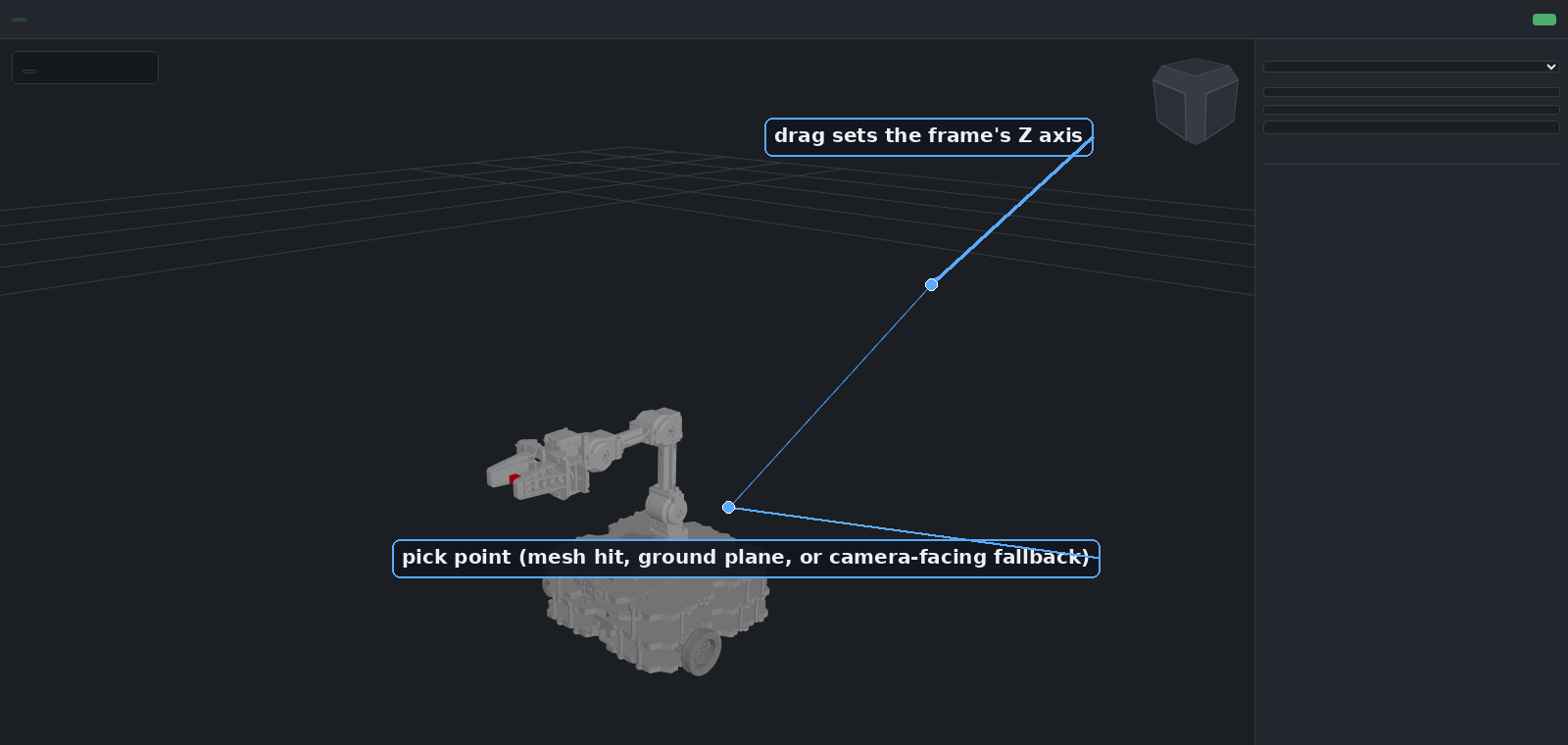 | 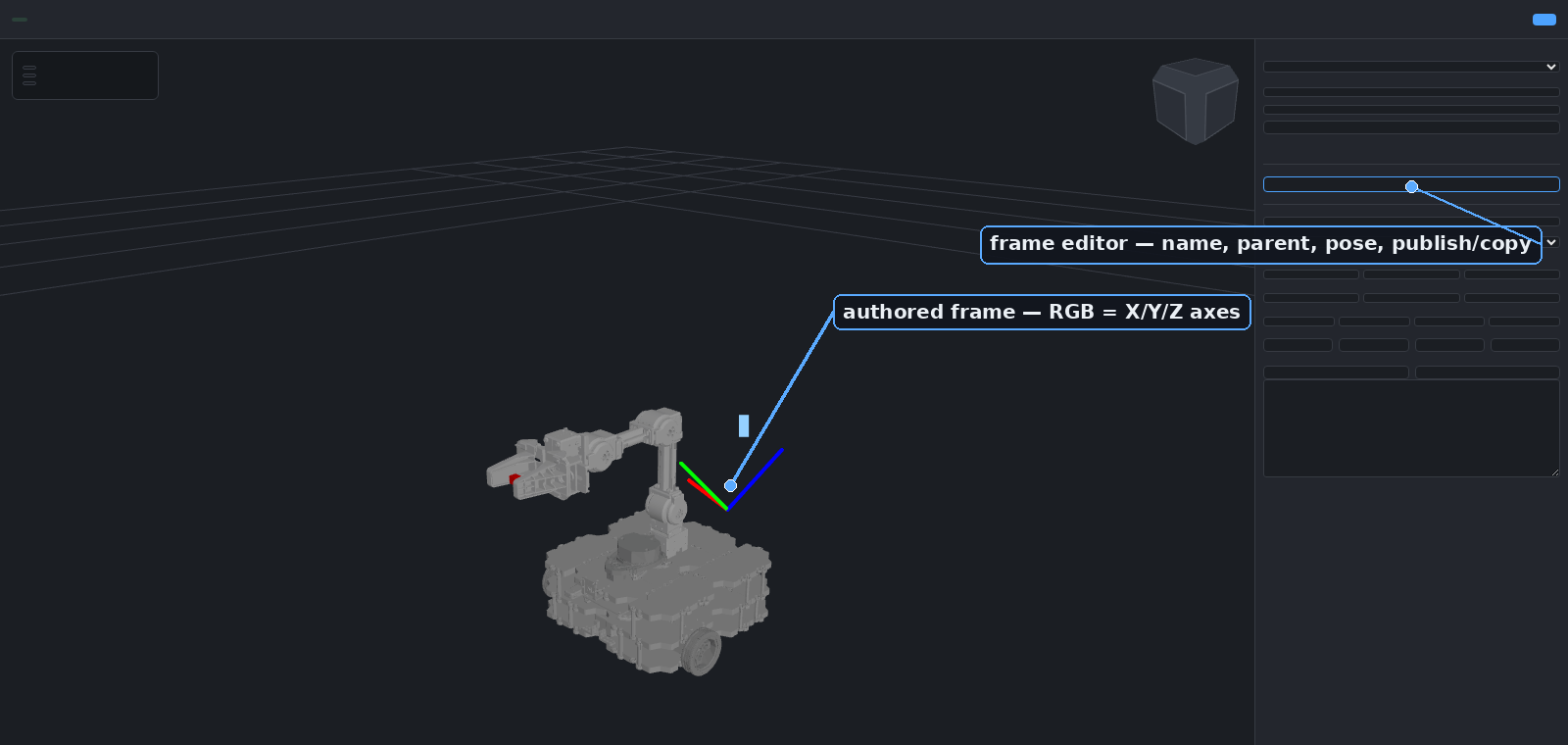 |
| Click a point and drag to set a direction — the new frame's Z axis follows the drag. | Every frame gets a full editor: reparent, pose, publish, copy out as YAML or a static_transform_publisher command. |
Use cases
- Sensor/tool extrinsics — eyeball a camera, LiDAR, or gripper offset on the actual mesh
instead of hand-editing numbers in a xacro file, then copy the result straight into a
static_transform_publisherlaunch entry. - MoveIt goal frames — author a grasp or approach frame relative to a link, publish it live, and drive planning against it without restarting anything.
- Calibration sanity checks — visually confirm a frame estimated by an external calibration pipeline lines up with the robot before trusting it downstream.
- Teaching / demos — a lightweight, browser-only way to show TF concepts (parent/child, world-pose-preserving reparenting) without installing rviz.
- Remote / headless robots — inspect and author frames on a robot with no display attached, from any machine on the network.
Architecture
Image: Architecture (opens in a new tab)
The browser talks to the ROS 2 graph over two channels: plain HTTP for the static UI, the
expanded URDF, and mesh files (web_server_node), and a rosbridge WebSocket for live topics.
Authored frames are sent to frame_bridge_node, which is the single source of truth for
/tf — it broadcasts all authored frames at 30 Hz and republishes them as a transient-local
state topic so a page reload restores them.
Quick start
Requires a sourced ROS 2 Jazzy install on the host, plus this package's dependencies
(rosbridge_server, robot_state_publisher, joint_state_publisher, xacro, and, for the
default robot, turtlebot3_manipulation_description).
# clone (or symlink) this package into a colcon workspace
mkdir -p ~/ros2_ws/src
ln -s /path/to/interactive_frame_js ~/ros2_ws/src/web_tf_editor
cd ~/ros2_ws

# install missing ROS dependencies
rosdep install --from-paths src --ignore-src -r -y

# build (the pre-built front end in web/dist/ is committed, so no npm is needed here)
colcon build --symlink-install --packages-select web_tf_editor
source install/setup.bash

ros2 launch web_tf_editor web_tf_editor.launch.py
Then open http://localhost:8080 (opens in a new tab). rosbridge listens on ws://localhost:9090. Both ports are
launch arguments (http_port:=, ros_bridge_port:=) if you need to avoid a clash with something
else already running on the host. The web server listens on all interfaces by default and serves
files from any installed package's share directory; pass bind_address:=127.0.0.1 to keep it
local to the machine.
Default robot is TurtleBot3 + OpenMANIPULATOR-X. To use a different robot:
ros2 launch web_tf_editor web_tf_editor.launch.py urdf:=/path/to/robot.urdf.xacro
This also applies when loading a URDF from a ROS topic or the robot_description parameter via
the panel's "Add robot" controls, not just via urdf:=.
Meshes
Whatever serves package:// URIs needs the actual mesh files on disk — this is true for rviz
too. Because web_server_node runs natively on the host, it resolves package://<pkg>/...
through the host's own ROS 2 environment (ament_index_python), so any description package
already installed on the host — via apt, a workspace overlay, wherever — just works with no
extra steps. If a package isn't installed, the loader will still say "Loaded" (the URDF itself
parsed fine) but the robot will render with no visible geometry — check the browser
console/network tab for 404s on /package/<pkg>/... to confirm this is what's happening.
For mesh directories that aren't installed as proper ROS packages (e.g. dropped in ad hoc), pass
extra search directories via the mesh_search_paths launch argument (colon-separated), which
web_server_node.py's /package/<pkg>/<path> route falls back to when a package isn't found
through ament_index:
ros2 launch web_tf_editor web_tf_editor.launch.py mesh_search_paths:=/path/to/extra_meshes
Multiple robots and scenes
The panel's "Add robot" button adds a robot/scene instance alongside whatever is already
loaded — it doesn't replace it, so you can view e.g. a humanoid and a static factory scene
together, each with its own name/joint-count/status row in the sidebar (with a ✕ to remove
just that one). Each instance is positioned independently from /tf: an instance whose
base_footprint/base_link (or namespaced equivalent) is found in the TF tree follows it,
and one with no such frame — a static scene, typically — just sits at the fixed frame's
origin.
On the ROS side, each additional robot or scene needs its own robot_description/
joint_states publisher on a distinct namespace so they don't collide with each other or
the default robot — docker/ur5e_description/launch/ur5e_description.launch.py is a working
example (a robot_state_publisher + joint_state_publisher pair remapped onto
/ur5e/robot_description and /ur5e/joint_states). A static scene is the same pattern minus
joint_state_publisher, since it has no joints. Then in the panel: source "Topic", topic name
/<namespace>/robot_description, joint states topic /<namespace>/joint_states (auto-guessed
from the topic name), "Add robot".
Using the UI
- Click + Frame (or press
A) to enter add-frame mode. - Click a point — on the robot mesh, or in empty space (falls back to the ground plane, then a camera-facing plane) — and drag to set a direction; release to place the frame. The frame's Z axis is aligned to the drag direction by default.
- Right-click a frame for a context menu: align X/Y/Z to the drag direction, show the 6-DoF gizmo, rename, or delete.
- With the gizmo shown,
T/Rswitch translate/rotate,Escdeselects. - Use the side panel to rename, reparent (world pose is preserved across reparenting), edit
position/RPY/quaternion, publish/unpublish to
/tf, delete, or copy the frame out as YAML or as aros2 run tf2_ros static_transform_publisher …command.
Development
Front-end iteration without a colcon build per change: point web_server_node straight at the
source tree's web/ directory instead of the installed copy under install/, and rebuild only
the JS bundle.
cd web
npm install
npm run watch
ros2 launch web_tf_editor web_tf_editor.launch.py \
  web_root:=/path/to/interactive_frame_js/web
With web_root pointed at the source tree, web_server_node serves the freshly built
dist/bundle.js on the next page refresh — no relaunch needed.
web/dist/ is committed because the ROS buildfarm builds release packages offline, without npm.
After changing anything under web/src/, run npm run build (minified, no sourcemap, and it
regenerates dist/THIRD_PARTY_NOTICES.txt) and commit web/dist/ along with the source. CI
fails if the two are out of sync.
Docker
Dockerfile/docker-compose.yml are kept for sandboxed testing (e.g. CI, or trying the UI on a
machine without ROS 2 installed) — not for real use. A container only sees the description
packages baked into its image or explicitly bind-mounted in, so package:// mesh resolution
breaks for anything else already installed on the host; running natively (see Quick start above)
avoids that entirely.
License
Apache License 2.0 — see LICENSE (opens in a new tab). The bundled front end includes third-party
JavaScript under MIT, BSD-2-Clause and Apache-2.0 licenses (three.js, roslib, urdf-loader and
their dependencies) — see web/dist/THIRD_PARTY_NOTICES.txt (opens in a new tab).
Files and versions
- Repository on GitHubgithub.com/farshad-heravi/web_tf_editor (opens in a new tab)
- The version Robotheca read9208b5d (opens in a new tab)
- Latest releaseNone published on GitHub
Robotheca never hosts the code: each link goes to the creator's own page.
Use it
How to install it, in the creator's words: The project's README (opens in a new tab)
Robotheca doesn't review code. Read it before running it.
Robotheca lists software as a reference: nothing is hosted or run here, and every fact links to where it was read.