Software
RoboCasa
By RoboCasa Team, from github.com/robocasa/robocasa (opens in a new tab)
- Simulators
- Simulator
- MIT (code)
- CC-BY-4.0 (assets)
RoboCasa is a large-scale simulation framework for training and benchmarking generally capable robots on everyday household tasks, centered on kitchen scenes.
Facts
- GitHub stars
- 1,869read on 6 Nov 2026
- Last update
- 30 Oct 2026Newest commit on main
- Maintenance
- Activea commit in the last 90 days
- Difficulty
- Intermediate
- Hardware it needs, as the project states it
- Works across all major computing platforms; installation is done through Anaconda with Python 3.11. Downloading kitchen assets requires about 10GB of disk space. Mac users run demo scripts with mjpython.
Checked on GitHub on 6 Nov 2026.
Licenses
- Code
- MIT (opens in a new tab)
Read by Robotheca from LICENSE (opens in a new tab) (MIT) at commit 3443cdf (opens in a new tab), on 31 Oct 2026.
- Commercial use
- Yes
Overview
What it does: Robotheca's summary
- Provides 365 tasks created with guidance from large language models, covering everyday kitchen activities.
- Includes over 2,500 kitchen scenes and more than 3,200 3D objects as simulation assets.
- Offers high-quality demonstration data, including human demonstrations and robot datasets made with automated trajectory tools.
- Supports benchmarking of policy learning methods such as Diffusion Policy, pi, and GR00T, with a public leaderboard for submitted models.
- Includes gym-style environments that can run random rollouts and save videos.
- Provides demo scripts for playing back task demonstrations, exploring kitchen scenes and objects, and teleoperating the robot with a keyboard or SpaceMouse.
Written by Robotheca from the project's README (opens in a new tab) at commit a9e152e, not by its creator.
The README
The creator's own README, copied as written: README.md by RoboCasa Team, at commit 3443cdf, under MIT (opens in a new tab). The original on GitHub (opens in a new tab).
Read the README here
RoboCasa
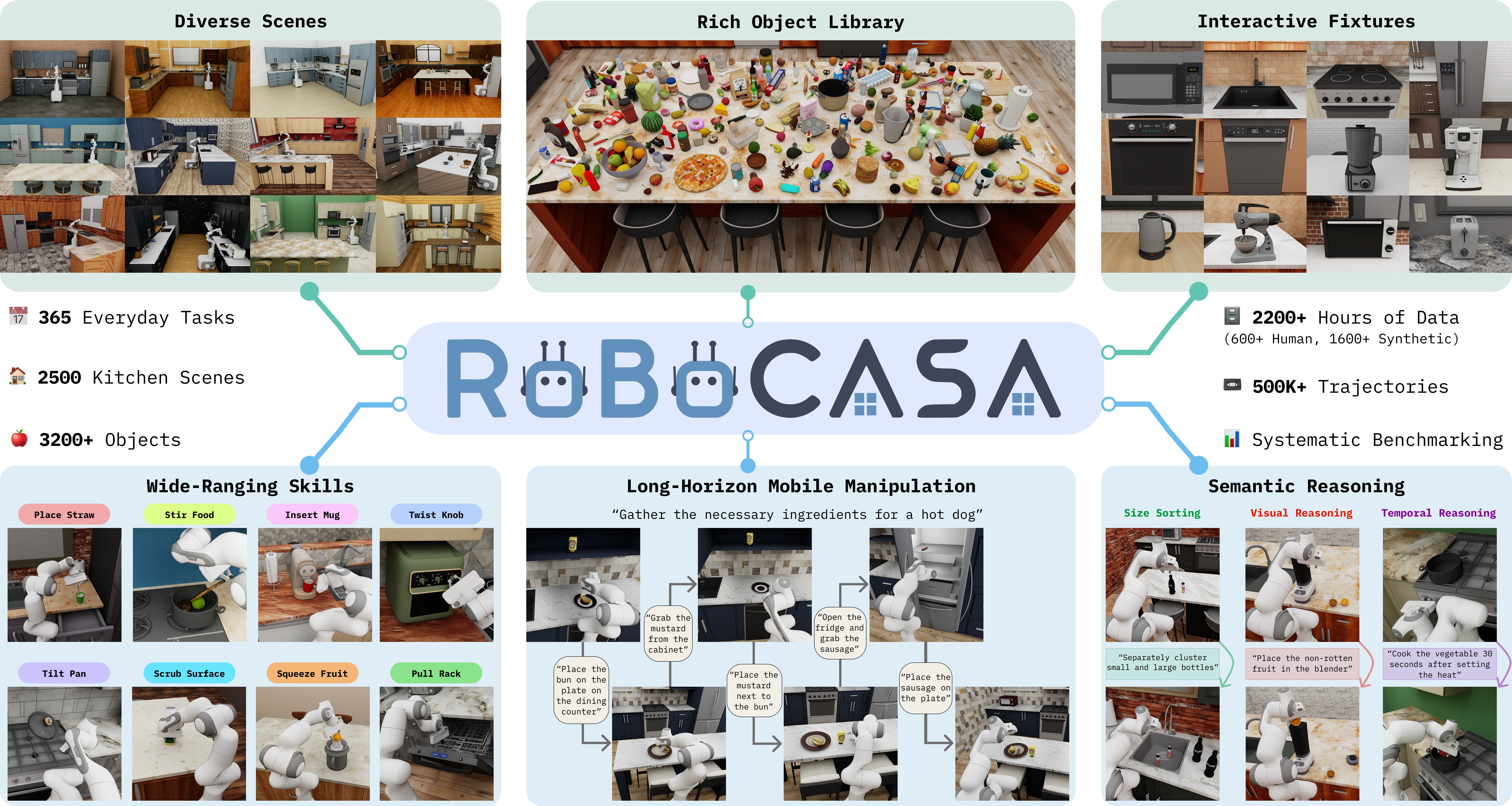
RoboCasa is a large-scale simulation framework for training generally capable robots to perform everyday tasks. It was originally released (opens in a new tab) in 2024 by UT Austin researchers. The latest iteration, RoboCasa365, builds upon the original release with significant new functionalities to support large-scale training and benchmarking in sim. Four pillars underlie RoboCasa365:
- Diverse tasks: 365 tasks created with the guidance of large language models
- Diverse assets: including 2,500+ kitchen scenes and 3,200+ 3D objects
- High-quality demonstrations: including 600+ hours of human demonstrations in addition to 1,600+ hours of robot datasets created with automated trajectory tools
- Benchmarking support: popular policy learning methods including Diffusion Policy, pi, and GR00T, plus user-submitted models on the leaderboard (opens in a new tab)
This guide contains information about installation and setup. Please refer to the following resources for additional information:
[Home page] (opens in a new tab) [Documentation] (opens in a new tab) [RoboCasa365 Paper] (opens in a new tab) [Original RoboCasa Paper] (opens in a new tab) [Leaderboard] (opens in a new tab)
Updates
- [10/28/2026] The leaderboard now accepts agentic submissions (opens in a new tab): new models or novel agentic harnesses built around a base policy.
- [10/14/2026] Released the subtask annotation pipeline (opens in a new tab), with labelers covering all 300 composite tasks. It generates per-frame subtask labels directly from each demo's simulation state.
- [7/7/2026] Our target composite task datasets have been updated to include per-frame subtask annotations. Every timestep is labeled with a subtask index, atomic-skill name, stage (i.e. pick / place / navigate), and a natural-language instruction, to support hierarchical policy learning.
- [5/12/2026] v1.0.1: Updated horizon lengths (1.5x increase) across all tasks for consistency. Please update to the latest version for running evals.
- [4/6/2026] RoboCasa365 Leaderboard (opens in a new tab) published, comparing generalist robot policies on the multi-task learning benchmark and open to community model submissions.
- [2/18/2026] v1.0: RoboCasa365 release, with 365 tasks, 2500+ kitchen scenes, 2200+ hours of robot demonstration data, and benchmarking support.
- [10/31/2024] v0.2: using RoboSuite
v1.5as the backend, with improved support for custom robot composition, composite controllers, more teleoperation devices, photo-realistic rendering.
Table of Contents
- Updates
- Installation
- Basic Usage
- Tasks, datasets, policy learning, and additional use cases
- Questions
- License
- Citation
Installation
RoboCasa works across all major computing platforms. The easiest way to set up is through the Anaconda (opens in a new tab) package management system. Follow the instructions below to install:
-
Set up conda environment:
conda create -c conda-forge -n robocasa python=3.11 -
Activate conda environment:
conda activate robocasa -
Clone and setup robosuite dependency (important: use the master branch!):
git clone https://github.com/ARISE-Initiative/robosuite cd robosuite pip install -e . -
Clone and setup this repo:
cd .. git clone https://github.com/robocasa/robocasa cd robocasa pip install -e . pip install pre-commit; pre-commit install # Optional: set up code formatter. (optional: if running into issues with numba/numpy, run: conda install -c numba numba=0.56.4 -y) -
Install the package and download assets:
python -m robocasa.scripts.setup_macros              # Set up system variables.
python -m robocasa.scripts.download_kitchen_assets   # Caution: Assets to be downloaded are around 10GB.
Basic Usage
Gym wrapper
You can create environments using gym wrappers and run rollouts:
import gymnasium as gym
import robocasa
from robocasa.utils.env_utils import run_random_rollouts

env = gym.make(
    "robocasa/PickPlaceCounterToCabinet",
    split="pretrain", # use 'pretrain' or 'target' kitchen scenes and objects
    seed=0 # seed environment as needed. set seed=None to run unseeded
)

# run rollouts with random actions and save video
run_random_rollouts(
    env, num_rollouts=3, num_steps=100, video_path="/tmp/test.mp4"
)
Play back sample demonstrations of tasks
(Mac users: for these scripts, prepend the "python" command with "mj": mjpython ...)
Select a task and play back a sample demonstration for the selected task:
python -m robocasa.demos.demo_tasks
Explore kitchen scenes
Explore 2500+ kitchen scenes:
python -m robocasa.demos.demo_kitchen_scenes
Explore library of 2500+ objects
View and interact with both human-designed and AI-generated objects:
python -m robocasa.demos.demo_objects
Note: By default, this demo shows objaverse objects. To view AI-generated objects, add the flag --obj_types aigen.
Teleoperate the robot
Control the robot directly, either through a keyboard controller or spacemouse. This script renders the robot semi-translucent in order to minimize occlusions and enable better visibility.
python -m robocasa.demos.demo_teleop
Note: If using SpaceMouse, you may need to modify the product ID to your appropriate model, setting SPACEMOUSE_PRODUCT_ID in robocasa/macros_private.py.
Tasks, datasets, policy learning, and additional use cases
Please refer to the documentation page (opens in a new tab) for information about tasks, datasets, benchmarking, and more.
Questions
If you have any questions about RoboCasa, reach out at robocasa@googlegroups.com (opens in a new tab).
License
Code: MIT License (opens in a new tab)
Assets and Datasets: CC BY 4.0 (opens in a new tab)
Citation
RoboCasa365:
@inproceedings{robocasa365,
  title={RoboCasa365: A Large-Scale Simulation Framework for Training and Benchmarking Generalist Robots},
  author={Soroush Nasiriany and Sepehr Nasiriany and Abhiram Maddukuri and Yuke Zhu},
  booktitle={International Conference on Learning Representations (ICLR)},
  year={2026}
}
RoboCasa (Original Release):
@inproceedings{robocasa2024,
  title={RoboCasa: Large-Scale Simulation of Everyday Tasks for Generalist Robots},
  author={Soroush Nasiriany and Abhiram Maddukuri and Lance Zhang and Adeet Parikh and Aaron Lo and Abhishek Joshi and Ajay Mandlekar and Yuke Zhu},
  booktitle={Robotics: Science and Systems (RSS)},
  year={2024}
}
Files and versions
- Repository on GitHubgithub.com/robocasa/robocasa (opens in a new tab)
- The version Robotheca read3443cdf (opens in a new tab)
- Latest releasev1.0 (RoboCasa365 Release) (18 Feb 2026)
Robotheca read the repository at two versions: the summary at a9e152e and the facts and the README at 3443cdf (read on 6 Nov 2026).
Robotheca never hosts the code: each link goes to the creator's own page.
Use it
How to install it, in the creator's words: The project's website (opens in a new tab)
Robotheca doesn't review code. Read it before running it.
Robotheca lists software as a reference: nothing is hosted or run here, and every fact links to where it was read.