Software
Makelangelo software
By MarginallyClever, from github.com/MarginallyClever/Makelangelo-software (opens in a new tab)
- Robot arms and industry
- Tool
- GPL-2.0-only
Java desktop program that prepares artwork for CNC plotters, originally built for the Makelangelo Art Robot. It turns images and drawings into machine instructions.
Facts
- GitHub stars
- 431read on 6 Nov 2026
- Last update
- 9 Jun 2026Newest commit on master
- Maintenance
- Maintaineda commit in the last 12 months
- Difficulty
- Beginner
Checked on GitHub on 6 Nov 2026.
Licenses
- Code
- GPL-2.0-only (opens in a new tab)
Read by Robotheca from LICENSE (opens in a new tab) (GPL-2.0-only) at commit 94ff58e (opens in a new tab), on 22 Oct 2026.
- Commercial use
- Yes
Copyleft: Modified source must be published.
Overview
What it does: Robotheca's summary
- Prepares art for CNC plotters, originally designed for the Makelangelo Art Robot.
- Runs on Windows, macOS, and several Linux distributions.
- Pairs with Marlin 3D printer firmware, which receives instructions and moves the motors.
- Developer setup and building from the console are described in the project wiki.
Written by Robotheca from the project's README (opens in a new tab) at commit 94ff58e, not by its creator.
The README
The creator's own README, copied as written: README.md by MarginallyClever, at commit 94ff58e, under GPL-2.0-only (opens in a new tab). The original on GitHub (opens in a new tab).
Read the README here
Makelangelo Software
Image: Open Source (opens in a new tab) (opens in a new tab) Image: Crowdin (opens in a new tab) (opens in a new tab) (opens in a new tab)
Makelangelo Software is a Java program that prepares art for CNC plotters. It was originally designed for the Makelangelo Art Robot (opens in a new tab). It runs in Windows, OSX, and several flavors of linux.
It pairs really well with Marlin 3D printer firmware (opens in a new tab), the code in the brain of the robot that receives instructions and moves the motors.
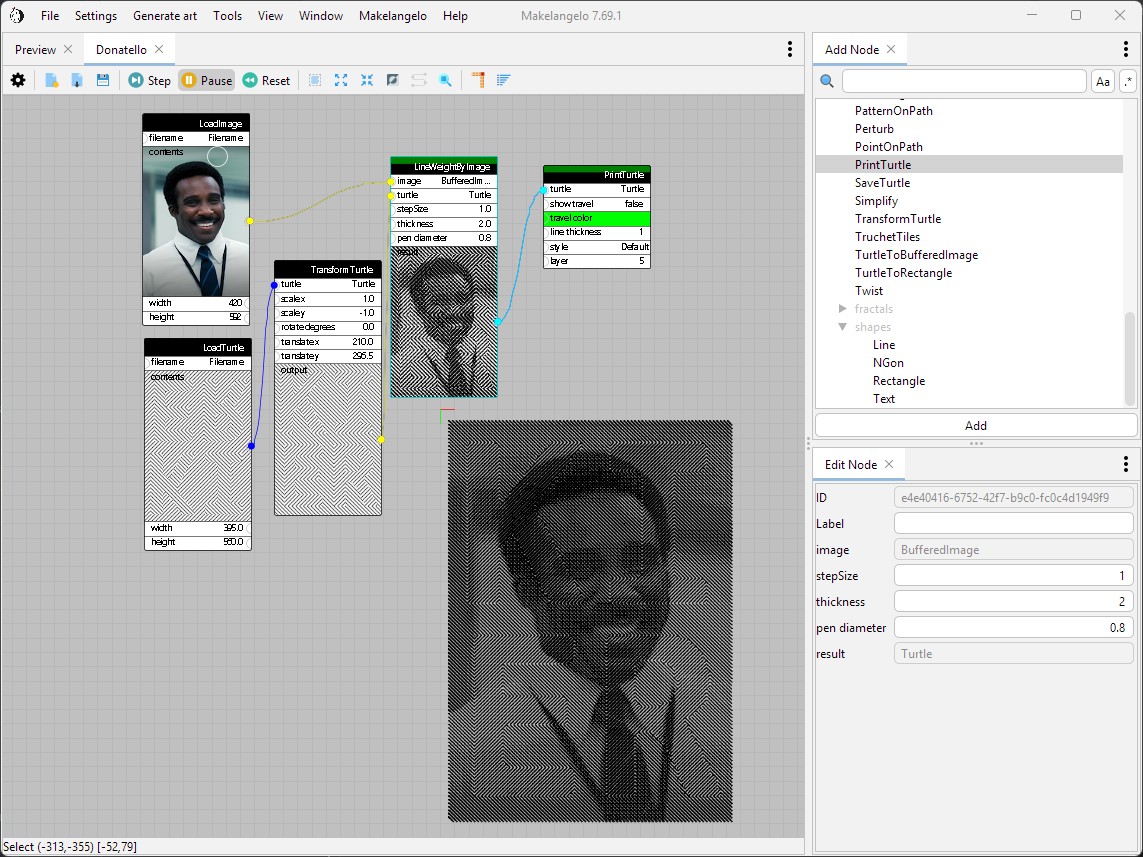
Installing and running
Get the latest nightly build (opens in a new tab) How to use Makelangelo Software 7.24.0+ (opens in a new tab)
Where to go from here
- Join our Discord community (opens in a new tab). Share your creations, make new friends! The best place to get support.
- Read more of our friendly manuals (opens in a new tab). Pictures and arrows and everything.
- Build your own plotter and setup Marlin 3D printer firmware (opens in a new tab) with the help of the documentation (opens in a new tab).
- Buy a Makelangelo 5 (opens in a new tab) vertical plotter.
Developers + Translators
- Translations are organized through https://crowdin.com/project/makelangelo (opens in a new tab) and your help is very welcome.
- Please see the developer getting started wiki page (opens in a new tab) for tips on setting up your local copy of the project, connecting to an IDE, and building from the console.
- Also check out the contributing guide (opens in a new tab).
Credits
- Icons from Famfamfam silk icons (opens in a new tab), Creative Commons Attribution 3.0 License
- App icons provided by http://icons8.com (opens in a new tab).
- Ramps v1.4 drawing from Reprap (opens in a new tab), GPL v2
- Inspiration from Kinogaki (opens in a new tab)
- Makelangelo is derived from the work of Paul Fisher. It is largely inspired by Hektor (opens in a new tab) by Jürg Lehni and Uli Franke.
- some test suite resources from file-examples.com (opens in a new tab)
Files and versions
- Repository on GitHubgithub.com/MarginallyClever/Makelangelo-software (opens in a new tab)
- The version Robotheca read94ff58e (opens in a new tab)
- Latest release7.78.6 (10 May 2026)
Robotheca never hosts the code: each link goes to the creator's own page.
Use it
How to install it, in the creator's words: The project's README (opens in a new tab)
Robotheca doesn't review code. Read it before running it.
Robotheca lists software as a reference: nothing is hosted or run here, and every fact links to where it was read.