Software
LightGlue
By Computer Vision and Geometry Lab, ETH Zurich, Switzerland (checked on github.com/cvg (opens in a new tab)), from github.com/cvg/LightGlue (opens in a new tab)
- Perception
- Library
- Apache-2.0
LightGlue is a deep network that matches local image features across pairs of images, built for fast inference. It is released as inference code with pretrained weights.
Facts
- GitHub stars
- 4,863read on 6 Nov 2026
- Last update
- 26 Oct 2026Newest commit on main
- Maintenance
- Activea commit in the last 90 days
- Difficulty
- Advanced
Checked on GitHub on 6 Nov 2026.
Licenses
- Code
- Apache-2.0 (opens in a new tab)
Read by Robotheca from LICENSE (opens in a new tab) (Apache-2.0) at commit 5a650c4 (opens in a new tab), on 31 Oct 2026.
- Commercial use
- Yes
Overview
What it does: Robotheca's summary
- Takes keypoints and descriptors from each image and returns indices of corresponding points.
- Uses adaptive pruning of network width and depth, so easy pairs run faster than difficult ones.
- Pretrained weights are provided for SuperPoint, DISK, ALIKED and SIFT local features.
- Installs with pip from the repository and includes a demo notebook for matching an image pair.
- Adjustable parameters include number of layers, FlashAttention, mixed precision, and confidence thresholds for early stopping and pruning.
- Training and evaluation code is available separately in the glue-factory library.
Written by Robotheca from the project's README (opens in a new tab) at commit eb42fee, not by its creator.
The README
The creator's own README, copied as written: README.md by Computer Vision and Geometry Lab, ETH Zurich, at commit 5a650c4, under Apache-2.0 (opens in a new tab). The original on GitHub (opens in a new tab).
Read the README here
LightGlue ⚡️
Local Feature Matching at Light Speed
Philipp Lindenberger (opens in a new tab) · Paul-Edouard Sarlin (opens in a new tab) · Marc Pollefeys (opens in a new tab)
ICCV 2023
Paper (opens in a new tab) | Colab (opens in a new tab) | 🤗 Demo (opens in a new tab) | Poster (opens in a new tab) | ⚙️ Train your own (opens in a new tab)
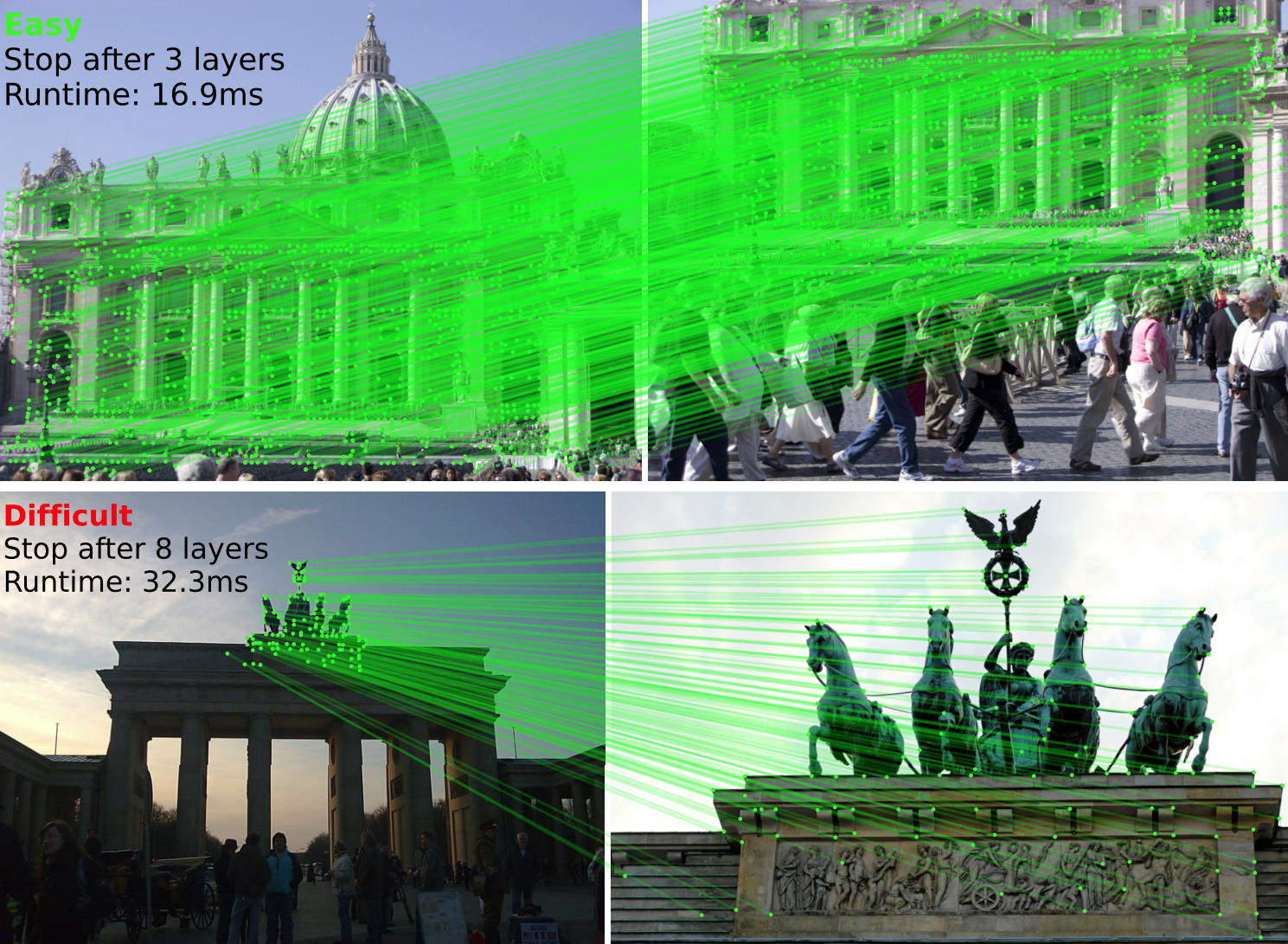
<em>LightGlue is a deep neural network that matches sparse local features across image pairs.
An adaptive mechanism makes it fast for easy pairs (top) and reduces the computational complexity for difficult ones (bottom).
This repository hosts the inference code of LightGlue, a lightweight feature matcher with high accuracy and blazing fast inference. It takes as input a set of keypoints and descriptors for each image and returns the indices of corresponding points. The architecture is based on adaptive pruning techniques, in both network width and depth - check out the paper for more details (opens in a new tab).
We release pretrained weights of LightGlue with SuperPoint (opens in a new tab), DISK (opens in a new tab), ALIKED (opens in a new tab) and SIFT (opens in a new tab) local features. The training and evaluation code can be found in our library glue-factory (opens in a new tab).
LightGlue is now part of 🤗 Hugging Face Transformers (opens in a new tab) (credit to @sbucaille (opens in a new tab)!). It enables easy inference in a few lines of Python code, using pip install transformers (model card (opens in a new tab)).
Installation and demo Image: Open In Colab (opens in a new tab) (opens in a new tab) (opens in a new tab)
Install this repo using pip:
git clone https://github.com/cvg/LightGlue.git && cd LightGlue
python -m pip install -e .
We provide a demo notebook (opens in a new tab) which shows how to perform feature extraction and matching on an image pair.
Here is a minimal script to match two images:
from lightglue import LightGlue, SuperPoint, DISK, SIFT, ALIKED, DoGHardNet
from lightglue.utils import load_image, rbd

# SuperPoint+LightGlue
extractor = SuperPoint(max_num_keypoints=2048).eval().cuda()  # load the extractor
matcher = LightGlue(features='superpoint').eval().cuda()  # load the matcher

# or DISK+LightGlue, ALIKED+LightGlue or SIFT+LightGlue
extractor = DISK(max_num_keypoints=2048).eval().cuda()  # load the extractor
matcher = LightGlue(features='disk').eval().cuda()  # load the matcher

# load each image as a torch.Tensor on GPU with shape (3,H,W), normalized in [0,1]
image0 = load_image('path/to/image_0.jpg').cuda()
image1 = load_image('path/to/image_1.jpg').cuda()

# extract local features
feats0 = extractor.extract(image0)  # auto-resize the image, disable with resize=None
feats1 = extractor.extract(image1)

# match the features
matches01 = matcher({'image0': feats0, 'image1': feats1})
feats0, feats1, matches01 = [rbd(x) for x in [feats0, feats1, matches01]]  # remove batch dimension
matches = matches01['matches']  # indices with shape (K,2)
points0 = feats0['keypoints'][matches[..., 0]]  # coordinates in image #0, shape (K,2)
points1 = feats1['keypoints'][matches[..., 1]]  # coordinates in image #1, shape (K,2)
We also provide a convenience method to match a pair of images:
from lightglue import match_pair
feats0, feats1, matches01 = match_pair(extractor, matcher, image0, image1)
robotheca-center-start
Image: Logo (opens in a new tab) (opens in a new tab)
LightGlue can adjust its depth (number of layers) and width (number of keypoints) per image pair, with a marginal impact on accuracy.
Advanced configuration
n_layers: Number of stacked self+cross attention layers. Reduce this value for faster inference at the cost of accuracy (continuous red line in the plot above). Default: 9 (all layers).flash: Enable FlashAttention. Significantly increases the speed and reduces the memory consumption without any impact on accuracy. Default: True (LightGlue automatically detects if FlashAttention is available).mp: Enable mixed precision inference. Default: False (off)depth_confidence: Controls the early stopping. A lower values stops more often at earlier layers. Default: 0.95, disable with -1.width_confidence: Controls the iterative point pruning. A lower value prunes more points earlier. Default: 0.99, disable with -1.filter_threshold: Match confidence. Increase this value to obtain less, but stronger matches. Default: 0.1
The default values give a good trade-off between speed and accuracy. To maximize the accuracy, use all keypoints and disable the adaptive mechanisms:
extractor = SuperPoint(max_num_keypoints=None)
matcher = LightGlue(features='superpoint', depth_confidence=-1, width_confidence=-1)
To increase the speed with a small drop of accuracy, decrease the number of keypoints and lower the adaptive thresholds:
extractor = SuperPoint(max_num_keypoints=1024)
matcher = LightGlue(features='superpoint', depth_confidence=0.9, width_confidence=0.95)
The maximum speed is obtained with a combination of:
- FlashAttention (opens in a new tab): automatically used when
torch >= 2.0or if installed from source (opens in a new tab). - PyTorch compilation, available when
torch >= 2.0:
matcher = matcher.eval().cuda()
matcher.compile(mode='reduce-overhead')
For inputs with fewer than 1536 keypoints (determined experimentally), this compiles LightGlue but disables point pruning (large overhead). For larger input sizes, it automatically falls backs to eager mode with point pruning. Adaptive depths is supported for any input size.
Benchmark
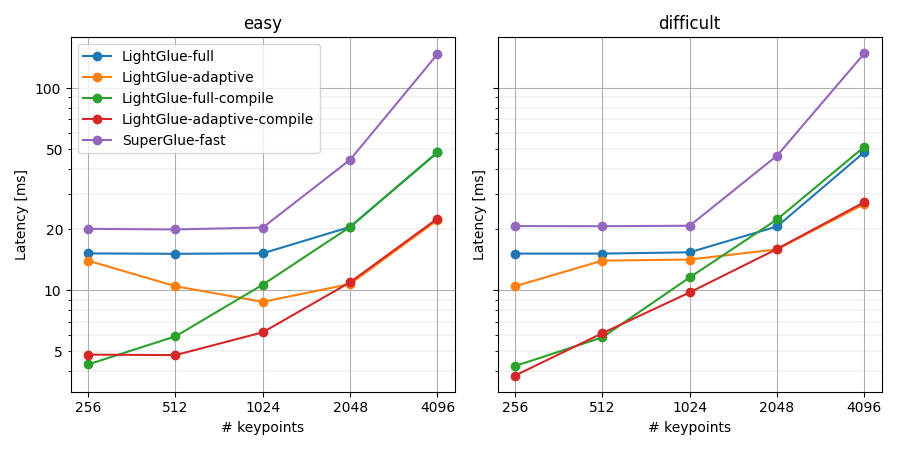
Benchmark results on GPU (RTX 3080). With compilation and adaptivity, LightGlue runs at 150 FPS @ 1024 keypoints and 50 FPS @ 4096 keypoints per image. This is a 4-10x speedup over SuperGlue.
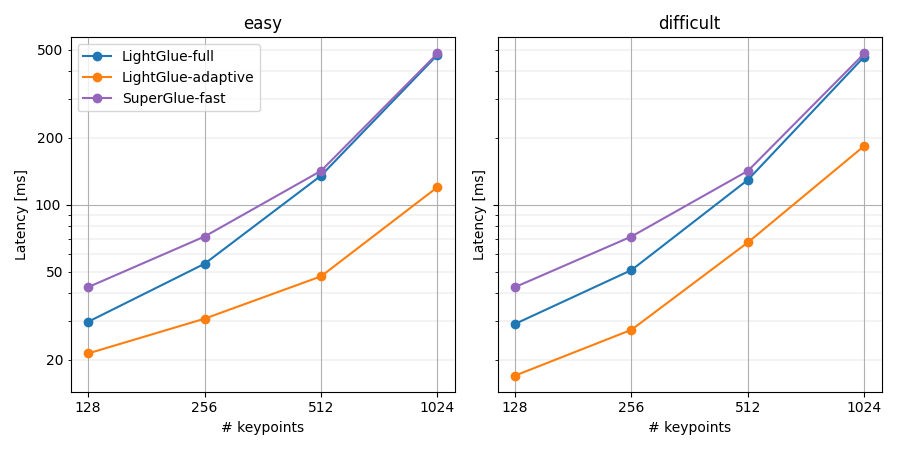
Benchmark results on CPU (Intel i7 10700K). LightGlue runs at 20 FPS @ 512 keypoints.
Obtain the same plots for your setup using our benchmark script (opens in a new tab):
python benchmark.py [--device cuda] [--add_superglue] [--num_keypoints 512 1024 2048 4096] [--compile]
Note: Point pruning introduces an overhead that sometimes outweighs its benefits.
Point pruning is thus enabled only when the there are more than N keypoints in an image, where N is hardware-dependent.
We provide defaults optimized for current hardware (RTX 30xx GPUs).
We suggest running the benchmark script and adjusting the thresholds for your hardware by updating LightGlue.pruning_keypoint_thresholds['cuda'].
Training and evaluation
With Glue Factory (opens in a new tab), you can train LightGlue with your own local features, on your own dataset! You can also evaluate it and other baselines on standard benchmarks like HPatches and MegaDepth.
Other links
- hloc - the visual localization toolbox (opens in a new tab): run LightGlue for Structure-from-Motion and visual localization.
- LightGlue-ONNX (opens in a new tab): export LightGlue to the Open Neural Network Exchange (ONNX) format with support for TensorRT and OpenVINO.
- Image Matching WebUI (opens in a new tab): a web GUI to easily compare different matchers, including LightGlue.
- kornia (opens in a new tab) now exposes LightGlue via the interfaces
LightGlue(opens in a new tab) andLightGlueMatcher(opens in a new tab).
BibTeX citation
If you use any ideas from the paper or code from this repo, please consider citing:
@inproceedings{lindenberger2023lightglue,
  author    = {Philipp Lindenberger and
               Paul-Edouard Sarlin and
               Marc Pollefeys},
  title     = {{LightGlue: Local Feature Matching at Light Speed}},
  booktitle = {ICCV},
  year      = {2023}
}
License
The pre-trained weights of LightGlue and the code provided in this repository are released under the Apache-2.0 license (opens in a new tab). DISK (opens in a new tab) follows this license as well but SuperPoint follows a different, restrictive license (opens in a new tab) (this includes its pre-trained weights and its inference file (opens in a new tab)). ALIKED (opens in a new tab) was published under a BSD-3-Clause license.
Files and versions
- Repository on GitHubgithub.com/cvg/LightGlue (opens in a new tab)
- The version Robotheca read5a650c4 (opens in a new tab)
- Latest releaseNone published on GitHub
Robotheca read the repository at two versions: the summary at eb42fee and the facts and the README at 5a650c4 (read on 6 Nov 2026).
Robotheca never hosts the code: each link goes to the creator's own page.
Use it
How to install it, in the creator's words: The project's README (opens in a new tab)
Robotheca doesn't review code. Read it before running it.
Robotheca lists software as a reference: nothing is hosted or run here, and every fact links to where it was read.