Software
LIBERO
By Lifelong Robot Learning, from github.com/Lifelong-Robot-Learning/LIBERO (opens in a new tab)
- Humanoids and robot learning
- Framework
- MIT (code)
- CC-BY-4.0 (assets)
LIBERO is a benchmark for studying knowledge transfer in multitask and lifelong robot learning, with procedurally generated manipulation tasks and demonstration datasets.
- Stale. No commit in 12 months: the newest is from 15 Mar 2025.
Facts
- GitHub stars
- 2,522read on 6 Nov 2026
- Last update
- 15 Mar 2025Newest commit on master
- Maintenance
- Staleno commit in 12 months
- Difficulty
- Intermediate
Checked on GitHub on 6 Nov 2026.
Licenses
- Code
- MIT (opens in a new tab)
Read by Robotheca from LICENSE (opens in a new tab) (MIT) at commit 8f1084e (opens in a new tab), on 16 Oct 2026.
- Commercial use
- Yes
Overview
What it does: Robotheca's summary
- Procedural generation pipeline that could in principle produce an unlimited number of manipulation tasks.
- 130 tasks grouped into four suites: LIBERO-Spatial, LIBERO-Object, LIBERO-Goal and LIBERO-100.
- LIBERO-100 is split into LIBERO-90 for policy pretraining and LIBERO-10 for testing lifelong learning.
- Human teleoperation demonstration datasets for the four task suites, downloadable directly or from HuggingFace.
- Three visuomotor policy architectures: bc_rnn_policy, bc_transformer_policy and bc_vilt_policy.
- Three lifelong learning algorithms (er, ewc, packnet) alongside sequential finetuning (base) and multitask learning baselines.
Written by Robotheca from the project's README (opens in a new tab) at commit 8f1084e, not by its creator.
The README
The creator's own README, copied as written: README.md by Lifelong Robot Learning, at commit 8f1084e, under MIT (opens in a new tab). The original on GitHub (opens in a new tab).
Read the README here

(opens in a new tab) (opens in a new tab)
Benchmarking Knowledge Transfer for Lifelong Robot Learning
Bo Liu, Yifeng Zhu, Chongkai Gao, Yihao Feng, Qiang Liu, Yuke Zhu, Peter Stone
[Website] (opens in a new tab) [Paper] (opens in a new tab) [Docs] (opens in a new tab)
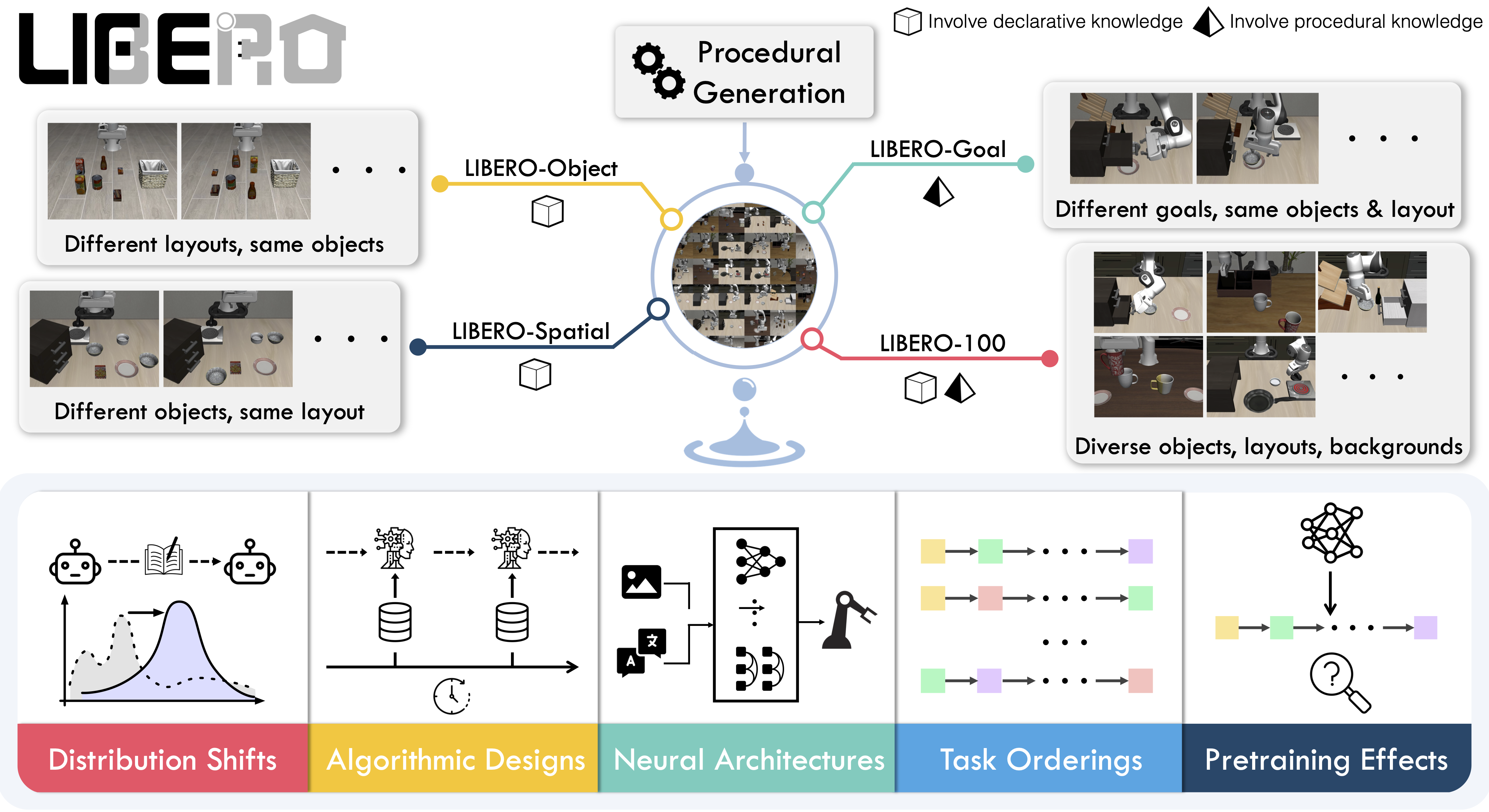
LIBERO is designed for studying knowledge transfer in multitask and lifelong robot learning problems. Successfully resolving these problems require both declarative knowledge about objects/spatial relationships and procedural knowledge about motion/behaviors. LIBERO provides:
- a procedural generation pipeline that could in principle generate an infinite number of manipulation tasks.
- 130 tasks grouped into four task suites: LIBERO-Spatial, LIBERO-Object, LIBERO-Goal, and LIBERO-100. The first three task suites have controlled distribution shifts, meaning that they require the transfer of a specific type of knowledge. In contrast, LIBERO-100 consists of 100 manipulation tasks that require the transfer of entangled knowledge. LIBERO-100 is further splitted into LIBERO-90 for pretraining a policy and LIBERO-10 for testing the agent's downstream lifelong learning performance.
- five research topics.
- three visuomotor policy network architectures.
- three lifelong learning algorithms with the sequential finetuning and multitask learning baselines.
Contents
Installtion
Please run the following commands in the given order to install the dependency for LIBERO.
conda create -n libero python=3.8.13
conda activate libero
git clone https://github.com/Lifelong-Robot-Learning/LIBERO.git
cd LIBERO
pip install -r requirements.txt
pip install torch==1.11.0+cu113 torchvision==0.12.0+cu113 torchaudio==0.11.0 --extra-index-url https://download.pytorch.org/whl/cu113
Then install the libero package:
pip install -e .
Datasets
We provide high-quality human teleoperation demonstrations for the four task suites in LIBERO. To download the demonstration dataset, run:
python benchmark_scripts/download_libero_datasets.py
By default, the dataset will be stored under the LIBERO folder and all four datasets will be downloaded. To download a specific dataset, use
python benchmark_scripts/download_libero_datasets.py --datasets DATASET
where DATASET is chosen from [libero_spatial, libero_object, libero_100, libero_goal.
NEW!!!
Alternatively, you can download the dataset from HuggingFace by using:
python benchmark_scripts/download_libero_datasets.py --use-huggingface
This option can also be combined with the specific dataset selection:
python benchmark_scripts/download_libero_datasets.py --datasets DATASET --use-huggingface
The datasets hosted on HuggingFace are available at here (opens in a new tab).
Getting Started
For a detailed walk-through, please either refer to the documentation or the notebook examples provided under the notebooks folder. In the following, we provide example scripts for retrieving a task, training and evaluation.
Task
The following is a minimal example of retrieving a specific task from a specific task suite.
from libero.libero import benchmark
from libero.libero.envs import OffScreenRenderEnv


benchmark_dict = benchmark.get_benchmark_dict()
task_suite_name = "libero_10" # can also choose libero_spatial, libero_object, etc.
task_suite = benchmark_dict[task_suite_name]()

# retrieve a specific task
task_id = 0
task = task_suite.get_task(task_id)
task_name = task.name
task_description = task.language
task_bddl_file = os.path.join(get_libero_path("bddl_files"), task.problem_folder, task.bddl_file)
print(f"[info] retrieving task {task_id} from suite {task_suite_name}, the " + \
      f"language instruction is {task_description}, and the bddl file is {task_bddl_file}")

# step over the environment
env_args = {
    "bddl_file_name": task_bddl_file,
    "camera_heights": 128,
    "camera_widths": 128
}
env = OffScreenRenderEnv(**env_args)
env.seed(0)
env.reset()
init_states = task_suite.get_task_init_states(task_id) # for benchmarking purpose, we fix the a set of initial states
init_state_id = 0
env.set_init_state(init_states[init_state_id])

dummy_action = [0.] * 7
for step in range(10):
    obs, reward, done, info = env.step(dummy_action)
env.close()
Currently, we only support sparse reward function (i.e., the agent receives +1 when the task is finished). As sparse-reward RL is extremely hard to learn, currently we mainly focus on lifelong imitation learning.
Training
To start a lifelong learning experiment, please choose:
BENCHMARKfrom[LIBERO_SPATIAL, LIBERO_OBJECT, LIBERO_GOAL, LIBERO_90, LIBERO_10]POLICYfrom[bc_rnn_policy, bc_transformer_policy, bc_vilt_policy]ALGOfrom[base, er, ewc, packnet, multitask]
then run the following:
export CUDA_VISIBLE_DEVICES=GPU_ID && \
export MUJOCO_EGL_DEVICE_ID=GPU_ID && \
python libero/lifelong/main.py seed=SEED \
                               benchmark_name=BENCHMARK \
                               policy=POLICY \
                               lifelong=ALGO
Please see the documentation for the details of reproducing the study results.
Evaluation
By default the policies will be evaluated on the fly during training. If you have limited computing resource of GPUs, we offer an evaluation script for you to evaluate models separately.
python libero/lifelong/evaluate.py --benchmark BENCHMARK_NAME \
                                   --task_id TASK_ID \
                                   --algo ALGO_NAME \
                                   --policy POLICY_NAME \
                                   --seed SEED \
                                   --ep EPOCH \
                                   --load_task LOAD_TASK \
                                   --device_id CUDA_ID
Citation
If you find LIBERO to be useful in your own research, please consider citing our paper:
@article{liu2023libero,
  title={LIBERO: Benchmarking Knowledge Transfer for Lifelong Robot Learning},
  author={Liu, Bo and Zhu, Yifeng and Gao, Chongkai and Feng, Yihao and Liu, Qiang and Zhu, Yuke and Stone, Peter},
  journal={arXiv preprint arXiv:2306.03310},
  year={2023}
}
License
| Component | License |
|---|---|
| Codebase | MIT License (opens in a new tab) |
| Datasets | Creative Commons Attribution 4.0 International (CC BY 4.0) (opens in a new tab) |
Files and versions
- Repository on GitHubgithub.com/Lifelong-Robot-Learning/LIBERO (opens in a new tab)
- The version Robotheca read8f1084e (opens in a new tab)
- Latest releaseNone published on GitHub
Robotheca never hosts the code: each link goes to the creator's own page.
Use it
How to install it, in the creator's words: The project's README (opens in a new tab)
Robotheca doesn't review code. Read it before running it.
Robotheca lists software as a reference: nothing is hosted or run here, and every fact links to where it was read.