Software
ASAP
By LeCAR Lab at CMU, United States (checked on github.com/LeCAR-Lab (opens in a new tab)), from github.com/LeCAR-Lab/ASAP (opens in a new tab)
- Humanoids and robot learning
- Framework
- MIT
ASAP is a framework for training agile whole-body skills on humanoid robots, transferring policies from simulation to real hardware. It builds on the HumanoidVerse and Human2Humanoid codebases.
Facts
- GitHub stars
- 2,141read on 6 Nov 2026
- Last update
- 6 Jan 2026Newest commit on main
- Maintenance
- Maintaineda commit in the last 12 months
- Difficulty
- Advanced
- Hardware it needs, as the project states it
- Real-robot deployment needs a Unitree G1 humanoid with 29 DoF, connected to the PC by Ethernet.
Checked on GitHub on 6 Nov 2026.
Licenses
- Code
- MIT (opens in a new tab)
Read by Robotheca from LICENSE (opens in a new tab) (MIT) at commit df5320c (opens in a new tab), on 4 Nov 2026.
- Commercial use
- Yes
Overview
What it does: Robotheca's summary
- Trains phase-based motion tracking policies that imitate recorded human motions on humanoid robots, shown with a Unitree G1 example.
- Provides an ASAP delta action model that learns to correct simulation actions to match real-world or sim2sim motion.
- Runs training across IsaacGym, IsaacSim with IsaacLab, and Genesis through the HumanoidVerse framework.
- Includes a pipeline to retarget SMPL human motion data (AMASS) to other humanoid robots.
- Offers sim2sim deployment in MuJoCo and sim2real deployment on the G1 using the Unitree SDK and ROS 2.
- Includes a demo for collecting real-world data for delta action model training.
Written by Robotheca from the project's README (opens in a new tab) at commit df5320c, not by its creator.
The README
The creator's own README, copied as written: README.md by LeCAR Lab at CMU, at commit df5320c, under MIT (opens in a new tab). The original on GitHub (opens in a new tab).
Read the README here
ASAP: Aligning Simulation and Real-World Physics for
Learning Agile Humanoid Whole-Body Skills
Robotics: Science and Systems (RSS) 2025
[Website] (opens in a new tab) [Arxiv] (opens in a new tab) [Video] (opens in a new tab)

(opens in a new tab) (opens in a new tab) (opens in a new tab) (opens in a new tab) (opens in a new tab)
📚 Table of Contents
-
Installation & Setup
2.1 Base Frameworks
2.2 IsaacGym Setup
2.3 HumanoidVerse Setup
2.4 IsaacSim + IsaacLab Setup
2.5 Genesis Environment Setup -
Training Pipelines
3.1 Phase-Based Motion Tracking
3.2 ASAP Delta Action Model
- Train Delta Action Model
- Finetune Policy with Delta Action Model -
Motion Retargeting to Any Humanoid
4.1 Step 1: SMPL Shape Preparation
4.2 Step 2: SMPL Motion Preparation (AMASS)
4.3 Step 3: Robot XML & Motion Config
4.4 Step 4: Humanoid-SMPL Shape Fitting
4.5 Step 5: Humanoid-SMPL Motion Retargeting -
Deployment: Sim2Sim & Sim2Real
5.1 Environment Setup
5.2 Sim2Sim Deployment
5.3 Sim2Real Deployment
TODO
- Release code backbone
- Release phase-based motion tracking training pipeline
- Release ASAP motion datasets
- Release motion retargeting pipeline
- Release sim2sim in MuJoCo
- Release sim2real with UnitreeSDK
- Release ASAP delta action model training pipeline
Installation
ASAP codebase is built on top of HumanoidVerse (opens in a new tab) (a multi-simulator framework for humanoid learning) and Human2Humanoid (opens in a new tab) (our prior work on humanoid whole-body tracking).
HumanoidVerse (opens in a new tab) allows you to train humanoid skills in multiple simulators, including IsaacGym, IsaacSim, and Genesis. Its key design logic is the separation and modularization of simulators, tasks, and algorithms, which enables smooth transfers between different simulators and the real world with minimum effort (just one line of code change). We leverage this framework to develop ASAP (opens in a new tab) and study how to best transfer policies across simulators and the real world.
IsaacGym Conda Env
Create mamba/conda environment, in the following we use conda for example, but you can use mamba as well.
conda create -n hvgym python=3.8
conda activate hvgym
Install IsaacGym
Download IsaacGym (opens in a new tab) and extract:
wget https://developer.nvidia.com/isaac-gym-preview-4
tar -xvzf isaac-gym-preview-4
Install IsaacGym Python API:
pip install -e isaacgym/python
Test installation:
python 1080_balls_of_solitude.py  # or
python joint_monkey.py
For libpython error:
- Check conda path:
conda info -e - Set LD_LIBRARY_PATH:
export LD_LIBRARY_PATH=</path/to/conda/envs/your_env/lib>:$LD_LIBRARY_PATH
Install HumanoidVerse
Install dependencies:
pip install -e .
pip install -e isaac_utils
pip install -r requirements.txt
Test with:
HYDRA_FULL_ERROR=1 python humanoidverse/train_agent.py \
+simulator=isaacgym \
+exp=locomotion \
+domain_rand=NO_domain_rand \
+rewards=loco/reward_g1_locomotion \
+robot=g1/g1_29dof_anneal_23dof \
+terrain=terrain_locomotion_plane \
+obs=loco/leggedloco_obs_singlestep_withlinvel \
num_envs=1 \
project_name=TestIsaacGymInstallation \
experiment_name=G123dof_loco \
headless=False
HYDRA_FULL_ERROR=1 python humanoidverse/train_agent.py \
+simulator=isaacgym \
+exp=locomotion \
+domain_rand=NO_domain_rand \
+rewards=loco/reward_g1_locomotion \
+robot=g1/g1_29dof_anneal_23dof \
+terrain=terrain_locomotion_plane \
+obs=loco/leggedloco_obs_singlestep_withlinvel \
num_envs=4096 \
project_name=TestIsaacGymInstallation \
experiment_name=G123dof_loco \
headless=True \
rewards.reward_penalty_curriculum=True \
rewards.reward_initial_penalty_scale=0.1 \
rewards.reward_penalty_degree=0.00003
IsaacLab Environment
Install IsaacSim
- Download Omniverse Launcher
- Install Isaac Sim through launcher
- Set environment variables:
export ISAACSIM_PATH="${HOME}/.local/share/ov/pkg/isaac-sim-4.2.0"
export ISAACSIM_PYTHON_EXE="${ISAACSIM_PATH}/python.sh"
Install IsaacLab
git clone https://github.com/isaac-sim/IsaacLab.git
cd IsaacLab && ./isaaclab.sh --conda hvlab
mamba activate hvlab
sudo apt install cmake build-essential
./isaaclab.sh --install
Setup HumanoidVerse
pip install -e .
pip install -e isaac_utils
Genesis Environment
mamba create -n hvgen python=3.10
mamba activate hvgen
pip install genesis-world torch
Install dependencies:
pip install -e .
pip install -e isaac_utils
Motion Tracking Training
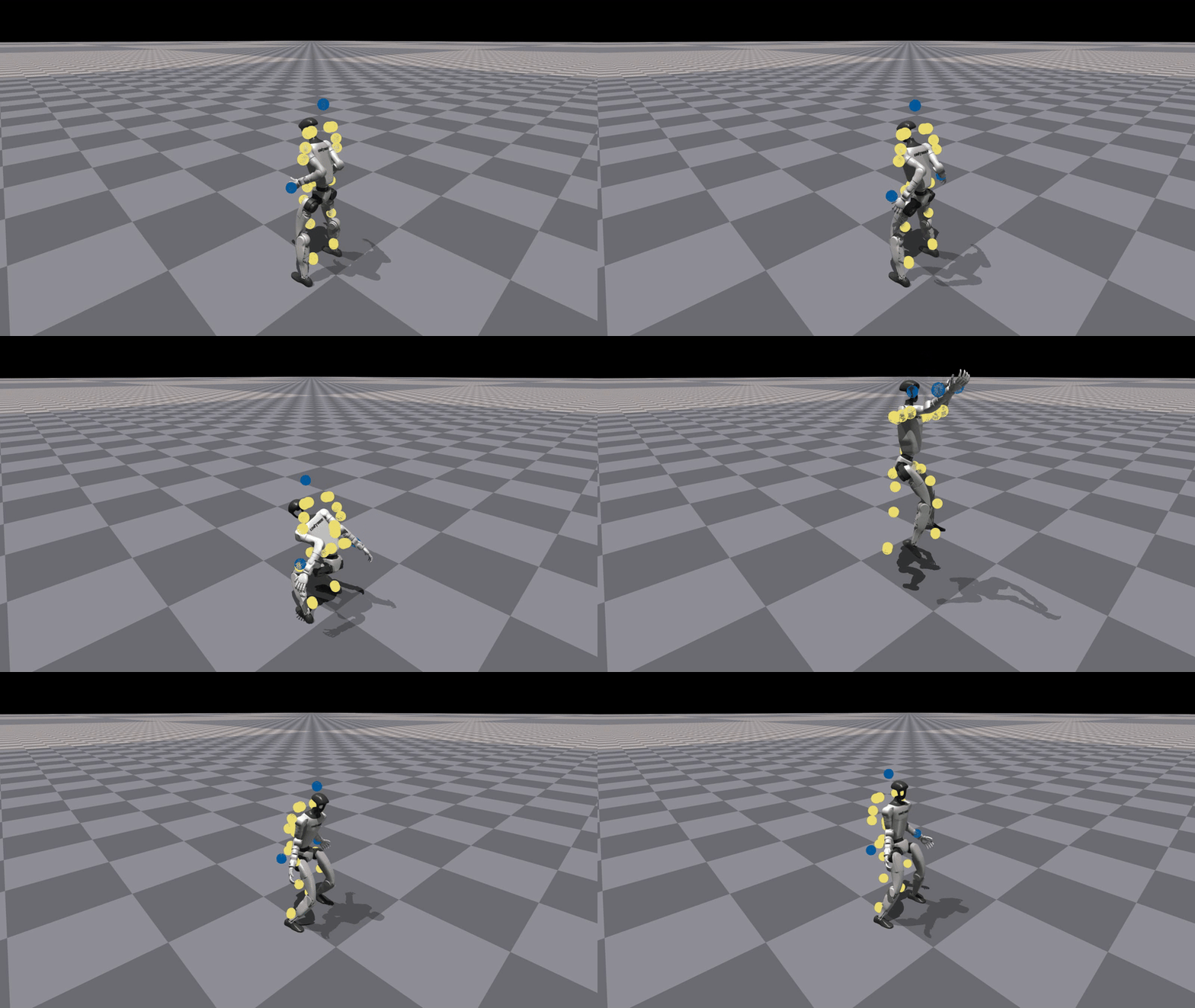
Train a phase-based motion tracking policy to imitate Cristiano Ronaldo's signature Siuuu move
python humanoidverse/train_agent.py \
+simulator=isaacgym \
+exp=motion_tracking \
+domain_rand=NO_domain_rand \
+rewards=motion_tracking/reward_motion_tracking_dm_2real \
+robot=g1/g1_29dof_anneal_23dof \
+terrain=terrain_locomotion_plane \
+obs=motion_tracking/deepmimic_a2c_nolinvel_LARGEnoise_history \
num_envs=4096 \
project_name=MotionTracking \
experiment_name=MotionTracking_CR7 \
robot.motion.motion_file="humanoidverse/data/motions/g1_29dof_anneal_23dof/TairanTestbed/singles/0-TairanTestbed_TairanTestbed_CR7_video_CR7_level1_filter_amass.pkl" \
rewards.reward_penalty_curriculum=True \
rewards.reward_penalty_degree=0.00001 \
env.config.resample_motion_when_training=False \
env.config.termination.terminate_when_motion_far=True \
env.config.termination_curriculum.terminate_when_motion_far_curriculum=True \
env.config.termination_curriculum.terminate_when_motion_far_threshold_min=0.3 \
env.config.termination_curriculum.terminate_when_motion_far_curriculum_degree=0.000025 \
robot.asset.self_collisions=0
After training, you can visualize the policy by:
python humanoidverse/eval_agent.py \
+checkpoint=logs/MotionTracking/xxxxxxxx_xxxxxxx-MotionTracking_CR7-motion_tracking-g1_29dof_anneal_23dof/model_5800.pt
This is the visualization of the policy after traning 5800 iters. The policy is able to imitate the motion of Cristiano Ronaldo's Siuuu move. With more training, the policy will be more accurate and smooth (see the video in the paper (opens in a new tab)).
ASAP delta action model training
Note that the only difference between the delta action model training and naive motion tracking training is that delta action model needs a motion file with extra keyname "action" in the motion file, so that the resulting RL policy we are training is able to use the delta action model to "control the robot" to match the real-world/sim2sim motions.
Train delta action model
python humanoidverse/train_agent.py \
  +simulator=isaacgym \
  +exp=train_delta_a_open_loop \
  +domain_rand=NO_domain_rand \
  +rewards=motion_tracking/delta_a/reward_delta_a_openloop \
  +robot=g1/g1_29dof_anneal_23dof \
  +terrain=terrain_locomotion_plane \
  +obs=delta_a/open_loop \
  num_envs=5000 \
  project_name=DeltaA_Training \
  experiment_name=openloopDeltaA_training \
  robot.motion.motion_file="<PATH_TO_YOUR_MOTION_FILE_WITH_ACTION_KEYNAME>" \
  env.config.max_episode_length_s=1.0 \
  rewards.reward_scales.penalty_minimal_action_norm=-0.1 \
  +device=cuda:0 \
  env.config.resample_motion_when_training=True \
  env.config.resample_time_interval_s=10000
Use delta action model for policy finetuning
HYDRA_FULL_ERROR=1 \
python humanoidverse/train_agent.py \
+simulator=isaacgym \
+exp=train_delta_a_closed_loop \
algo.config.policy_checkpoint='<PATH_TO_YOUR_DELTA_A_MODEL>' \
+domain_rand=NO_domain_rand_finetune_with_deltaA \
+rewards=motion_tracking/reward_motion_tracking_dm_simfinetuning \
+robot=g1/g1_29dof_anneal_23dof \
+terrain=terrain_locomotion_plane \
+obs=delta_a/train_policy_with_delta_a \
num_envs=4096 \
project_name=DeltaA_Finetune \
experiment_name=finetune_with_deltaA \
robot.motion.motion_file="<PATH_TO_YOUR_MOTION_FILE>" \
+opt=wandb \
env.config.add_extra_action=True \
+checkpoint="<PATH_TO_YOUR_POLICY_TO_BE_FINETUNED>" \
domain_rand.push_robots=False \
env.config.noise_to_initial_level=1 \
rewards.reward_penalty_curriculum=True \
+device=cuda:0 \
algo.config.save_interval=5 \
algo.config.num_learning_iterations=1000
Motion Retargeting to Any Humanoid
[!IMPORTANT] Here we share a generic humanoid motion retargeting pipeline to any humanoid from PHC (opens in a new tab).
[!IMPORTANT] We have provided all the SMPL motions (
ASAP/humanoidverse/data/motions/raw_tairantestbed_smpl) and retargtted G1 motions (ASAP/humanoidverse/data/motions/g1_29dof_anneal_23dof/TairanTestbed/singles) used in the ASAP paper in this codebase. If you are interested in using these motions G1, you can ignore this section. If you are interested in retargeting other humanoids or other motions, you can follow the steps below to prepare the SMPL shapes and motions.
It has three steps:
- SMPL Shape preparation
- SMPL Motion preparation
- Robot XML and Motion Config preparation
- Humanoid-SMPL shape fitting
- Humanoid-SMPL motion retargeting
1. SMPL Shape preparation
Download v1.1.0 SMPL files with pkl format (opens in a new tab) and put it under humanoidverse/data/smpl/, and you should have:
|-- ASAP
    |-- humanoidverse
        |-- data
            |-- smpl
                |-- SMPL_python_v.1.1.0.zip
Then cd ASAP/humanoidverse/data/smpl/ and unzip SMPL_python_v.1.1.0.zip, after some copying and moving, you should have:
|-- ASAP
    |-- humanoidverse
        |-- data
            |-- smpl
                |-- SMPL_python_v.1.1.0
                |-- models
                    |-- basicmodel_f_lbs_10_207_0_v1.1.0.pkl
                    |-- basicmodel_m_lbs_10_207_0_v1.1.0.pkl
                    |-- basicmodel_neutral_lbs_10_207_0_v1.1.0.pkl
                |-- smpl_webuser
                |-- ...
Rename these three pkl files and move it under smpl like this:
|-- ASAP
    |-- humanoidverse
        |-- data
            |-- smpl
                |-- SMPL_FEMALE.pkl
                |-- SMPL_MALE.pkl
                |-- SMPL_NEUTRAL.pkl
2. SMPL Motion preparation (AMASS)
Download AMASS Dataset (opens in a new tab) with SMPL + H G format and put it under humanoidverse/data/motions/AMASS/AMASS_Complete/.
|-- ASAP
    |-- humanoidverse
        |-- data
            |-- AMASS
                |-- AMASS_Complete
                    |-- ACCAD.tar.bz2
                    |-- BMLhandball.tar.bz2
                    |-- BMLmovi.tar.bz2
                    |-- BMLrub.tar
                    |-- CMU.tar.bz2
                    |-- ...
                    |-- Transitions.tar.bz2
And then cd ASAP/humanoidverse/data/motions/AMASS/AMASS_Complete/ and extract all the motion files by running:
for file in *.tar.bz2; do
    tar -xvjf "$file"
done
Then you should have:
|-- ASAP
    |-- humanoidverse
        |-- data
            |-- AMASS
                |-- AMASS_Complete
                    |-- ACCAD
                    |-- BioMotionLab_NTroje
                    |-- BMLhandball
                    |-- BMLmovi
                    |-- CMU
                    |-- ...
                    |-- Transitions
3. Robot XML and Motion Config preparation
Make sure you have robot xml and meshes ready at (G1 as example) humanoidverse/data/robots/g1/g1_29dof_anneal_23dof_fitmotionONLY.xml
And add your config for the robot motion in humanoidverse/config/robot/g1_29dof_anneal_23dof.yaml with like the following. Remember to link the xml path in the config.
4. Humanoid-SMPL shape fitting
Run the following command to fit the SMPL shape to the humanoid.
python scripts/data_process/fit_smpl_shape.py +robot=g1/g1_29dof_anneal_23dof
And you should have you shape file located at humanoidverse/data/shape/g1_29dof_anneal_23dof/shape_optimized_v1.pkl
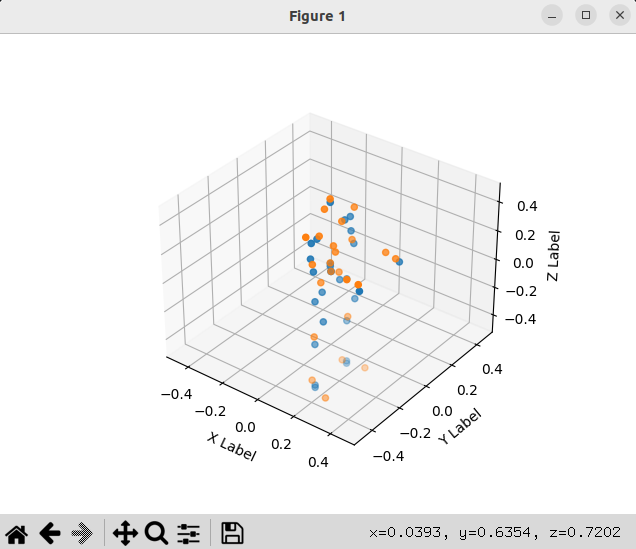
If you want to visualize the shape, you can run with flag +vis=True, then you can have visualization of the fitted SMPL body shape and the humanoid body keypoints like this shape. The blue is the humanoid body keypoints and the orange is the fitted SMPL body keypoint. You can tune the robot motion in humanoidverse/config/robot/g1_29dof_anneal_23dof.yaml to adjust the correspondence, extend links lengths to get better fitted SMPL shape.
5. Humanoid-SMPL motion retargeting
Run the following command to retarget the motion to the humanoid.
python scripts/data_process/fit_smpl_motion.py +robot=g1/g1_29dof_anneal_23dof
Visualize motion
Run
python scripts/vis/vis_q_mj.py +robot=g1/g1_29dof_anneal_23dof +visualize_motion_file="humanoidverse/data/motions/g1_29dof_anneal_23dof/TairanTestbed/singles/0-motions_raw_tairantestbed_smpl_video_side_jump_level4_filter_amass.pkl"
To test, and you should have you one single motion file located at humanoidverse/data/motions/g1_29dof_anneal_23dof/TairanTestbed/singles/0-motions_raw_tairantestbed_smpl_video_side_jump_level4_filter_amass.pkl.
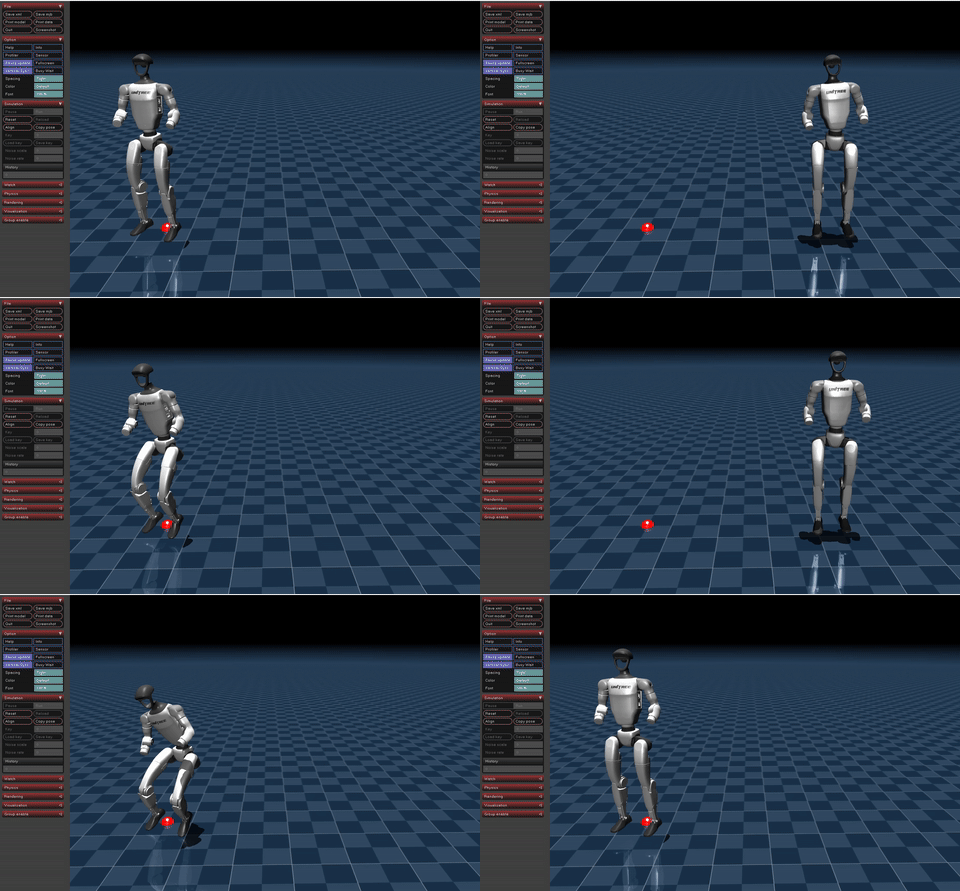
If you want to visualize the motion, you can run
python scripts/vis/vis_q_mj.py +robot=g1/g1_29dof_anneal_23dof +visualize_motion_file="humanoidverse/data/motions/g1_29dof_anneal_23dof/TairanTestbed/singles/0-motions_raw_tairantestbed_smpl_video_side_jump_level4_filter_amass.pkl"
You should have
Sim2Sim/Sim2Real
Environment Setup
Env Installation:
mamba create -n asap_deploy python=3.10
mamba activate asap_deploy
Install ros2-python
# this adds the conda-forge channel to the new created environment configuration
conda config --env --add channels conda-forge
# and the robostack channel
conda config --env --add channels robostack-staging
# remove the defaults channel just in case, this might return an error if it is not in the list which is ok
conda config --env --remove channels defaults
# install the ros2-python package
conda install ros-humble-desktop
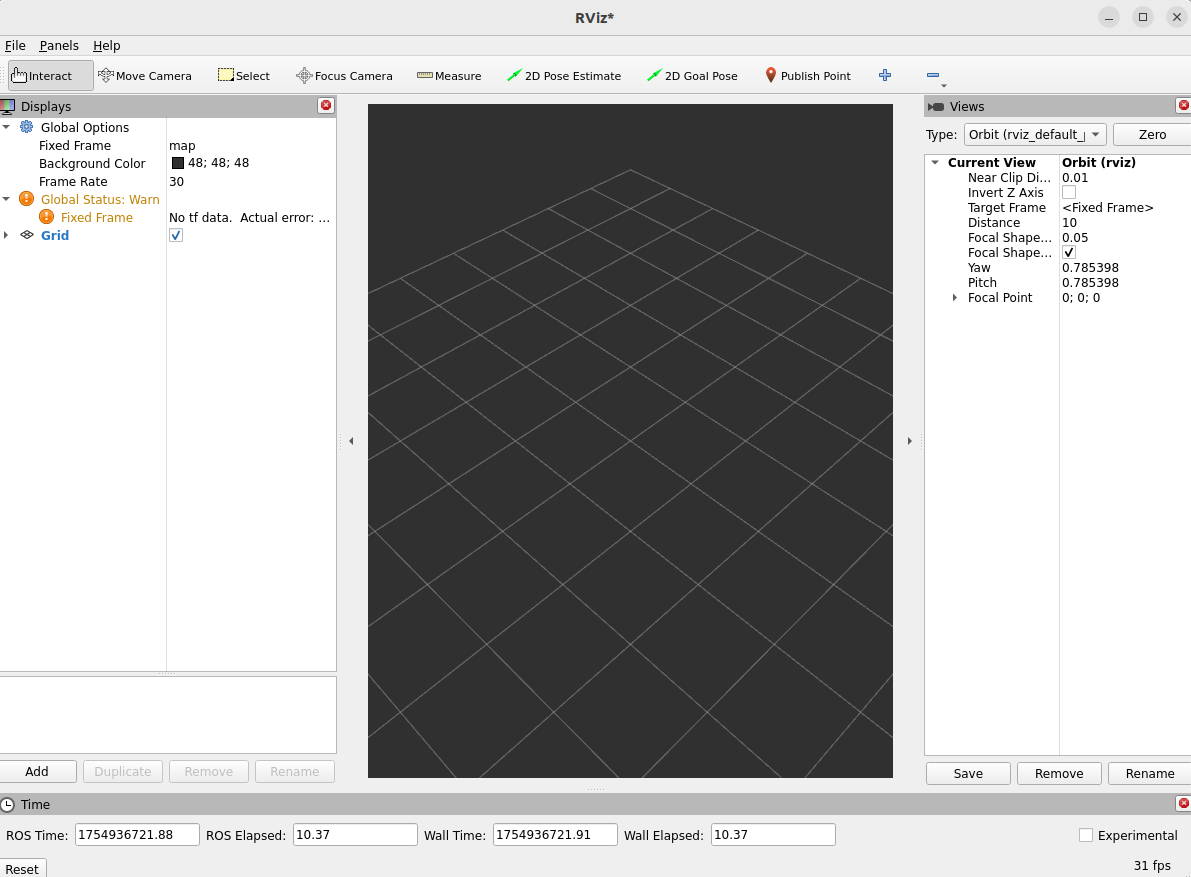
Test Ros2Installation:
rviz2
You should see the UI like this:
Install Unitree SDK
git clone git@github.com:unitreerobotics/unitree_sdk2_python.git
cd unitree_sdk2_python
pip install -e .
minor issue to fix:
pip install --upgrade numpy scipy
Sim2Sim
start the simulation in the sim2real folder:
python sim_env/base_sim.py --config=config/g1_29dof_hist.yaml
in another terminal, start the policy:
python rl_policy/deepmimic_dec_loco_height.py --config=config/g1_29dof_hist.yaml --loco_model_path=./models/dec_loco/20250109_231507-noDR_rand_history_loco_stand_height_noise-decoupled_locomotion-g1_29dof/model_6600.onnx --mimic_model_paths=./models/mimic
- click to the policy terminal and press
]to activate the locomotion policy - click to the policy terminal and press
[to activate the asap policy (phase-based motion tracking policy) - click to the policy terminal and press
;to switch to the asap policy - press
ito make the robot the initial position - press
oto emergence stop the robot - press
9in mujoco viewer to release the robostack - press
=to switch between tapping and walking for the locomotion policy - press
w/a/s/dto control the linear velocity - press
q/eto control the angular velocity - press
zto set all commands to zero
And you should be able to play around with some checkpoints from the ASAP paper. Have fun!
Sim2Real
Note from Tairan: make sure to make the G1 robot to 29dof following this doc (opens in a new tab) and restart the robot after waist unlocking. If you don't know how to log into the Unitree Explore APP, contact unitree support.
Enter Low-Level for g1
- Open humanoid and wait until the head blue light is constantly on
L2+R2L2+AL2+B- Connect PC to the G1 by ethernet cable and configure the network following this document (opens in a new tab)
Before starting the policy, modify the config/g1_29dof_hist.yaml to set INTERFACE to eth0 (if you are using linux), basically the network interface that you are using to connect to the robot with your PC's IP shown as 192.168.123.xxx in ifconfig.
start the policy:
python rl_policy/deepmimic_dec_loco_height.py --config=config/g1_29dof_hist.yaml --loco_model_path=./models/dec_loco/20250109_231507-noDR_rand_history_loco_stand_height_noise-decoupled_locomotion-g1_29dof/model_6600.onnx --mimic_model_paths=./models/mimic
- click to the policy terminal and press
]to activate the locomotion policy - click to the policy terminal and press
[to activate the asap policy (phase-based motion tracking policy) - click to the policy terminal and press
;to switch to the asap policy - press
ito make the robot the initial position - press
oto emergence stop the robot - press
9in mujoco viewer to release the robostack - press
=to switch between tapping and walking for the locomotion policy - press
w/a/s/dto control the linear velocity - press
q/eto control the angular velocity - press
zto set all commands to zero - press
oto emergence stop the robot
‼️Alert & Disclaimer
Deploying these models on physical hardware can be hazardous. Unless you have deep sim‑to‑real expertise and robust safety protocols, we strongly advise against running the model on real robots. These models are supplied for research use only, and we disclaim all responsibility for any harm, loss, or malfunction arising from their deployment.
Demo code to collect real-world data
We provide a demo code to collect real-world data in the sim2real/rl_policy/listener_deltaa.py file. Since MoCap setup is hard to transfer across different robots/labs, we hope this code can help you to collect data for your own experiments. Contact us (tairanh@andrew.cmu.edu (opens in a new tab)) if you have any questions.
Citation
If you find our work useful, please consider citing us!
@article{he2025asap,
  title={ASAP: Aligning Simulation and Real-World Physics for Learning Agile Humanoid Whole-Body Skills},
  author={He, Tairan and Gao, Jiawei and Xiao, Wenli and Zhang, Yuanhang and Wang, Zi and Wang, Jiashun and Luo, Zhengyi and He, Guanqi and Sobanbabu, Nikhil and Pan, Chaoyi and Yi, Zeji and Qu, Guannan and Kitani, Kris and Hodgins, Jessica and Fan, Linxi "Jim" and Zhu, Yuke and Liu, Changliu and Shi, Guanya},
  journal={arXiv preprint arXiv:2502.01143},
  year={2025}
}
License
This project is licensed under the MIT License - see the LICENSE (opens in a new tab) file for details.
Files and versions
- Repository on GitHubgithub.com/LeCAR-Lab/ASAP (opens in a new tab)
- The version Robotheca readdf5320c (opens in a new tab)
- Latest releaseNone published on GitHub
- HumanoidVerse, the multi-simulator training framework ASAP is built on (MIT)github.com/LeCAR-Lab/HumanoidVerse (opens in a new tab)
Robotheca never hosts the code: each link goes to the creator's own page.
Use it
How to install it, in the creator's words: The project's website (opens in a new tab)
Robotheca doesn't review code. Read it before running it.
Robotheca lists software as a reference: nothing is hosted or run here, and every fact links to where it was read.