LogoBot
A cheap, extensible Arduino-based mobile robot with 3D-printed parts that can be programmed with a Logo interpreter.
- Wheeled
- Open source
- arduino
- 3D printable
Suggested by Robotheca, created by @swindonmakers (opens in a new tab), from github.com/swindonmakers/LogoBot (opens in a new tab). Pinned to commit 20b7c8b (opens in a new tab).
- Hardware license
- MIT (opens in a new tab)
- Software license
- MIT (opens in a new tab)
- Commercial use
- Allowed
This repository contains executable files that Robotheca doesn't check. Only run them if you trust the creator.
Which files (5 files marked executable, 16 scripts)
- hardware/ci/addedacutpart.sh (opens in a new tab)
- hardware/ci/addedaprintedpart.sh (opens in a new tab)
- hardware/ci/addedavitamin.sh (opens in a new tab)
- hardware/ci/tweakedanassembly.sh (opens in a new tab)
- hardware/docs/js/jsc3d/build/compile.bat (opens in a new tab)
- hardware/docs/js/jsc3d/build/compile.sh (opens in a new tab)
- hardware/docs/js/jsc3d/build/gendoc.bat (opens in a new tab)
- hardware/docs/js/jsc3d/build/gendoc.sh (opens in a new tab)
- hardware/document.sh (opens in a new tab)
- software/firmware/LogoBotBasic/upload.sh (opens in a new tab)
- software/firmware/LogoBotBasic/verify.sh (opens in a new tab)
- software/firmware/LogoBotDA/verify.sh (opens in a new tab)
- software/firmware/LogoBotDrive/upload.sh (opens in a new tab)
- software/firmware/LogoBotDrive/verify.sh (opens in a new tab)
- software/firmware/LogoBotPolarGraph/verify.sh (opens in a new tab)
- software/firmware/LogoBotWifiScribbler/verify.sh (opens in a new tab)
- software/simulator/images/gitignore (opens in a new tab)
- software/simulator/js/gitignore (opens in a new tab)
- software/simulator/Makefile (opens in a new tab)
- software/simulator/REVISION (opens in a new tab)
- and 1 more
Photo and 3D model
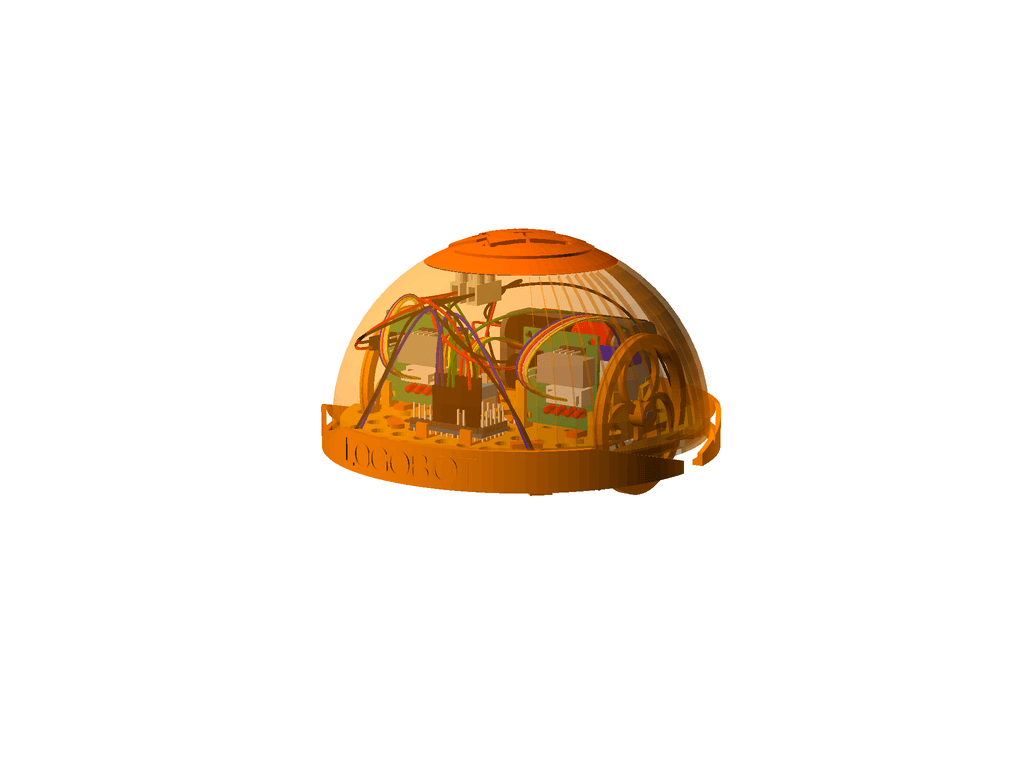
3D preview converted from github.com/swindonmakers/LogoBot at 20b7c8b, under MIT. View the original files from GitHub (37.7 MB) (opens in a new tab)
What it can do
Written by Robotheca from the project's documents.
- Mobile two-wheeled robot driven by two stepper motors with a caster at the rear, arranged like a traditional turtle bot.
- Front and rear bumpers each with a pair of microswitches, usable as bump sensors or remapped to control behaviours.
- An RGB LED for character and a piezo sounder for audio feedback.
- Designed to be extensible; the Scribbler variant adds a pen lift servo and an ESP8266-01 WiFi module for remote control with a LOGO command set.
- An IR Seeker variant adds a Sharp 2Y0A21 IR distance sensor on a servo-driven bracket.
Bill of materials
This repository has no parts list Robotheca can read yet.
Build guide
The guide appears here as you scroll.
Guide by @swindonmakers (README.md), under MIT.
More guides
Wiring and electronics
Notes written by Robotheca from the project's documents.
Main parts
- Arduino Pro Mini microcontroller board.
- 28YBJ48 stepper motors, two of them, driven by ULN2003 driver boards.
- MicroSwitch microswitches for the bumpers.
- 3mm LEDs and an RGB LED.
- Piezo sounder.
- AA battery pack of four AA cells with a SPST toggle power switch.
- 2 Pole 20A terminal block for power distribution.
- Optional: ESP8266-01 WiFi module, 9g micro servo for pen lift or IR sensor, Sharp 2Y0A21 IR sensor.
Connections
- Arduino pins 2-5 connect to the left stepper driver and pins 6-9 to the right stepper driver, per the planned pin assignments.
- Piezo sounder is on pin 10 and the RGB LED on pins 11-13.
- Microswitches connect to analog pins A0-A3 for front left, front right, back left and back right.
- Pins 0-1 are left spare for WiFi or Bluetooth UART; A4-A7 are spare analog pins.
- Jumper wires run from the motor drivers to the Arduino; the terminal block distributes battery power to the stepper drivers and the Arduino.
- The Arduino wiring diagram in the hardware images shows the pin connections.
