Four-Legged Robot
A small open-source quadruped robot with four MG90S servos, one hip joint per leg, an Arduino Nano, and a 3D-printed body.
- Quadruped
- Open source
- arduino
- 3D printable
Suggested by Robotheca, created by @one-for-all (opens in a new tab), from github.com/one-for-all/four-legged (opens in a new tab). Pinned to commit 2335804 (opens in a new tab).
- Hardware license
- MIT (opens in a new tab)
- Software license
- MIT (opens in a new tab)
- Commercial use
- Allowed
Photo
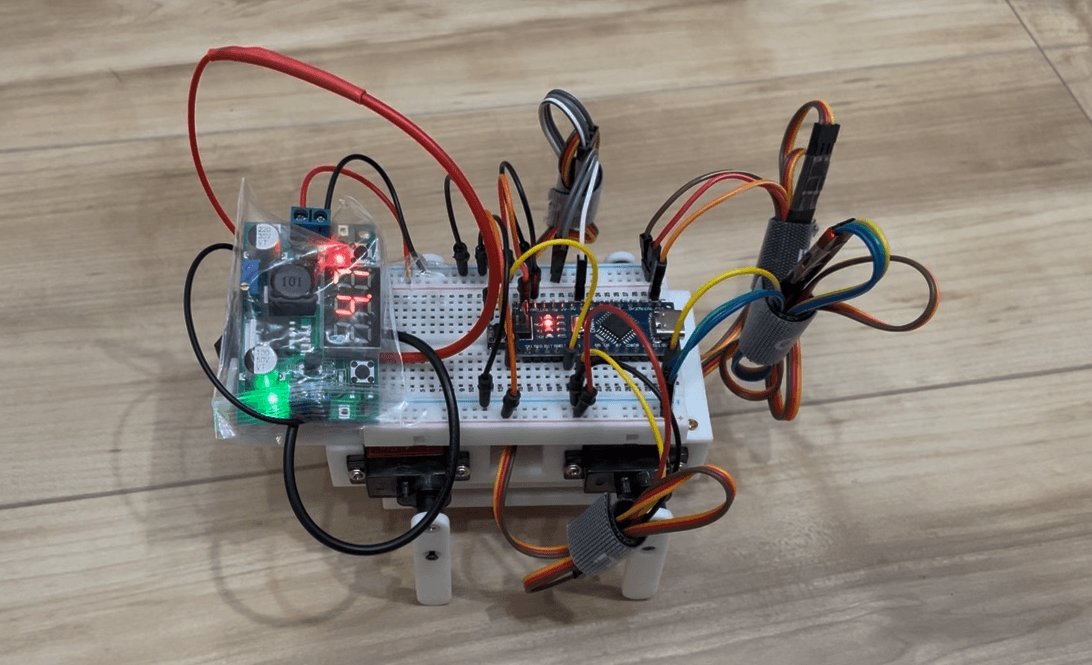
What it can do
Written by Robotheca from the project's documents.
- Walks as a quadruped with one hip joint per leg, using a diagonal trot gait
- Turns by differential stride length, steered over serial keys a, d and f
- Random-heading wander mode, triggered by the r serial key
- Stand and walk toggled by a tactile button on D2, the only on-robot interface
- Speed and stride adjustable over serial; calibration sweep of each leg via serial key c
Bill of materials
13 parts13 of 13 parts shown
| # | Component | Quantity | Est. price | Supplier |
|---|---|---|---|---|
| 1 | Arduino Nano | 1 | – | – |
| 2 | MG90S servo, with horn and horn screws | 4 | – | – |
| 3 | 7.4 V LiPo battery, with charger | 1 | – | – |
| 4 | Step-down converter (HW-411 / LM2596 style) | 1 | – | – |
| 5 | Power switch | 1 | – | – |
| 6 | JST-2P connector | 1 | – | – |
| 7 | Tactile switch | 1 | – | – |
| 8 | Half-size breadboard | 1 | – | – |
| 9 | Hook-up wire | – | – | – |
| 10 | M2 × 10 mm self-tapping screws | 8 | – | – |
| 11 | M2 × 5 mm self-tapping screws | 4 | – | – |
| 12 | M2 × 8 mm self-tapping screws | 4 | – | – |
| 13 | M2.5 × 8 mm machine screws | 4 | – | – |
13 of 13 parts have no price in the source, so there is no parts total. Read from README.md at the pinned commit.
Build guide
The creator's steps, each with its instructions.
- 1Print the parts and clean up the holes
- 2Seat the battery in the battery holder and mount the holder to the base
- 3Home the servos before the horns go on using calibrate.ino
- 4Mount the servos to the body with M2 x 10 mm self-tapping screws and secure each
- 5Mount the top cover with M2 x 5 mm screws, routing servo and battery leads throu
- 6Attach the legs to the horns with M2 x 8 mm self-tapping screws
- 7Wire the breadboard, converter, Nano and button per the wiring table
- 8Flash quadruped_walk.ino and press the button
The guide appears here as you scroll.
Guide by @one-for-all (README.md), under MIT.
Wiring and electronics
Notes written by Robotheca from the project's documents.
Main parts
- Arduino Nano controller board
- Four MG90S servos, one per leg
- 7.4 V LiPo battery with charger
- Step-down converter (HW-411 / LM2596 style) set to 5 V for the servo rail
- Power switch between battery and converter
- Tactile switch as the stand/walk button
- Half-size breadboard carrying the 5 V and GND rails
Connections
- Servo signal pins: left front on D13, left back on A5, right front on D12, right back on D3
- Tactile switch bridges D2 to GND; firmware enables the internal pull-up, so no external resistor
- Power path: 7.4 V LiPo to JST-2P connector, to power switch, to step-down converter set to 5 V, to breadboard rails
- Servos and Nano share the 5 V rail and a common ground; servos are not powered from the Nano regulator
- Converter output must be set to 5 V with a multimeter before connecting; do not power from USB and the 5 V rail at the same time
Cables and connectors
From the parts list.
- JST-2P connector × 1
- Hook-up wire